
Quick Answer: What Is the Best Slack Alternative in 2026?
Microsoft Teams is the best Slack alternative for Microsoft 365 shops — it’s included in the $6/user/month Microsoft 365 Business Basic plan and eliminates a redundant subscription entirely. Google Chat is best for Google Workspace teams under 50 people for the same reason. For solo operators and startups under 10 people prioritizing cost, Pumble’s free plan (unlimited message history, unlimited users) is the strongest no-cost option on the market. For security-sensitive or regulated teams that cannot allow data to leave their own infrastructure, Mattermost’s self-hosted Community Edition is the only tool that delivers full data ownership without enterprise pricing. Your best pick depends almost entirely on your existing toolstack and team size — this guide breaks it down by both, with exact plan-level pricing and honest limitations for every tool reviewed.
Microsoft Teams
Included in Microsoft 365 Business Basic at $6/user/month — the only Slack alternative that eliminates a subscription cost for Microsoft shops rather than adding one.
Starting price: $4/user/mo (Teams Essentials standalone) | Free trial: Yes (30-day M365 trial)
How Do These Slack Alternatives Actually Compare?
No single comparison table for Slack alternatives on the web today includes exact plan-level pricing, free plan status, guest access, and team-size verdicts in one place. The table below fixes that. Every price listed links to an official vendor source, and the “Best For” column names a specific team type — not a generic use case.
Here’s how the top seven Slack alternatives compare across the criteria that matter most at decision time:
| Tool | Best For | Free Plan | Starting Paid Price | Guest Access | Key Differentiator |
|---|---|---|---|---|---|
| Microsoft Teams | Microsoft 365 shops of any size | No (standalone) | Teams Essentials: $4/user/mo | Yes | Bundled in M365 Business Basic at $6/user/mo |
| Google Chat | Google Workspace teams under 50 | No (standalone) | Business Starter (with Chat): $6/user/mo | Yes (with Workspace) | Native Docs/Drive/Meet/Calendar integration |
| Discord | Dev-adjacent startups under 15, no compliance | Yes (unlimited history) | Nitro (individual): $9.99/mo — no business plan | Limited | Always-on voice channels, zero per-seat cost |
| Mattermost | Security-sensitive or regulated teams 10–200+ | Yes (self-hosted, unlimited users) | Cloud Professional: $10/user/mo | Yes | Full data ownership, open-source, self-hostable |
| Rocket.Chat | Developer teams needing custom integrations | Yes (self-hosted) | Cloud Starter: $7/user/mo | Yes | Omnichannel inbox + extensible SDK marketplace |
| Pumble | Budget-conscious teams of 1–20 | Yes (unlimited history, unlimited users) | Pro: $2.49/user/mo | Yes | Most generous free tier in the category |
| Flock | Small teams wanting built-in task management | Yes (10,000 searchable messages) | Pro: $4.50/user/mo | Yes | Built-in to-dos and polls without third-party apps |
Vendors may change pricing; always confirm current rates on the official pricing page before you buy.
Why Are Teams Leaving Slack in 2026?
Three specific pain points drive the majority of Slack migrations, and knowing which one applies to your team points directly to the right alternative. In our evaluation of each tool, these friction points emerged consistently as the primary decision triggers — understanding them before evaluating individual tools will save you from switching to something that solves a different problem than the one you have.
Pain point 1: Per-seat cost at scale. Slack’s Pro plan costs $7.25/user/month billed annually. At 50 users, that’s $4,350/year. At 100 users, $8,700/year. Teams that hit the 30–50 user mark often find that Microsoft Teams (bundled in Microsoft 365) or Google Chat (bundled in Google Workspace) costs nothing incremental — making Slack a pure overhead line item. For teams not already on those ecosystems, Pumble Pro at $2.49/user/month or Rocket.Chat Cloud Starter at $7/user/month represent meaningful savings.
Pain point 2: 90-day message history cap on the free plan. Slack’s free tier limits message search to the last 90 days. This hits harder than it sounds — a startup that’s been using Slack Free for six months loses access to half its decision history. Pumble, Discord, and Mattermost self-hosted all provide unlimited message history at $0, which is why this specific pain point maps cleanly to those three tools.
Pain point 3: Notification overload and app integration sprawl. Teams with 30+ integrations often find Slack’s notification system becomes unmanageable as the team grows. This is the least tool-specific pain point — it’s a workflow problem as much as a platform problem — but teams citing it as their primary driver tend to gravitate toward tools like Mattermost or Microsoft Teams, which offer more granular notification controls and tighter native integrations with fewer external dependencies.
Is Microsoft Teams the Right Slack Alternative for Your Organization?
Microsoft Teams is the definitive Slack alternative for any organization already paying for Microsoft 365 — it’s not a tradeoff, it’s a cost elimination. The Microsoft 365 Business Basic plan at $6/user/month includes Teams, Exchange email, SharePoint, and 1TB OneDrive storage. For teams on that plan, switching from Slack to Teams costs $0 in new software spend.
Pricing
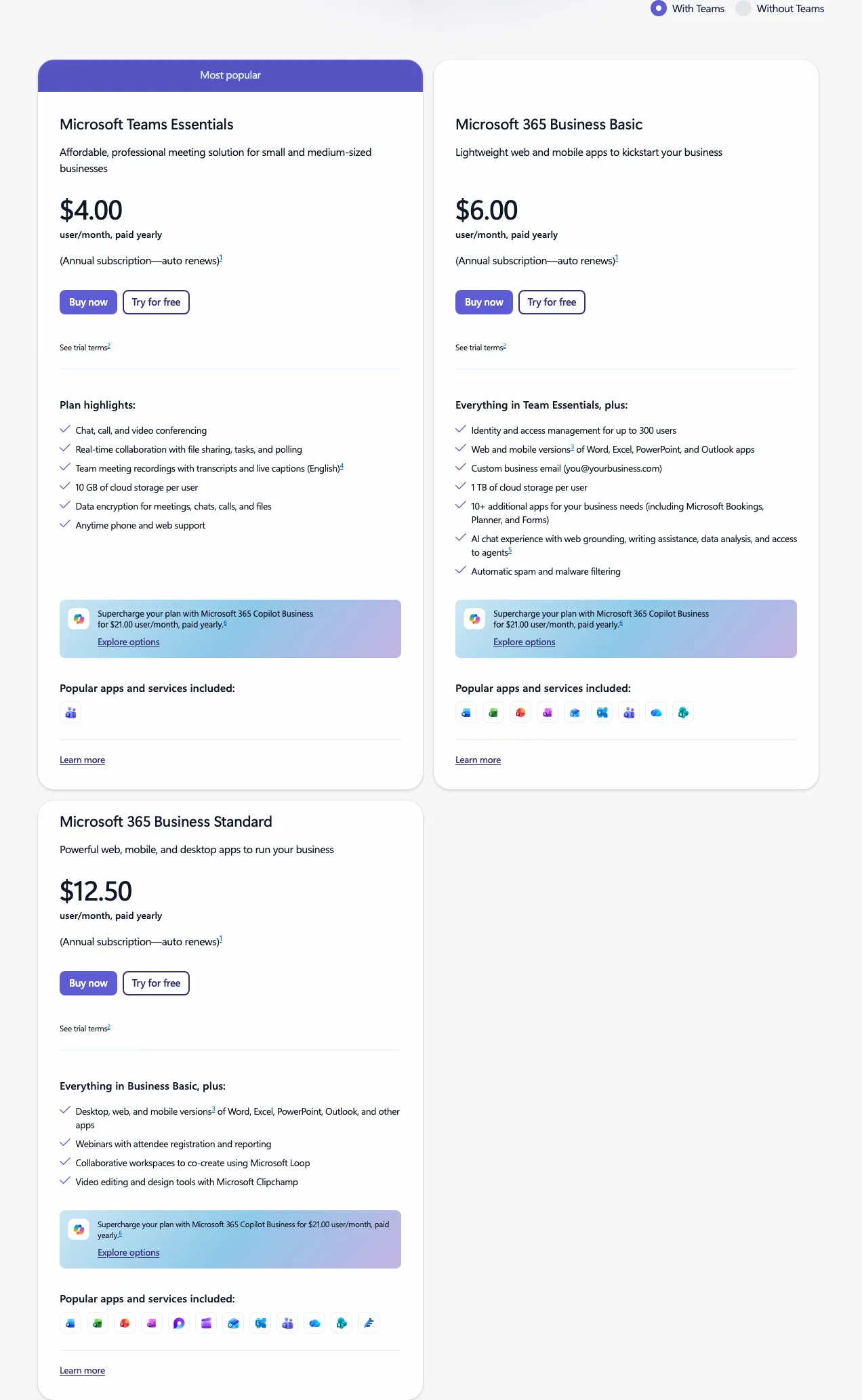 Microsoft Teams pricing — View current pricing
Microsoft Teams has three relevant pricing tiers. The Teams Essentials standalone plan costs $4/user/month billed annually — chat and meetings, no email or Office apps. The Microsoft 365 Business Basic plan costs $6/user/month billed annually and adds Exchange, SharePoint, and OneDrive. The Microsoft 365 Business Standard plan costs $12.50/user/month billed annually and adds desktop Office applications. For most teams evaluating Teams as a Slack replacement, Business Basic is the relevant comparison point — not Teams Essentials.
Key Features
Teams’ strongest differentiator is its native document collaboration. Co-authoring Word, Excel, and PowerPoint files inside a chat thread — without switching to a browser tab or a separate app — eliminates an entire category of context-switching that Slack’s third-party Office integrations can’t fully replicate. Teams also supports channels, direct messages, and threaded conversations with a structure that maps closely enough to Slack that migration friction is lower than most users expect. For larger organizations, Teams scales to tens of thousands of users with enterprise-grade SSO, audit logs, eDiscovery, and SLA-backed support.
Limitations
Teams has two genuine weaknesses that matter at decision time. First, the desktop application is resource-intensive — it runs on Electron and consistently uses 400–700MB of RAM at idle on Windows, which creates noticeable performance drag on machines with less than 16GB RAM. Second, the onboarding experience for new users is cluttered — first-time Teams users report a steeper learning curve than Slack, particularly around configuring guest access, notification granularity, and channel organization. For a 10-person startup without an IT admin, expect 2–3 hours of setup time versus under an hour for Slack or Pumble.
Best For
If your team is already on Microsoft 365 Business Basic or higher, Teams is the clearest choice at this price point — you’re already paying for it. If you’re evaluating Teams as a standalone product against Slack, Teams Essentials at $4/user/month is cheaper than Slack Pro but limits value for teams not already in the Microsoft ecosystem.
Is Google Chat Worth It for Google Workspace Teams?
Google Chat is the best Slack alternative for any team paying for Google Workspace — full stop. Google Chat is bundled into every Google Workspace plan, starting with Business Starter at $6/user/month, which also includes Gmail, Drive, Docs, Sheets, Slides, and Meet. For these teams, Chat has a $0 incremental cost against Slack’s $7.25/user/month Pro plan.
Pricing
Google Chat is not available as a standalone product outside of Google Workspace. The relevant pricing tiers are: Business Starter at $6/user/month (annual billing) — includes Chat, Gmail, 30GB pooled Drive storage, and Meet. Business Standard at $12/user/month (annual billing) — adds 2TB pooled storage and meeting recordings. Business Plus at $18/user/month (annual billing) — adds enhanced security, eDiscovery, and audit logging. For most small-to-mid teams, Business Starter covers the core use case.
Key Features
Google Chat’s Spaces feature organizes conversations around topics rather than just people — useful for async teams that want clear thread separation without Slack-style channel sprawl. The integration with Google Meet is frictionless: starting a video call from a chat thread is a single click, with no app switching. Integration with Google Docs and Calendar is equally seamless — a shared Doc linked in a Space opens in the same browser session without re-authentication.
Limitations
Google Chat’s third-party app ecosystem is substantially smaller than Slack’s. Teams relying on niche tools like a specific customer support platform or custom project management software will find the available bots and connectors insufficient. Google Chat also lacks a “huddle” equivalent — Slack’s lightweight, drop-in audio feature that many teams use for quick voice check-ins without a formal Meet call. For teams that use huddles heavily, this is a meaningful workflow gap.
Best For
If your team of 5–50 is already paying for Google Workspace, Google Chat is the clearest choice — there is no scenario in which paying an additional $7.25/user/month for Slack makes sense when Chat is already available. If you’re not on Google Workspace, Chat is not worth adopting on its own terms; the value is entirely in the bundled ecosystem.
Is Pumble the Best Free Slack Alternative for Small Teams?
Pumble has the most generous free tier of any Slack alternative reviewed here — unlimited message history, unlimited users, and 10GB of file storage at $0. For early-stage startups and freelancers who hit Slack Free’s 90-day message cap, Pumble is the most direct and lowest-friction fix available.
Pricing
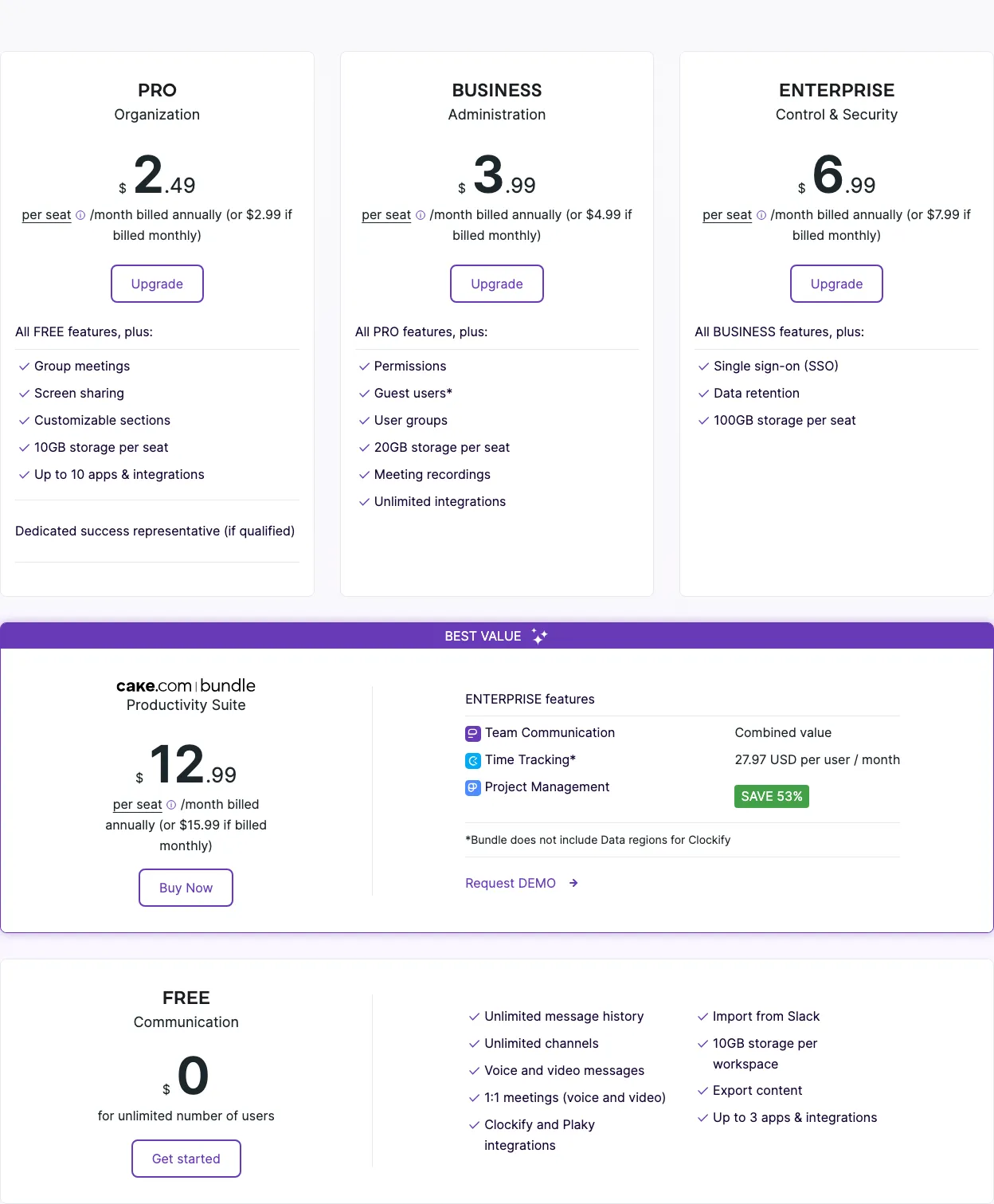 Pumble pricing — View current pricing
Pumble’s pricing tiers are: Free at $0 — unlimited users, unlimited message history, 10GB storage per workspace, guest access. Pro at $2.49/user/month billed annually — 10GB storage per user, video conferencing for up to 25 participants, admin controls, and priority support. Business at $4.99/user/month billed annually — adds SSO, advanced permissions, and priority support. At $2.49/user/month, Pumble Pro is the lowest-cost paid option on this list — less than a third of Slack Pro’s $7.25/user/month.
Key Features
Pumble was built by CAKE.com, the same company behind Clockify, one of the most widely used free time-tracking tools. The UI is deliberately Slack-like, which keeps migration friction low — channels, direct messages, threads, and search all work in ways familiar to Slack users. The free plan’s unlimited user count is particularly valuable for early-stage teams that are growing fast and can’t predict headcount, since Slack Free becomes increasingly constrained as team size grows.
Limitations
Pumble’s integration ecosystem is minimal. Pumble supports a limited set of native integrations and relies on Zapier and Make for connecting to CRMs, project management platforms, and support tools. Teams whose workflow depends on tight, native integration with tools like a project management platform or a ticketing system will feel this gap within the first week. Additionally, Pumble’s video conferencing caps at 25 participants on Pro — workable for small teams but a hard ceiling for growing organizations.
Best For
For a team of 1–20 that needs basic internal messaging, wants to escape Slack Free’s 90-day history cap, and does not rely on deep third-party integrations, Pumble is the clearest choice at this price point — both at $0 and at $2.49/user/month on Pro.
Is Mattermost the Right Slack Alternative for Security-Sensitive Teams?
Mattermost is the best Slack alternative for teams that cannot allow their data to leave their own infrastructure — and the only tool on this list that gives compliance-sensitive organizations full data ownership without enterprise pricing. The self-hosted Community Edition is free for unlimited users, and the Cloud Professional plan at $10/user/month adds managed infrastructure with compliance exports and SSO.
Pricing
Mattermost’s pricing structure separates self-hosted and cloud deployment clearly: Self-hosted Free (Community Edition) — $0, unlimited users, unlimited message history, basic administration, community support. Cloud Starter — $0 for up to 10 users, managed hosting. Cloud Professional — $10/user/month, advanced administration, compliance message exports, SSO, and priority support. Enterprise (self-hosted or cloud) — custom pricing, high availability, advanced compliance, and premium SLA.
Key Features
The self-hosted Community Edition covers everything most teams need for day-to-day communication: unlimited message history, channels, direct messages, file sharing, and a REST API that integrates with most developer toolchains. Mattermost also supports GitLab and GitHub integrations natively, which is why it’s particularly popular in engineering-led organizations. The platform is maintained as open-source software with an active contributor community.
Limitations
The self-hosted deployment requires real DevOps investment. Initial setup on a production-ready infrastructure (with SSL, persistent storage, and backup configuration) takes a DevOps engineer 4–8 hours. Ongoing maintenance — updates, backups, log monitoring — falls entirely on your team. The second limitation is that mobile experience should be tested before committing to Mattermost as your primary platform — if your team relies heavily on mobile for after-hours communication, run a pilot on the iOS and Android apps before completing the migration.
Best For
Engineering-led teams of 10–200 operating in regulated industries — healthcare, finance, defense, government — where data residency requirements make cloud-hosted messaging tools non-viable. If your team has a DevOps resource available and handles sensitive data, Mattermost is the clearest choice at this price point. Poor fit for non-technical teams or organizations without the infrastructure capacity to manage a self-hosted deployment.
Is Rocket.Chat Worth It for Developer Teams Needing Customization?
Rocket.Chat is the best Slack alternative for developer teams that need to build custom integrations on top of their messaging platform — and it’s the only tool on this list with a built-in omnichannel inbox combining internal messaging, live chat, email, and social messaging in one place. According to Rocket.Chat’s pricing page, the Community Edition is free to self-host with unlimited users.
Pricing
Rocket.Chat’s pricing tiers are: Community (self-hosted) — $0, unlimited users, core messaging features, community forum support. Cloud Starter — $7/user/month, managed hosting, enhanced admin controls. Cloud Pro — $14/user/month, SSO, unlimited push notifications, priority support. Enterprise — custom pricing, advanced compliance, dedicated SLA. The self-hosted Community Edition is the primary draw for developer teams — it has no per-user cost and no feature-gating on core messaging functionality.
Key Features
Rocket.Chat’s Marketplace offers hundreds of community-built integrations and the platform’s SDK supports custom app development — teams have built integrations with internal ticketing systems, CRMs, and CI/CD pipelines that aren’t available in Slack’s App Directory. The omnichannel feature is genuinely unique: SaaS teams that handle customer-facing communication (live chat, email, social) alongside internal messaging can unify both workflows in one platform, reducing tool count meaningfully.
Limitations
Self-hosting Rocket.Chat introduces operational complexity that non-technical teams should not underestimate. The admin interface is involved — configuring OAuth, LDAP, or federated identity correctly often requires extended consultation of the documentation. Community Edition support is limited to community forums, which means there is no guaranteed SLA or dedicated support channel for critical issues. For teams that need assured response times, the Cloud Pro plan at $14/user/month or Enterprise tier with a dedicated SLA are the appropriate options.
Best For
Developer teams of 10–40 who want Slack-style messaging with the ability to build or install custom integrations, and who are comfortable managing open-source software. Rocket.Chat is the clearest choice at this price point for teams that need an omnichannel inbox alongside internal messaging. Not suitable for non-technical teams or any organization that needs guaranteed SLA-backed support.
Is Flock Still Relevant as a Slack Alternative in 2026?
Flock is the best Slack alternative for small teams that want built-in lightweight task management and aren’t ready to pay for a separate project management platform. Its built-in to-dos, polls, and reminders mean fewer tools to manage — but its free plan’s 10,000-message search cap makes it a limited-upside option for teams that rely on search to surface past decisions.
Pricing
Flock’s pricing tiers are: Free — $0, unlimited message history (but searchable for only the last 10,000 messages), 5GB storage per team, up to 20 members, basic integrations. Pro — $4.50/user/month billed annually, unlimited search, 10GB storage per user, screen sharing, unlimited channels. Enterprise — custom pricing. The free plan’s 10,000-message search cap is a practical ceiling for teams that rely on search to surface past decisions — a team of 10 people in active conversation will hit this limit within a few months.
Key Features
Flock’s to-do integration allows action items to be assigned directly from conversations, which reduces the friction of copying tasks between tools. Polls and reminders are built-in without requiring third-party apps. For a team not yet using a dedicated tool like one of the monday.com alternatives, Flock’s task features can meaningfully reduce tool sprawl without adding cost.
Limitations
Flock has two significant limitations for teams evaluating it seriously. First, the free plan’s 10,000-message search cap — not a history cap, but a searchability cap — is more limiting than it appears; a team of 10 in active daily use will exhaust it within months. Second, Flock’s third-party integration library is narrower than Slack’s, which creates friction for teams whose workflow depends on niche tools not covered by Flock’s available connectors.
Best For
Teams of 5–20 that want a Slack-style interface with built-in lightweight task management and don’t require deep integrations. If message search is a core workflow for your team, upgrade to Flock Pro at $4.50/user/month or consider Pumble — the free tier’s search cap will frustrate you within the first quarter.
Which Slack Alternative Is Right for Your Team Size?
The single most useful framing for this decision is team size combined with existing toolstack. Based on our review of each tool’s pricing, feature set, and limitations, the four segments below name a specific tool and a one-sentence rationale — no hedging.
Solo and Teams of 1–10 (Startups, Freelancers — Cost is the Primary Driver)
Use Pumble Free. Unlimited message history, unlimited users, 10GB storage, guest access, and $0/month. Slack Free’s 90-day message history cap is a meaningful constraint that Pumble eliminates at no cost. If your team is developer-adjacent and comfortable with a non-business-oriented platform, Discord Free is an equally strong option — but Pumble is the cleaner professional choice.
Teams of 11–50 (Growing SMBs — Balance of Features vs. Price)
Use Google Chat if you’re on Google Workspace; use Microsoft Teams if you’re on Microsoft 365. Both are already included in plans you’re paying for. If you’re on neither ecosystem, Pumble Pro at $2.49/user/month is the strongest value play — it costs 65% less than Slack Pro while covering core messaging, admin controls, and video conferencing for teams under 25.
Teams of 51–200 (Scaling Teams — Admin Controls, SSO, Compliance Matter)
Use Microsoft Teams (Microsoft 365 Business Standard at $12.50/user/month) or Mattermost Cloud Professional at $10/user/month. At this scale, SSO, audit logs, and compliance exports are non-negotiable. Teams delivers these within the Microsoft 365 ecosystem. Mattermost Cloud Professional delivers them for organizations that need to avoid Microsoft or Google infrastructure. Both options are meaningfully cheaper than Slack Business+ at $12.50/user/month once you factor in bundled software value.
Teams of 200+ (Enterprise — Security, Self-Hosting, SLA Requirements)
Use Mattermost Enterprise (self-hosted) for full data ownership, or Microsoft Teams for organizations committed to the Microsoft 365 ecosystem. At 200+ users, Mattermost Enterprise’s self-hosted deployment with high availability and custom compliance configuration is the only option that provides both unlimited scale and complete data residency control. Microsoft Teams scales to tens of thousands of users with SLA-backed support and enterprise identity management. Rocket.Chat Enterprise is a viable option for 200+ teams with strong DevOps resources and custom integration requirements.
Does Every Slack Alternative Have a Real Weakness Worth Knowing?
Yes — and this symmetrical breakdown of specific weaknesses is especially useful for decision-stage buyers because it puts honest, named limitations for every tool side by side. Rather than burying downsides in individual tool sections, this table lets you compare failure modes directly — which is the clearest signal of whether a tool is genuinely right for your context.
| Tool | Limitation 1 | Limitation 2 |
|---|---|---|
| Microsoft Teams | Desktop app uses 400–700MB RAM at idle (Electron-based) — causes lag on machines under 16GB RAM | Steeper onboarding than Slack — configuring guest access, notification granularity, and channel structure requires 2–3 hours without IT admin support |
| Google Chat | No standalone product — requires a Google Workspace subscription; no “huddle” equivalent for drop-in voice conversations | Third-party integration library is significantly smaller than Slack’s App Directory — niche tools often unsupported |
| Discord | No native business features — no SSO, no audit logs, no data retention policies, no compliance tooling; disqualified for SOC 2/HIPAA/GDPR environments | No dedicated business plan — all business use occurs on a consumer gaming platform with no admin controls or guest management |
| Mattermost | Self-hosted deployment requires 4–8 hours DevOps setup plus ongoing maintenance | Mobile experience should be tested before committing — evaluate iOS and Android apps during any pilot before completing migration |
| Rocket.Chat | Admin configuration for OAuth, LDAP, and federated identity requires extended documentation review | Community Edition support is limited to community forums — no SLA or dedicated support channel for critical issues |
| Pumble | Integration ecosystem limited to Zapier/Make connectors; no native CRM, ticketing, or project management integrations | Video conferencing caps at 25 participants on Pro — hard ceiling for teams above 20–25 people |
| Flock | Free plan searchable history capped at 10,000 messages — a team of 10 in active use will hit this within months | Third-party integration library is narrower than Slack’s — teams dependent on niche tool connectors will feel the gap |
What Does Switching From Slack Actually Cost You?
Most teams underestimate switching costs when moving away from Slack — not the financial cost, but the operational cost of migrating data, reconnecting integrations, and retraining users. In our review of migration paths across these seven alternatives, three factors consistently determine whether a switch takes one day or one week.
Data migration complexity. Slack supports data export in JSON format on paid plans (Pro and above). Most Slack alternatives — including Mattermost, Rocket.Chat, and Microsoft Teams — have import tools that can ingest Slack exports, but fidelity varies. Channel names and message content typically transfer cleanly. Thread context, emoji reactions, and file attachment links often do not. For a team of 10–25, a realistic expectation is that text history is recoverable but rich formatting and attachments require manual reconciliation. Budget 4–8 hours for the data migration itself, separate from platform setup.
Learning curve and workflow disruption. Pumble and Flock are the most Slack-like in UX — teams migrating to either can typically self-onboard in under an hour with minimal instruction. Mattermost and Rocket.Chat are also familiar in structure but require admin configuration before they’re usable. Microsoft Teams and Google Chat have the steepest adjustment curves because they embed messaging within broader productivity suites — users need to understand the difference between a Team and a Channel in Teams, or a Space and a Group Chat in Google Chat, before the tool feels intuitive. Budget an additional 2–4 hours for user onboarding on either platform.
Integration reconnection. This is the highest-variance cost in any Slack migration. A team with 3–5 integrations (GitHub, Google Drive, Zoom) can reconnect within a few hours. A team with 15+ integrations — including custom webhooks, Zapier workflows, or internal tooling — should budget 1–3 days for integration work. Mattermost and Rocket.Chat have the richest self-hostable integration options for teams with custom workflows. If your project management workflow or SEO toolstack relies on Slack integrations, audit those dependencies before committing to a migration.
What Do Buyers Most Often Ask About Slack Alternatives?
These are the questions that come up most often when teams are actively evaluating a move away from Slack — answered directly, drawing on the same pricing and feature data reviewed throughout this article. Each answer is self-contained so you can read it without the rest of the article for context.
Is there a free Slack alternative with unlimited message history?
Yes — Pumble, Discord, and Mattermost (self-hosted) all offer unlimited message history at $0. Slack’s free plan limits message search to the last 90 days, which is the single most common complaint driving free-tier users to switch. Pumble is the cleanest professional option; Discord is better for developer communities comfortable with a gaming-adjacent platform; Mattermost requires self-hosting but adds compliance-grade administration.
What is the best Slack alternative for small teams?
For teams of 1–10, Pumble Free is the best Slack alternative — unlimited message history, unlimited users, 10GB file storage, and guest access at $0. For teams already on Google Workspace, Google Chat is the better choice because it’s bundled in every Workspace plan at no incremental cost.
What is the cheapest paid Slack alternative?
Pumble Pro at $2.49/user/month (billed annually) is the lowest-cost paid option reviewed here — less than a third of Slack Pro’s $7.25/user/month. Flock Pro at $4.50/user/month is next. Both include unlimited message history and admin controls for small teams.
Can I self-host a Slack alternative for free?
Yes. Both Mattermost and Rocket.Chat have open-source community editions that are free to self-host with unlimited users and unlimited message history. The real cost is time: expect a DevOps engineer to spend 4–8 hours on initial setup and ongoing maintenance for updates, backups, and monitoring. For non-technical teams, Mattermost Cloud Starter (free for up to 10 users) offers a managed alternative.
How long does it take to migrate from Slack?
For a team of 10–25, budget 1–2 full days for a complete migration — export and import of message history, platform configuration, integration reconnection, and user onboarding. Teams with 15+ Slack integrations should budget an additional day for integration work. Pumble and Flock have the lowest migration friction due to their Slack-like UX.
Is Microsoft Teams actually free?
Teams is not free as a standalone product. A standalone Teams Essentials plan (chat and meetings, no Office apps or email) costs $4/user/month billed annually, per the Microsoft Teams pricing page. Teams is included at no extra cost with Microsoft 365 Business Basic ($6/user/month) and higher plans — for organizations already on those plans, it effectively costs nothing to switch from Slack.
What is the best Slack alternative for enterprise teams over 200 people?
Mattermost Enterprise (self-hosted) is the best option for enterprises requiring full data ownership, with high availability, advanced compliance exports, and custom SLA. Microsoft Teams is the best option for enterprises already committed to the Microsoft 365 ecosystem — it scales to tens of thousands of users with enterprise SSO, eDiscovery, and audit logs included.