
HoneyBook is the best CRM for most freelancers — its Starter plan at $29/month (billed yearly) combines contracts, proposals, invoicing, and payments in a single client-facing workflow that purpose-built CRMs for solo operators simply cannot match. For freelancers managing recurring retainer clients, Dubsado’s Premier plan at $525/year offers deeper workflow automation. The key decision factor is your archetype: solo creatives need simplicity and polish, retainer-based freelancers need automation, and subcontractor-managing freelancers need multi-seat project visibility.
HoneyBook
The all-in-one clientflow platform that handles contracts, proposals, invoicing, and payments — without stitching together four separate tools.
Starting price: $29/mo (Starter, billed yearly) | Free trial: Yes (no credit card required)
How Do the Top Freelancer CRMs Compare?
Choosing the wrong CRM as a freelancer usually means paying for features you don’t need — or discovering that a tool’s critical features are locked behind a higher tier. Here’s a direct comparison of every tool covered in this guide, with verified plan-level pricing and the most important limitation per tool:
| Tool | Best For | Starting Price (Verified Plan) | Free Plan | Key Limitation |
|---|---|---|---|---|
| HoneyBook | Solo creative freelancers | $29/mo (Starter, billed yearly) | No (free trial only) | Automations locked to Essentials ($49/mo); US/Canada only |
| Dubsado | Retainer-based freelancers | $335/yr (Starter, billed annually) | No (21-day trial only) | Automated workflows, Zapier, and public proposals are Premier-only |
| monday.com | Freelancers managing subcontractors | CAD $13/seat/mo (Basic, billed annually) | Yes (2 seats, 3 boards) | Free plan is too restricted; automations require Standard tier |
| Moxie | Freelancers wanting one dashboard | Starts at around $16/mo (unverified) | No (14-day trial only) | Fewer integrations than established CRMs; newer product |
| Trello | Visual task tracking supplement | $5/user/mo (Standard, billed annually) | Yes (up to 10 collaborators) | Not a CRM — no invoicing, contracts, or payment processing |
| Indy | Budget-conscious solopreneurs | Starts at around $9/mo (unverified) | Yes (basic tools free) | Full pricing page was inaccessible; plan limits unverified |
| Keap | Established small businesses scaling up | $299/mo (base plan, billed annually) | No (14-day trial only) | Prohibitively expensive for solo freelancers; requires a paid onboarding package |
Is HoneyBook the Best CRM for Freelancers Overall?
HoneyBook is the clearest all-in-one choice for solo freelancers who need contracts, proposals, invoicing, and client management without managing multiple subscriptions. In our evaluation of purpose-built freelance platforms, HoneyBook’s Starter plan at $29/month (billed yearly) covers the core freelance workflow — and its attorney-drafted contract templates give it an immediate practical advantage that generic CRMs cannot replicate.
Pricing
According to HoneyBook’s official pricing page, three plans are available:
- Starter: $29/month (billed yearly) — invoices, contracts, proposals, payments, client portal
- Essentials: $49/month (billed yearly) — adds automations, full scheduler, QuickBooks integration, removes “Powered by HoneyBook” branding
- Premium: $109/month (billed yearly) — unlimited lead forms, priority support
Key Features
HoneyBook’s core strength is what it calls clientflow management — the ability to move a lead from inquiry to paid invoice without leaving the platform. The Scheduler lets clients book time and pay in a single step, reducing the back-and-forth that eats into billable hours. The Client Portal gives clients a dedicated workspace to access documents, project files, and communication history — a feature that signals professionalism to new clients.
The attorney-drafted contract templates are a genuine differentiator. Most freelancers either skip contracts entirely or use generic templates that may not hold up — HoneyBook’s built-in templates remove that risk.
Limitations
HoneyBook’s limitations are plan-specific and worth understanding before signing up. Automations, the full scheduler, and QuickBooks integration are locked behind the Essentials plan at $49/month — not available on Starter. Lead forms are capped at 2 on Starter and 10 on Essentials; unlimited lead forms require the $109/month Premium plan. Critically, HoneyBook is only available for businesses in the U.S. and Canada — international freelancers cannot use it at all.
Best For
If you’re a solo creative freelancer — photographer, designer, copywriter, consultant — who needs a polished client experience and legally sound contracts from day one, HoneyBook Starter at $29/month is the clearest choice at this price point.
Is Dubsado the Right CRM for Freelancers with Retainer Clients?
Dubsado is the best CRM for freelancers managing recurring retainer relationships who need deep workflow customization and unlimited client projects without per-project fees. The Premier plan at $525/year (billed annually) unlocks automated workflows, Zapier integration, and public proposals — the three features that make it genuinely powerful for ongoing client relationships.
Pricing
Per Dubsado’s pricing page, two annual plans are available:
- Starter: $335/year — unlimited projects and clients, basic client portals, 1 active lead capture form
- Premier: $525/year — automated workflows, scheduling, bookkeeping integration, Zapier, public proposals, unlimited lead forms
- Additional users (4–10): $25/month
- Additional brand: $10/month
Key Features
Dubsado’s automated workflows on the Premier plan are its most compelling feature for retainer-based freelancers. A workflow can trigger a contract send when a lead form is submitted, follow up automatically after three days of no response, and trigger an invoice on a recurring schedule — all without manual intervention. For a freelancer juggling five or more active retainer clients, this automation prevents the dropped-ball moments that damage client relationships.
The public proposals feature lets freelancers share branded, interactive proposals that clients can review and sign without creating an account — a smoother experience than emailing PDFs. The Zapier integration on Premier connects Dubsado to thousands of third-party apps, which matters for freelancers already invested in a specific tool stack.
Limitations
The Starter plan is significantly limited — automated workflows, scheduling, bookkeeping integration, Zapier, and public proposals are all Premier-only. The single active lead capture form on Starter is a real constraint if you run multiple service lines. Like HoneyBook, Dubsado has no permanent free tier — only a 21-day free trial with full Premier access.
Best For
If you’re a freelancer with five or more active retainer clients who needs automated follow-ups and recurring invoice workflows, Dubsado Premier at $525/year is the clearest choice at this price point.
Is Monday.com a Good CRM for Freelancers Managing Subcontractors?
Monday.com is the best choice for freelancers coordinating work across subcontractors because it’s the only tool in this comparison designed for multi-seat project visibility from the ground up. Based on our review of multi-person freelance workflows, its Standard plan at CAD $17/seat/month (billed annually) unlocks automations and integrations that make cross-person coordination practical.
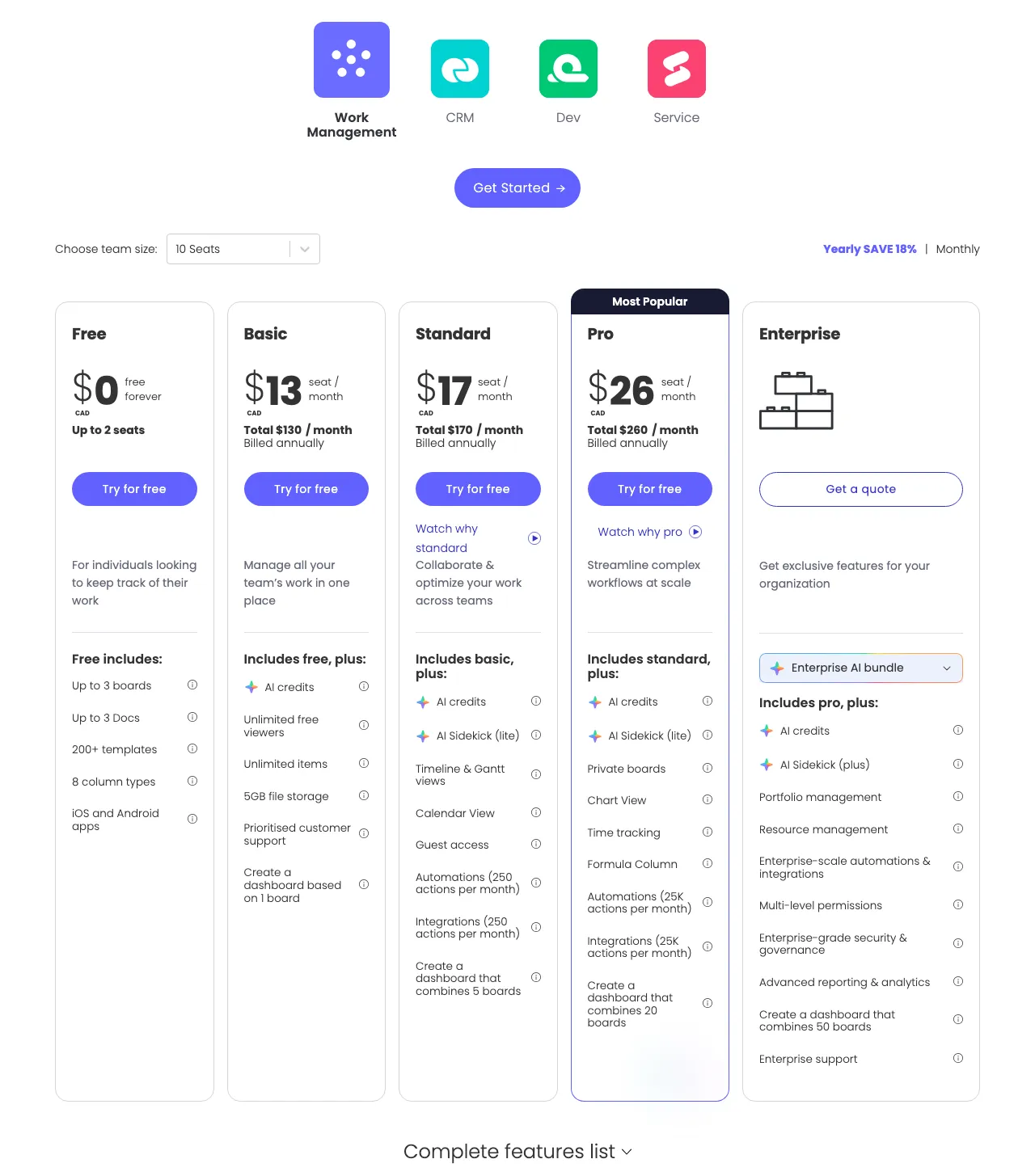 Monday.com pricing tiers — View current pricing
Pricing
Per monday.com’s official pricing page, the current plans are:
- Free: $0 (up to 2 seats, 3 boards, 3 Docs — no automations or integrations)
- Basic: CAD $13/seat/month (billed annually) — unlimited boards, no automations
- Standard: CAD $17/seat/month (billed annually) — 250 automation actions/month, Timeline and Gantt views, 250 integration actions/month
- Pro: CAD $26/seat/month (billed annually) — 25,000 automation actions/month, time tracking
- Enterprise: Custom quote
Key Features
Monday.com’s Visual Sales Pipeline gives a real-time view of every deal or project across all subcontractors — something that HoneyBook and Dubsado cannot provide for multi-person teams. The Timeline and Gantt views on Standard are genuinely useful for deadline-heavy project work. The 250 automation actions per month on Standard handles basic cross-team workflows: notify a subcontractor when a task is assigned, update a client status when work is delivered.
For freelancers with recurring project management needs, see how monday.com compares to specialized project management tools in our roundup of the best project management software for remote teams.
Limitations
Monday.com’s free plan is not viable for active freelance work. Three boards is inadequate for managing multiple clients, and the absence of automations removes the efficiency benefit that makes the platform worthwhile. Time tracking — a critical feature for billing — is locked behind the Pro plan at CAD $26/seat/month, not Standard. Per-seat pricing also compounds quickly: two subcontractors plus the freelancer on Standard costs CAD $51/month minimum.
Best For
If you’re a freelancer coordinating project-based work across one or two subcontractors, monday.com Standard at CAD $17/seat/month is the clearest choice at this price point.
Is Moxie Worth It for Freelancers Who Want One Dashboard?
Moxie is a purpose-built freelancer platform that combines CRM, proposals, contracts, invoicing, time tracking, and project management into one dashboard — competing directly with HoneyBook and Dubsado for the all-in-one freelancer market. Pricing starts at around $16/month at the time of research, though this figure is unverified from an official source — verify current pricing directly at Moxie’s website before committing.
Key Features
Moxie’s customizable pipelines let freelancers track prospects, active projects, and completed work in a single view. The platform integrates with Google Workspace, Trello, and QuickBooks — a practical stack for most freelancers. Automated follow-up reminders reduce the manual overhead of chasing leads and clients.
Limitations
Moxie is a newer product, and that shows in its integration depth — it offers fewer third-party connections than more established CRMs, and some features may feel simplified compared to tools with longer development histories. There is no permanent free tier — only a 14-day free trial. Because pricing could not be confirmed from an official source, budget-sensitive freelancers should verify current costs directly before committing.
Best For
If you’re a solo freelancer who wants a dashboard designed specifically for independent professionals — not adapted from a general business tool — and you’re comfortable with a newer platform, Moxie is worth trialing.
Is Trello Useful as a Freelancer CRM?
Trello is not a CRM — and treating it as one creates gaps in client management that cost freelancers real money. It has no native invoicing, no contract templates, no e-signatures, and no payment processing. What it does offer is an excellent visual kanban interface for tracking project stages, available free for up to 10 collaborators per Workspace.
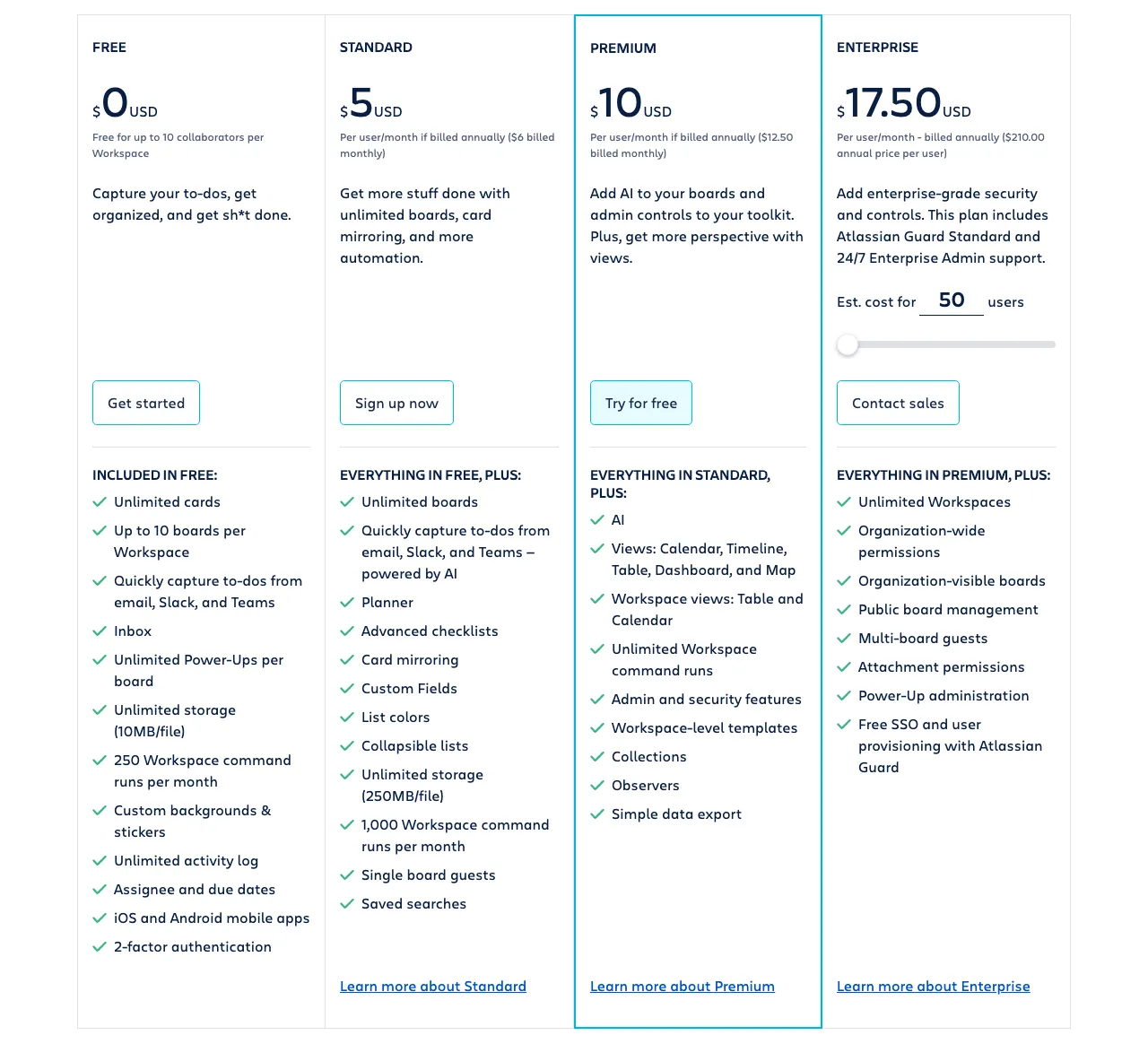 Trello pricing tiers — View current pricing
Pricing
- Free: $0 (up to 10 collaborators, 10 boards per Workspace, 250 automation command runs/month)
- Standard: $5/user/month (billed annually) — unlimited boards, Custom Fields, unlimited automation commands
- Premium: $10/user/month (billed annually) — Calendar, Timeline, Table, Dashboard, and Map views
- Enterprise: $17.50/user/month (billed annually)
Limitations
Trello’s Free plan caps boards at 10 per Workspace and limits automation to 250 command runs per month — sufficient for a single freelancer with a handful of clients, but restrictive for active pipelines. Advanced views (Calendar, Timeline, Table, Dashboard) are Premium-only at $10/user/month. Custom Fields require Standard or above. For the freelancer who needs a visual supplement to their actual CRM, Trello Free works — but it cannot replace dedicated clientflow software.
Best For
If you already use HoneyBook or Dubsado for client management and want a lightweight visual board to track your own task pipeline, Trello Free is a useful complement — not a standalone CRM solution.
Is Keap Worth It for Freelancers?
Keap is not designed for solo freelancers — and its pricing makes this clear. At $299/month (billed at $2,988/year) with a required paid onboarding package on top, Keap is positioned for small businesses with established sales pipelines and marketing automation needs that a one-person operation simply doesn’t have.
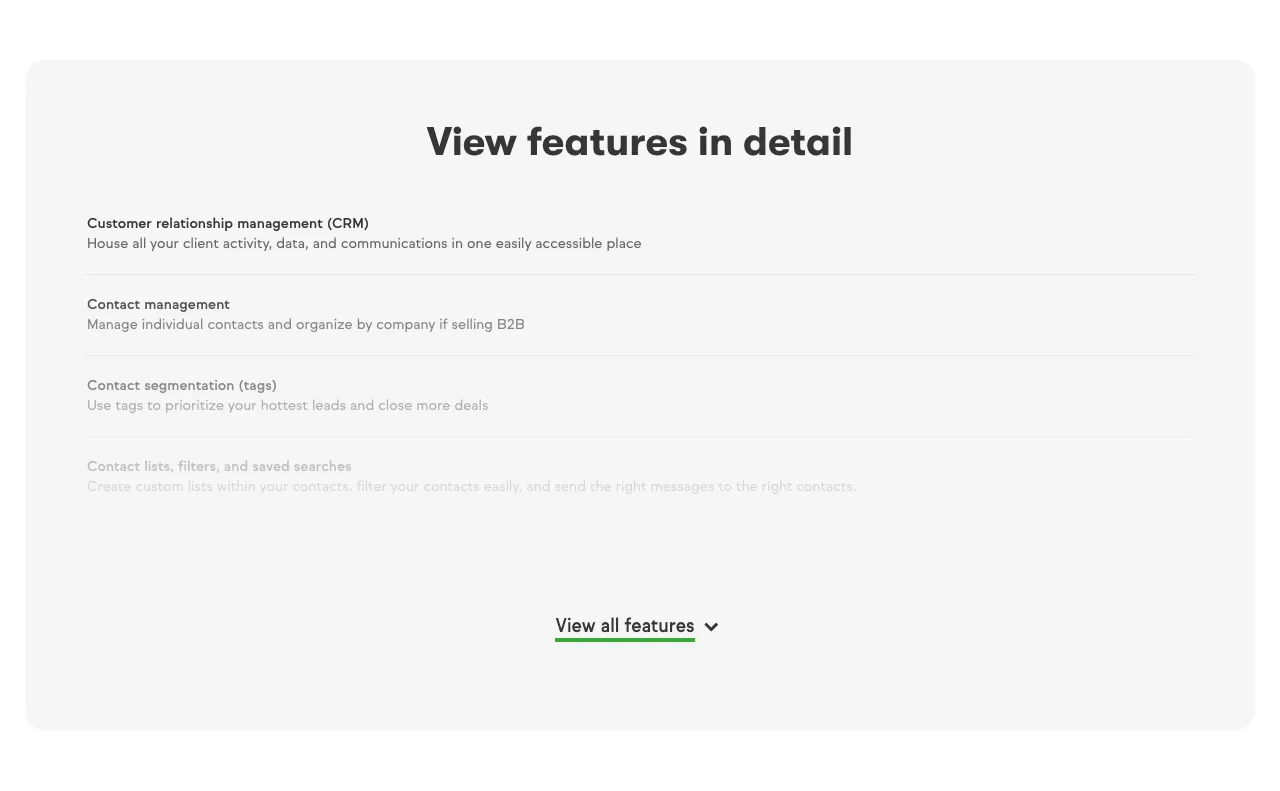 Keap pricing — View current pricing
Key Features
Keap’s advanced CRM includes contact segmentation, lead scoring, and automation history — features that matter for businesses running multi-touch sales cycles. Its AI Content Assistant and AI Automation Assistant streamline campaign creation. SMS marketing, appointment scheduling, and referral tools are built in.
Limitations
Keap starts at $299/month — roughly 10x what HoneyBook Starter costs. It requires paid implementation services to get started, adding to the total cost before the first client interaction. There’s no self-serve free trial for freelancers to evaluate it independently. These are not limitations for the audience Keap targets — but they make it the wrong tool for the vast majority of freelancers.
Best For
Keap is not recommended for freelancers. If your business has grown to a small agency with a sales team and marketing automation requirements, it may be worth evaluating — but at that point, you’re no longer a solo freelancer. For context on scaling CRM needs, see our guide to the best CRM for small businesses.
Which Free CRM Tiers Are Actually Usable for Freelancers?
Most free CRM tiers in this category are upsell entry points, not viable long-term tools — but there are meaningful differences between them. In our review of each free tier, only Trello offers a genuinely usable ongoing free option, while the other platforms provide trials of varying generosity. Here’s an honest assessment of each tool’s free access, based on verified plan details, so you know exactly what you’re getting before committing to a platform.
The following breakdown covers every free tier available across the tools in this guide:
- Monday.com Free — 2 seats, 3 boards, 3 Docs, no automations, no integrations. Usable as a two-week trial to evaluate the interface. Not viable for active client work — 3 boards is insufficient for managing even 3-4 clients with distinct project stages. Verdict: Upsell entry point.
- Trello Free — 10 boards, 10 collaborators, 250 automation runs/month. Genuinely usable for tracking task status if you don’t need CRM features. For pure project visualization with no invoicing or contracts, this is a legitimate free option. Verdict: Viable, with significant feature gaps.
- Indy Free — Basic tools are included at no cost; paid upgrade starts at around $9/month, though pricing details could not be confirmed from an official source. Positioned for solo operators. Full feature limits are unverified, so specific viability is unclear. Verdict: Evaluate directly.
- HoneyBook — No permanent free tier. Free trial available with no credit card required. Verdict: Trial only.
- Dubsado — No permanent free tier. 21-day free trial with full Premier access — the most generous trial in this comparison. Verdict: Trial only, but the most useful trial period.
- Moxie — No permanent free tier. 14-day free trial. Verdict: Trial only.
- Keap — No permanent free tier. 14-day free trial, but the pricing at $299/month makes this irrelevant for most freelancers. Verdict: Trial only, and not recommended.
For freelancers starting from scratch with zero budget, Trello Free is the only tool in this comparison that provides ongoing access to usable features — while acknowledging it is not a true CRM. For pure contact management alongside a separate tool stack for proposals and contracts, HubSpot’s free CRM tier is worth evaluating independently, though it falls outside the purpose-built freelance platforms covered in this guide.
What Does a Real Freelancer CRM Workflow Look Like?
The best way to understand why a dedicated CRM beats a spreadsheet is to trace a single client engagement from start to finish. Here’s how that workflow runs inside HoneyBook:
Step 1 — Lead Capture: A prospective client submits a contact form on your website. HoneyBook’s lead form captures their details and automatically creates a new contact and project in your pipeline — no manual entry.
Step 2 — Proposal: Inside HoneyBook, you send a branded proposal from a template. The client receives a link (no account creation required) and can review your services and pricing directly in their browser.
Step 3 — Contract + E-Signature: After the client approves the proposal, you send an attorney-drafted contract template (included in all plans) through the same interface. The client signs electronically — legally binding, timestamped, stored in the project file.
Step 4 — Invoice + Payment: HoneyBook triggers an invoice linked to the project. The client pays via card or bank transfer inside the client portal. Payment is recorded, and the project status updates automatically.
On the Essentials plan ($49/month), you can automate this entire sequence — a form submission triggers a proposal, proposal acceptance triggers a contract, and contract signing triggers the first invoice — without touching the project manually after setup.
For freelancers who bill hourly, pairing HoneyBook with dedicated time tracking software creates a complete billing pipeline. See our guide to the best time tracking software for freelancers for compatible options.
Which Freelancer Archetype Should Use Which CRM?
No competitor article maps specific freelancer work patterns to specific plan-level recommendations. In our evaluation of tools across all three archetypes, the right CRM depends entirely on how you structure your work — not on generic feature lists. This matrix maps three distinct freelancer work patterns to a specific CRM recommendation with the exact plan name, annual price, and one critical limitation per archetype.
The three most common freelancer work patterns each have different CRM requirements. Here’s where each tool lands:
| Archetype | Best CRM | Exact Plan | Annual Cost | Key Limitation |
|---|---|---|---|---|
| Solo creative (1 person, project-based: photographers, designers, writers) | HoneyBook | Starter | $348/yr ($29/mo, billed yearly) | Automations require upgrade to Essentials ($49/mo) |
| Retainer-based freelancer (1 person, 5+ ongoing clients: consultants, marketers, developers) | Dubsado | Premier | $525/yr | Zapier and public proposals are Premier-only; no free tier |
| Freelancer managing subcontractors (1-3 people, project-based: agencies-in-progress) | Monday.com | Standard | CAD $17/seat/mo (billed annually) | Time tracking locked to Pro (CAD $26/seat/mo); per-seat cost scales |
Solo creative freelancers need a polished client experience above all else. HoneyBook’s Starter plan delivers attorney-drafted contracts, online proposals, and integrated payments — the three things that separate professional freelancers from hobbyists — for $29/month billed yearly. The automation gap on Starter is manageable when you’re handling 5-10 projects at a time manually.
Retainer-based freelancers managing five or more ongoing client relationships need automation to avoid dropped follow-ups and missed invoices. Dubsado Premier’s automated workflows handle recurring billing triggers and client communication sequences without manual oversight — at $525/year, it’s the strongest option for high-volume retainer work. For additional context on managing recurring client relationships, our guide to the best CRM for small businesses in 2026 covers tools that scale beyond the solo operator stage.
Freelancers managing subcontractors have fundamentally different needs: multi-seat visibility, shared task assignment, and deadline tracking across people. Monday.com Standard is the only tool in this comparison built for that use case — HoneyBook and Dubsado are single-operator platforms by design.
What Are the Biggest Limitations of Each Freelancer CRM?
Honest weakness comparisons are the trust signal most review sites skip. Here’s a symmetrical view of what each top tool does poorly:
| Tool | Key Limitation | Impact on Freelancers | Workaround |
|---|---|---|---|
| HoneyBook | Automations locked to Essentials ($49/mo) | Manual follow-ups on Starter; higher cost to unlock workflow efficiency | Upgrade to Essentials or handle follow-ups manually |
| HoneyBook | US/Canada only | International freelancers cannot use it | Use Dubsado or monday.com instead |
| Dubsado | Automation, Zapier, proposals are Premier-only | Starter plan is significantly underpowered for workflow-heavy freelancers | Budget for Premier ($525/yr) from day one |
| Dubsado | 1 active lead form on Starter | Single-service freelancers are fine; multi-service freelancers hit limits fast | Upgrade to Premier or create a multi-service single form |
| Monday.com | Time tracking requires Pro (CAD $26/seat/mo) | Hourly-billing freelancers need a separate time tracking tool on Standard | Pair with dedicated time tracking software |
| Monday.com | Free plan limited to 3 boards | Not viable for active freelance client management | Upgrade to Basic (CAD $13/seat/mo) minimum |
| Moxie | Fewer integrations than established CRMs | Freelancers with complex tool stacks may find it limiting | Verify current integrations at Moxie’s website before purchasing |
| Trello | No invoicing, contracts, or payments | Cannot function as a standalone CRM | Use as a supplement to HoneyBook or Dubsado only |
| Keap | $299/month starting price | Economically inaccessible for solo freelancers | Skip entirely; not designed for this use case |
Should Freelancers Think About Switching Costs When Choosing a CRM?
If you’re moving from a spreadsheet or a basic tool like Trello to a dedicated freelance CRM, the switching process is low-friction — you’re not migrating structured CRM data, you’re setting up templates and importing a contact list. That said, a few considerations matter before you commit to a platform.
Data portability: Both HoneyBook and Dubsado allow contact and project data export. If you later outgrow either platform, your client records are accessible. Monday.com supports CSV export across all plans. The risk of lock-in is low for freelancers at the contact and project level — the real lock-in is template and workflow setup, which takes time to rebuild on a new platform.
Learning curve: HoneyBook is the fastest to get productive on — its interface is designed for non-technical users and the client-facing workflow is intuitive within a few hours. Dubsado has a steeper initial curve because its workflow builder is more flexible, and that flexibility requires configuration. Monday.com falls in between: the board interface is easy, but automation setup requires some investment.
Contract commitment: All three primary recommendations bill annually. HoneyBook Starter is $29/month billed yearly ($348 total). Dubsado Starter is $335/year; Premier is $525/year. Monday.com Standard can be billed monthly at a higher rate if you want flexibility. For freelancers uncertain about fit, using the free trial period to run live client work through the platform before committing annually is the most practical risk mitigation.
For freelancers who also need to manage their finances alongside client relationships, our guide to the best accounting software for freelancers covers tools that integrate with HoneyBook and Dubsado.
Frequently Asked Questions About the Best CRM for Freelancers
The questions below mirror the most common ways freelancers search for CRM guidance. Each answer is a standalone response — no prior context required.
Do freelancers actually need a CRM?
Yes — once you’re managing more than four or five active clients, a CRM prevents leads from falling through the cracks and eliminates the mental overhead of tracking follow-ups manually. For solo freelancers, a lightweight tool like HoneyBook or Dubsado handles proposals, contracts, and invoicing alongside client tracking, making it more useful than a traditional CRM. The cost of a missed follow-up or an unsigned contract typically exceeds the monthly subscription price.
Is HoneyBook or Dubsado better for freelancers?
HoneyBook is better for freelancers who want a polished, easy-to-use platform with attorney-drafted contract templates and a built-in scheduler. Dubsado is better for freelancers who need deep workflow customization and unlimited projects on a single plan. HoneyBook’s Starter plan costs $29/month (billed yearly); Dubsado’s Starter is $335/year. The key difference: Dubsado’s automation is Premier-only, while HoneyBook includes core clientflow features on Starter.
Is the monday.com free plan actually usable for a freelancer?
Barely. Monday.com’s free plan caps you at 2 seats, 3 boards, and 3 Docs, with no automations and no integrations. For a solo freelancer tracking multiple clients and projects, 3 boards is too restrictive for any meaningful volume. It works as a short-term product evaluation, but most freelancers will hit its limits within weeks of active use.
What is the cheapest CRM for freelancers that actually works?
Trello’s Standard plan at $5/user/month is the cheapest option with usable features, but it lacks native invoicing and contracts. For an all-in-one freelance CRM that handles the full client lifecycle, HoneyBook Starter at $29/month (billed yearly) or Dubsado Starter at $335/year are the most affordable verified options that include proposals, contracts, and payments.
Can I use Trello as a CRM for freelancers?
You can use Trello to track leads and project stages, but it is not a CRM. Trello has no native invoicing, no contract templates, no e-signature support, and no payment processing. It works as a visual pipeline supplement but requires separate tools for every client-facing function a freelancer needs.
Which CRM is best for a freelancer managing subcontractors?
Monday.com Standard at CAD $17/seat/month is the best option for freelancers managing subcontractors. It supports guest access, automations, and timeline views that let you track subcontractor deliverables alongside your own client work. The per-seat pricing makes it expensive if you’re adding more than 3–4 subcontractors, but for small teams it offers the strongest project visibility of any tool in this roundup.