
Best Accounting Software for Freelancers in 2026: Honest Pricing, Real Limits
Wave’s Starter plan is the default starting point for most solo freelancers — positioned as a free option with unlimited invoicing at no cost (pricing unverified at time of research). For invoicing-heavy consultants who bill by time, FreshBooks Lite at $6.90/mo is the stronger pick with built-in time tracking and automated reminders. The key decision: if you need bank feeds and automated reconciliation, Wave’s free tier won’t cut it.
Wave Starter
Unlimited invoicing, estimates, and basic reporting at approximately no cost — the default starting point for any solo freelancer.
Starting price: ~$0/mo (free plan available) | Free plan: Yes (permanent)
How Do the Top Accounting Tools for Freelancers Actually Compare?
Choosing between accounting tools comes down to three variables: whether you need automated bank connections, how many clients you invoice, and whether time tracking is built in. Here’s how the six strongest options stack up across the factors freelancers actually care about:
| Tool | Starting Price | Best For | Free Trial | Key Differentiator |
|---|---|---|---|---|
| Wave Starter | ~$0/mo (free plan) | Solo freelancers, tight budget | ✅ Permanent free plan | Approximately zero cost; unlimited invoices and clients |
| FreshBooks Lite | $6.90/mo (promo) | Consultants, invoicing-heavy | ❌ 30-day trial | Best-in-class invoicing + time tracking combo |
| Zoho Books Free | C$0/mo (under $50K/yr) | Solopreneurs under $50K revenue | ✅ Permanent free plan | Tax reporting (1099/T4A) on free tier |
| ZipBooks Starter | $0/mo (free forever) | Freelancers needing basic payments | ✅ Permanent free plan | No revenue cap on free tier; Square/PayPal payments |
| FreshBooks Plus | $12.90/mo (promo) | Solo consultants with up to 50 clients | ❌ 30-day trial | Recurring invoices + retainer management |
| Akaunting Standard | $12/mo (monthly) | Tech-comfortable freelancers | ❌ Free trial only | Open-source option; 50+ app integrations |
Pricing for FreshBooks sourced from FreshBooks pricing page. Zoho Books pricing sourced from Zoho Books pricing page. ZipBooks pricing sourced from ZipBooks pricing page. Wave pricing is approximate and unverified — verify directly before purchasing.
Is Wave Free Really Good Enough for Freelancers?
Wave’s Starter plan is positioned as genuinely functional for solo freelancers who do their own bookkeeping manually — it covers unlimited invoices, estimates, customers, vendors, and a profit and loss dashboard at approximately no cost. It is not a stripped-down trial. That said, the free option means manual data entry: bank account connections and automated features require the paid Pro plan.
Pricing
Wave’s Starter plan is positioned as free with no time limit. The Pro plan is paid — Wave does not publicly list the Pro price on the reviewed source page, so treat Pro pricing as “paid, price upon signup.” Both tiers should be verified directly at Wave’s pricing page before committing.
Key Features
Wave Starter includes unlimited invoices, estimates, customers, and vendors — no client caps, no invoice limits. The platform is cloud-based with mobile apps for iOS and Android, and uses PCI Level-1 certified, 256-bit encryption for payment security. For freelancers who send a handful of invoices monthly and reconcile manually at month-end, the free tier handles the full workflow.
The Wave Pro plan adds automated payment reminders, recurring invoices, and live bank account connections with real-time transaction updates. It also enables accountant access via a limited user role, and allows direct export of financial statements. If you have recurring clients or want automated reminders sent without manual follow-up, Pro is required.
Limitations
Wave’s free tier has real constraints that competitors don’t always mention:
- The Starter plan requires manual entry for all transactions — bank feeds are locked behind Pro
- Receipt capture costs extra on the free plan — it is not included
- No time tracking on any Wave plan — a significant gap for consultants billing hourly
- The free plan is limited to 1 user for accounting and invoicing
Best For
Wave Starter is the clearest choice for solo freelancers — designers, photographers, writers — who send invoices occasionally, track a handful of expenses, and reconcile manually. If you bill more than 10 clients regularly or need automated reminders, step up to Wave Pro or consider FreshBooks.
Is FreshBooks Worth It for Freelance Consultants?
FreshBooks is the best accounting software for freelancers who bill by time — the combination of built-in time tracking, automated payment reminders, and recurring invoices in a single platform is unmatched at this price point. The Lite plan at $6.90/mo handles invoicing-heavy consultants with up to 5 active clients without requiring any third-party integrations.
Pricing
According to FreshBooks’ official pricing page, current promotional pricing is:
- Lite: $6.90/mo (regular $23.00/mo) — up to 5 billable clients
- Plus: $12.90/mo (regular $43.00/mo) — up to 50 billable clients
- Premium: $21.00/mo (regular $70.00/mo) — unlimited clients
- Select: Custom pricing (includes 2 free team members)
No permanent free tier exists. A 30-day free trial is available with no credit card required.
Key Features
FreshBooks handles the full freelance billing stack: recurring invoices, automated payment reminders, online payments (credit/debit, ACH, Apple Pay, Google Pay, Buy Now Pay Later), built-in time tracking, estimates, proposals, and client retainers. Double-entry accounting reports and bank reconciliation are included across all plans. Mobile mileage tracking and real-time expense tracking round out the feature set for consultants who work on the go.
The payroll add-on ($40/mo plus $6/mo per user) is available for freelancers who have incorporated and pay themselves a salary — though most solo freelancers won’t need it.
Limitations
FreshBooks’ plan structure creates specific friction points:
- Lite caps at 5 billable clients — a real constraint for freelancers with more active projects
- Plus caps at 50 clients — unlimited clients require Premium at $21/mo
- Each additional team member costs $11/mo on Lite, Plus, and Premium
- Advanced Payments (additional payment processing features) costs an extra $20/mo on Lite, Plus, and Premium
- No permanent free tier — the 30-day trial eventually ends
If you manage more than 5 active clients and are on Lite, you’ll hit the wall fast. Plan for Plus from the start if your client roster is growing.
Best For
If you’re a solo consultant who bills hourly, manages recurring clients, and wants automated invoice reminders without manual follow-up, FreshBooks Plus at $12.90/mo is the clearest choice at this price point. The built-in time tracking alone saves the cost of a separate tool. For time tracking software comparisons across other categories, see our best time tracking software for remote teams guide.
Is Zoho Books Good for Freelancers on a Budget?
Zoho Books Free is the best free accounting software for freelancers earning under $50,000 per year — it is the only free plan in this comparison that includes mileage tracking, recurring invoices, automated payment reminders, bank reconciliation, and 1099/T4A tax reporting simultaneously. The revenue cap is the only meaningful constraint for most freelancers starting out.
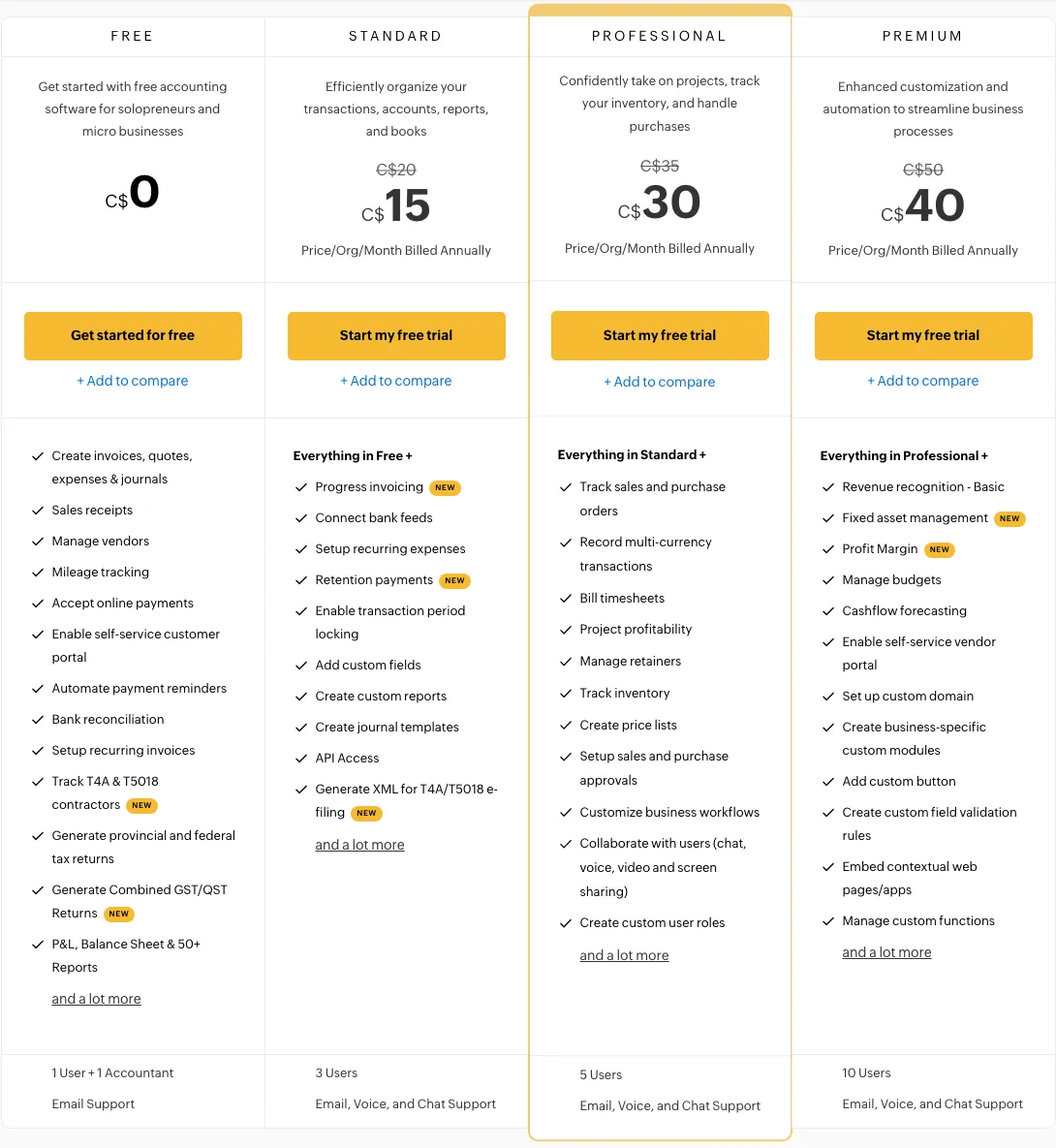 Zoho Books pricing tiers — View current pricing
Pricing
According to Zoho Books’ official pricing page, plans are priced in CAD:
- Free: C$0/mo — for businesses earning $50,000 or less annually
- Standard: C$20/mo (monthly) or C$15/mo (billed annually)
- Professional: C$35/mo (monthly) or C$30/mo (billed annually)
- Premium: C$50/mo (monthly) or C$40/mo (billed annually)
- Elite: C$200/mo (monthly) or C$165/mo (billed annually)
- Ultimate: C$350/mo (monthly) or C$290/mo (billed annually)
Key Features
The Zoho Books Free plan punches well above zero dollars. It supports mileage tracking, recurring invoices, automated payment reminders, bank reconciliation, expense tracking with receipt scans, and over 50 financial reports — including W-9 and 1099 reporting (T4A/T5018 in Canada). That tax reporting capability on a free plan is genuinely rare and saves freelancers meaningful time at year-end.
Zoho Books Standard at C$20/mo adds automatic bank feed connections (real-time transaction import), which is the most meaningful upgrade for freelancers who want to stop entering transactions manually. Higher plans add project profitability tracking, inventory, multi-currency support, and custom workflows — useful for freelancers who have grown into micro-agencies.
Limitations
Zoho Books Free has hard limits that matter at scale:
- Revenue cap of $50,000/year — exceeding it requires a paid upgrade immediately
- 1,000 invoices and 1,000 expenses per year maximum on the free plan
- No automatic bank feeds on the free tier — manual reconciliation only
- 1 user + 1 accountant — no additional team members on free plan
- Add-ons (extra users, advanced autoscans, BillPay) are not supported on Free
Best For
Zoho Books Free is the strongest free accounting option for freelancers under the $50K revenue threshold. Once you cross that threshold or need automatic bank connections, Zoho Books Standard at C$20/mo is the logical upgrade — it adds bank feeds without jumping to an expensive premium tier.
Is ZipBooks a Viable Free Option for Freelancers?
ZipBooks Starter is a legitimate free option for freelancers who need unlimited invoicing with Square or PayPal payment acceptance — and no revenue cap, unlike Zoho Books Free. It is less feature-rich than Wave or Zoho Books on the free tier, but the absence of a revenue ceiling makes it attractive for higher-earning freelancers who still want zero cost.
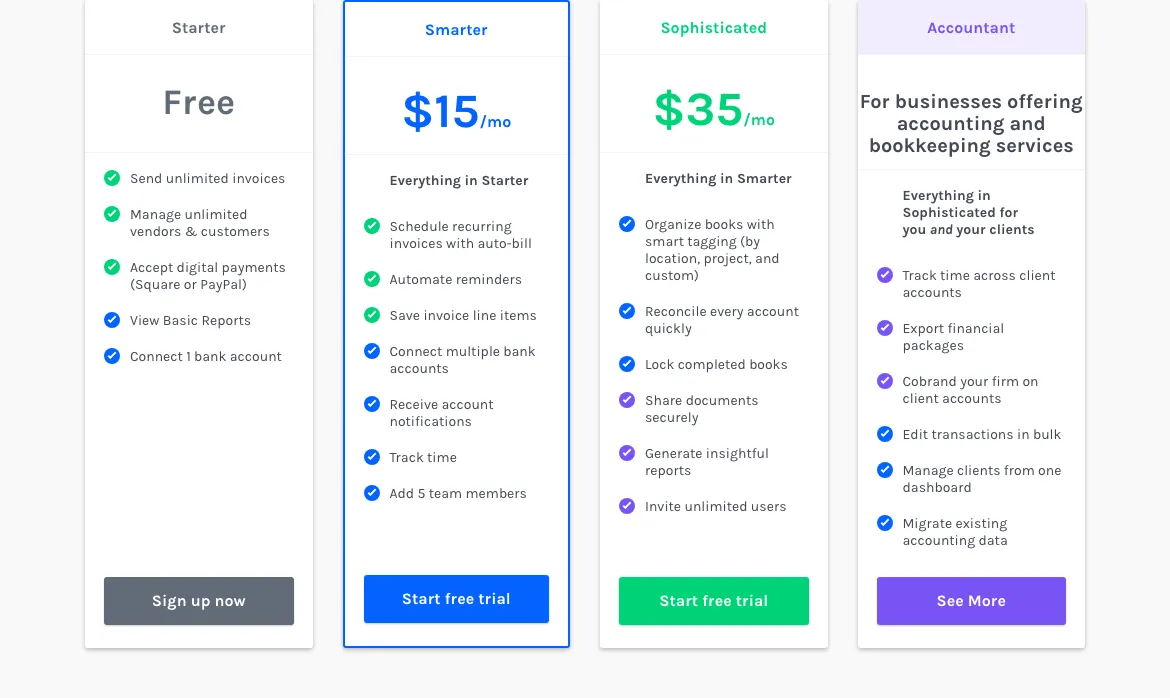 ZipBooks plan tiers — View current pricing
Pricing
According to ZipBooks’ pricing page:
- Starter: $0/mo (free forever) — 1 user, 1 bank account connection
- Smarter: $15/mo — recurring invoices, auto-billing, multiple bank accounts
- Sophisticated: $35/mo — unlimited users, book locking, advanced reconciliation
- Accountant: Contact for pricing
Key Features
ZipBooks Starter includes unlimited invoices, unlimited vendors and customers, and Square or PayPal payment acceptance with no monthly fee. Basic reporting is included. The Smarter plan at $15/mo unlocks recurring invoices, auto-billing, automated reminders, and multiple bank account connections — the core features most active freelancers need.
The Sophisticated plan at $35/mo adds machine learning-powered automated transaction categorization, smart tagging by location and project, book locking, advanced reconciliation, unlimited users, and Gusto payroll integration. Time tracking and project management with fixed or hourly billing rates are also available on paid plans, making ZipBooks a capable step up for growing freelancers.
Limitations
ZipBooks Starter is constrained in ways that affect daily use:
- Only 1 bank account connection on the free Starter plan
- Recurring invoices and automated reminders are locked behind Smarter at $15/mo
- Book locking and unlimited users require Sophisticated at $35/mo — a significant jump from the free tier
- The platform is less widely known than FreshBooks or Wave, meaning fewer integrations in third-party ecosystems
Best For
ZipBooks Starter is best for freelancers earning above $50K who want a free invoicing tool and are comfortable collecting payments through Square or PayPal. If you need recurring invoices or multiple bank account connections, the Smarter plan at $15/mo is cost-effective. For a broader view of business tools for independent workers, see our best CRM for freelancers guide.
Is Akaunting Worth Considering for Tech-Savvy Freelancers?
Akaunting is the best choice for freelancers who want either a self-hosted open-source solution or a highly customizable cloud platform — but only if you’re comfortable with technical setup or willing to pay for the Premium tier to access double-entry accounting. The Standard plan’s limitations make it a poor starting point for most freelancers.
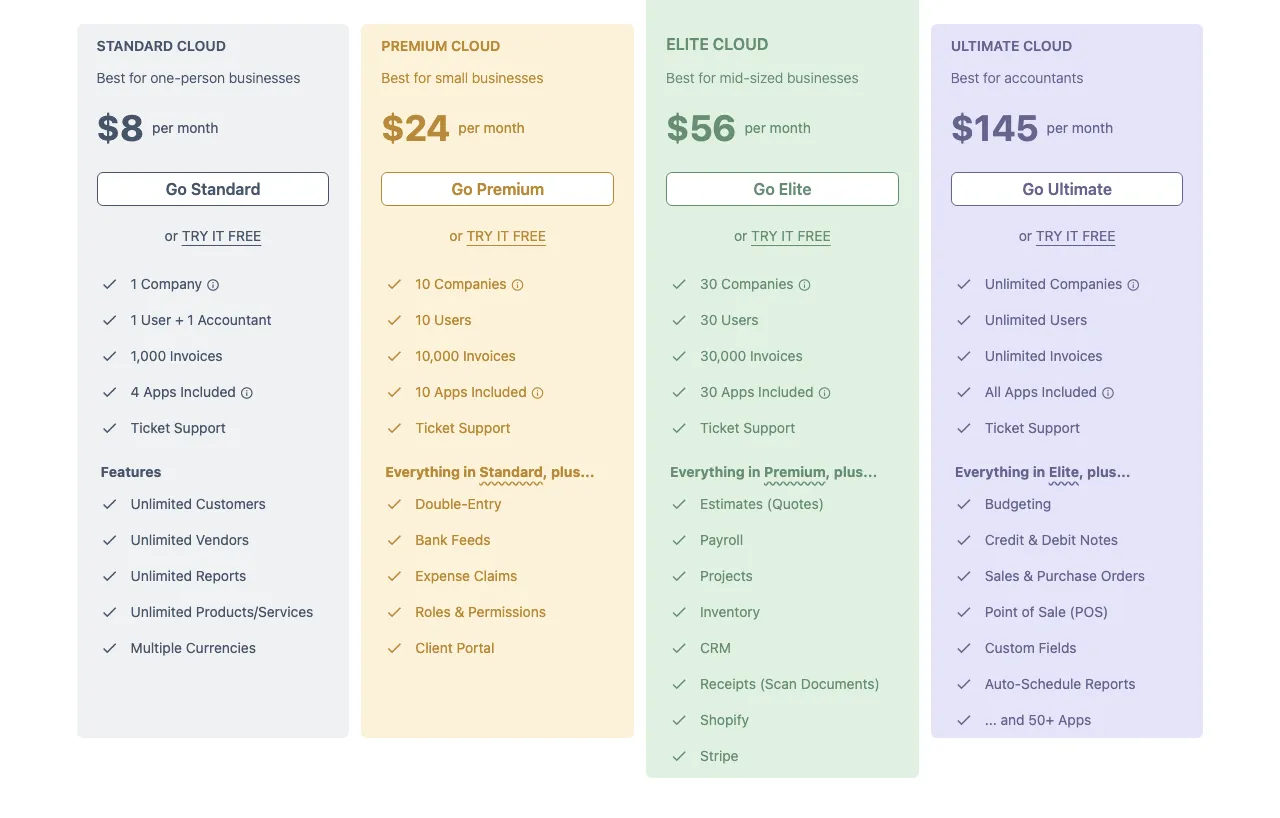 Akaunting cloud plan pricing — View current pricing
Pricing
According to Akaunting’s pricing page:
- Standard Cloud: $12/mo (monthly) or $8/mo (billed annually)
- Premium Cloud: $36/mo (monthly) or $24/mo (billed annually)
- Elite Cloud: $84/mo (monthly) or $56/mo (billed annually)
- Ultimate Cloud: $218/mo (monthly) or $145/mo (billed annually)
No permanent free cloud plan. A free trial is available. The open-source self-hosted version is free but requires server setup and technical maintenance.
Key Features
All Akaunting plans support multiple currencies, unlimited customers, vendors, products/services, and reports. The app store with 50+ add-ons is Akaunting’s most distinctive feature — you can extend the platform with payroll, CRM, projects, inventory, and Shopify integrations selectively. Premium Cloud at $36/mo adds double-entry accounting, bank feeds, balance sheet, chart of accounts, expense claims, and a client portal.
The self-hosted open-source version is a genuine option for developers or technically proficient freelancers who want full control over their data and zero recurring cost after setup.
Limitations
Akaunting’s plan structure has significant gaps at the entry level:
- Standard plan lacks double-entry accounting, bank feeds, balance sheet, and chart of accounts — these require Premium at $36/mo
- Estimates, payroll, and project management are locked behind Elite at $84/mo
- No permanent free cloud tier — unlike Wave, Zoho Books, or ZipBooks
- The self-hosted version requires technical setup that most freelancers cannot manage independently
Best For
Akaunting is the clearest choice for freelancers with a technical background who want maximum customization or data sovereignty via self-hosting. For non-technical freelancers, the Standard plan’s missing features make it a poor value at $12/mo compared to Wave or Zoho Books free tiers.
What Are the Real Weaknesses of Every Tool?
No competing article presents this data in a structured, comparable format. Here are the verified, specific limitations for every tool reviewed — so you can make a decision based on what each tool cannot do, not just what it claims to do.
The table below covers the most decision-relevant weaknesses per tool, sourced from official documentation:
| Tool | Limitation 1 | Limitation 2 | Limitation 3 |
|---|---|---|---|
| Wave Starter | No time tracking on any plan | Bank feeds require paid Pro plan — free tier is manual entry only | Receipt capture costs extra (not included on free tier) |
| FreshBooks Lite | Hard cap of 5 billable clients | Each additional team member costs $11/mo | Advanced Payments feature costs extra $20/mo |
| FreshBooks Plus | Cap of 50 billable clients — unlimited requires Premium | No permanent free tier; trial ends after 30 days | Payroll is a separate add-on at $40/mo + $6/user |
| Zoho Books Free | Revenue cap of $50,000/year — upgrade required above threshold | No automatic bank feeds — manual reconciliation only | Capped at 1,000 invoices and 1,000 expenses per year |
| ZipBooks Starter | Only 1 bank account connection on free plan | Recurring invoices and auto-billing locked behind $15/mo Smarter plan | Book locking and unlimited users require $35/mo Sophisticated plan |
| Akaunting Standard | No double-entry accounting, bank feeds, or balance sheet — requires Premium ($36/mo) | No estimates, payroll, or project management — requires Elite ($84/mo) | No permanent free cloud plan; self-hosted version requires technical setup |
Which Accounting Software Is Best for Your Freelancer Type?
The right tool depends on your specific situation — not a generic “best for freelancers” label. Here are definitive verdicts for the three most common freelancer profiles.
Solo Freelancer / Creative (1 Person, Irregular Income)
Best pick: Wave Starter (approximately free)
Solo creatives — photographers, illustrators, copywriters, web designers — typically send invoices in batches, have irregular income months, and need basic expense tracking without monthly fees. Wave Starter covers all of this at approximately zero cost: unlimited invoices, unlimited clients, and a profit and loss dashboard. The only requirement is tolerance for manual transaction entry.
If you occasionally need automated reminders or recurring invoices (for a retainer client, for example), Wave Pro handles it — or step up to ZipBooks Smarter at $15/mo for recurring billing plus multiple bank connections.
Runner-up: ZipBooks Starter — unlimited invoices with no revenue cap, making it better than Zoho Books Free once you cross $50K in annual earnings.
Solo Consultant / Service Provider (1 Person, Recurring Clients, Time Tracking Needed)
Best pick: FreshBooks Plus at $12.90/mo
Consultants who bill hourly, manage recurring client relationships, and want automated invoice workflows need more than a free tool can deliver. FreshBooks Plus handles up to 50 clients, includes built-in time tracking (no third-party integration needed), supports recurring invoices and payment reminders, and covers double-entry accounting reports and bank reconciliation — all in one platform. The promotional price of $12.90/mo makes it compelling.
For consultants who want free and are under the $50K revenue threshold, Zoho Books Free is the strongest alternative — it includes 1099/T4A tax reporting and mileage tracking that FreshBooks Lite doesn’t match at zero cost.
If your consulting work involves project-based billing and you want CRM features alongside accounting, see our guide to the best CRM for small business for tools that complement your accounting stack.
Micro-Agency / Freelance Team (2-5 People, Shared Invoicing and Expense Management)
Best pick: FreshBooks Premium at $21/mo
For a 2-5 person team sharing invoicing responsibilities, FreshBooks Premium is the most practical option: unlimited clients, team member access at $11/mo per additional user, recurring invoices, automated reminders, built-in time tracking, and full double-entry accounting. The platform was built for service businesses, and it shows — client retainers and proposals are native features, not add-ons.
Strong alternative: Zoho Books Standard at C$20/mo. It adds automatic bank feeds, multi-user support, and project profitability tracking — a strong fit for agencies tracking profitability per client engagement. For teams also managing projects alongside billing, pair it with a tool from our best project management software for small teams guide.
What Does a Real Freelancer Invoicing Workflow Look Like in FreshBooks?
Understanding the invoice-to-tax-report cycle in a specific tool helps you evaluate fit before committing. Here is how a solo consultant’s monthly cycle works end-to-end in FreshBooks Plus:
The workflow below covers the complete cycle from time logging to tax reporting:
- Time tracking (built-in): Log hours against a specific client project using FreshBooks’ native Time Tracking feature — no separate app required. Hours are stored against the project automatically.
- Invoice creation: At month-end, convert logged hours directly to an invoice. FreshBooks pulls the time entries and populates line items. Add any expense reimbursements from the Expense Tracking dashboard (with receipt photos captured via mobile).
- Automated payment reminders: Set a reminder schedule (e.g., 7 days before due, on due date, 7 days after) using FreshBooks’ Automated Payment Reminders feature. The system sends these without manual follow-up.
- Payment collection: Clients pay via the invoice’s payment link — credit/debit, ACH, Apple Pay, Google Pay, or Buy Now Pay Later are all supported natively.
- Bank reconciliation: Use the Bank Reconciliation feature to match incoming payments against your bank statement. FreshBooks flags discrepancies for review.
- Tax reporting: Pull the Profit & Loss Report and Tax Summary from the Reports section. For consultants using a US entity, FreshBooks supports 1099 contractor payment tracking. Export directly for your accountant or tax software.
This complete cycle — time log → invoice → reminder → payment → reconciliation → report — runs inside a single platform on the Plus plan at $12.90/mo. No third-party integrations required for the core workflow.
Should You Switch Tools? Switching Cost Reality Check
If you’re currently using spreadsheets or a tool you’ve outgrown, the switching cost is lower than most freelancers assume — but it’s not zero. Here’s what to expect for each scenario:
The following covers the three most common switching situations freelancers face:
- Spreadsheets → Wave or ZipBooks (free tiers): Low friction. Import your client list via CSV, manually enter open invoices, and you’re live within an hour. No contract lock-in on free plans.
- Wave → FreshBooks: Moderate effort. Export Wave’s transaction data and financial statements before cancelling. FreshBooks accepts CSV imports for contacts and expenses. Allow 2-3 hours for a full migration.
- FreshBooks → Zoho Books: Moderate effort. Export invoices, contacts, and chart of accounts from FreshBooks. Zoho Books supports CSV import for contacts and transactions. The UI shift is meaningful — Zoho Books has a steeper learning curve than FreshBooks for non-accountants.
- Any tool → Akaunting self-hosted: High effort. Requires server provisioning, software installation, and data migration via CSV. Not recommended unless you have technical resources.
Annual billing trap: FreshBooks and Akaunting both offer significant discounts for annual billing (up to 30% off). If you commit annually and switch mid-year, you forfeit the remaining months. Start with monthly billing when evaluating any tool.
FAQ
Is Wave accounting really free?
Wave’s Starter plan is positioned as free with no time limit, though this pricing is unverified at time of research — verify directly before committing. It includes unlimited invoices, estimates, customers, vendors, and a profit and loss dashboard. However, bank account connections, automated reminders, and recurring invoices require the paid Pro plan. Receipt capture also costs extra on the free tier — so the free option means manual data entry only.
Do freelancers need QuickBooks or is it overkill?
QuickBooks is overkill for most solo freelancers. It is a full-featured accounting platform designed for small businesses with employees, inventory, and complex reporting needs. Solo freelancers are better served by FreshBooks Lite at $6.90/mo, Zoho Books Free (under $50K revenue), or Wave Starter — all of which handle invoicing, expense tracking, and basic tax reporting without the complexity or cost.
What accounting software works best for self-employed consultants?
FreshBooks Plus at $12.90/mo is the clearest choice for self-employed consultants who bill by time and manage recurring clients. It combines built-in time tracking, recurring invoices, automated reminders, and double-entry accounting in one platform. Zoho Books Standard at C$20/mo is a strong alternative if automatic bank feed connections are a priority — see the Zoho Books pricing page for current plan details.
What is the best free accounting software for freelancers?
Zoho Books Free is the best free option for freelancers earning under $50,000/year — it includes mileage tracking, recurring invoices, payment reminders, bank reconciliation, and 1099/T4A tax reporting. ZipBooks Starter is the best free option for freelancers above that revenue threshold — no revenue cap, unlimited invoices, and Square/PayPal payment acceptance.
Can I use accounting software to handle my freelance tax reports?
Yes — every tool in this comparison supports basic tax reporting. Zoho Books Free includes W-9 and 1099 reporting (T4A/T5018 in Canada) and 50+ reports including profit and loss. FreshBooks Plus includes double-entry accounting reports and bank reconciliation. ZipBooks Sophisticated adds book locking and advanced reconciliation at $35/mo. All of these can export financial statements for your accountant at year-end.
Which accounting software is best for a 2-5 person freelance team?
FreshBooks Premium at $21/mo is the best option for micro-agencies needing shared invoicing — it supports unlimited clients and team members at $11/mo per additional user, with built-in time tracking and client retainer management. Zoho Books Standard at C$20/mo is a strong alternative with bank feeds and project profitability tracking for client-focused agencies.
Is Zoho Books free plan worth it for freelancers?
Zoho Books Free is worth it for freelancers under the $50K revenue threshold. It includes 1 user plus 1 accountant, up to 1,000 invoices and 1,000 expenses per year, mileage tracking, bank reconciliation, automated payment reminders, and W-9/1099 reporting — all free. The main limitation is no automatic bank feeds, which require upgrading to Standard at C$20/mo per the Zoho Books pricing page.