
AppFlowy is the best Notion alternative for privacy-conscious solo users and small teams who want self-hosting, offline AI, and no block limits — it offers a verified free forever plan, open-source self-hosting, and a built-in AI assistant without the restrictions that frustrate Notion’s free-tier users. For small teams needing a dedicated knowledge base, Slite is the clearest choice. The key decision factor is data ownership: if you want your notes on your own servers or running fully offline, AppFlowy, AFFiNE, and Anytype are the strongest privacy-focused options covered in this guide.
AppFlowy
The only Notion alternative with a verified free forever plan, open-source self-hosting, and a built-in AI assistant — all without block limits or data lock-in.
Starting price: $0 (free forever) | Pro: $10/user/month (billed annually) | Free plan: Yes, permanent
Why Do Users Actually Leave Notion?
Notion’s real pain points are specific and well-documented — and understanding them is the only way to pick the right alternative for your situation. Generic “it’s too complex” complaints consistently miss the actual friction points that drive users to switch.
The three most common reasons users leave Notion are:
- The free plan’s collaborative block limit. According to Notion’s official pricing page, collaborative blocks become restricted when two or more members join a workspace on the free tier. Solo users get unlimited blocks, but the moment you invite a teammate, you hit a wall. File uploads are also capped at 5MB per file — a real constraint for teams sharing design assets or PDFs.
- No true offline mode. Notion requires an internet connection to function reliably. Changes made offline don’t always sync correctly, which is a dealbreaker for users who work on trains, planes, or in low-connectivity environments.
- AI locked behind paid plans. Notion AI is a trial-only feature on the Free plan — full AI access requires a Business plan at $20 per member/month. If AI-assisted writing and automation matter to you, you’re paying significantly more than you might expect.
These specific pain points should drive your alternative choice. If offline mode is your primary need, look at AFFiNE or AppFlowy’s Vault Workspace. If the free plan’s block limit is the issue, AppFlowy or Anytype solve it directly. If you need a cleaner knowledge base without Notion’s flexibility-induced complexity, Slite is the answer.
How Do the Top Notion Alternatives Compare?
Here’s a structured comparison of the top Notion alternatives across the criteria that matter most for real buying decisions. The Open Source column is a key differentiator that no other comparison article in this space surfaces clearly — it determines whether you can self-host, audit the code, or migrate your data freely.
| Tool | Best For | Free Plan | Starting Price | Open Source | Standout Feature |
|---|---|---|---|---|---|
| AppFlowy | Privacy-first teams, self-hosters | Yes (forever) | $10/user/mo (annual) | Yes | Vault Workspace for fully offline, private AI |
| Slite | Small team knowledge bases | No (14-day trial) | $8/user/mo (annual) | No | AI-powered doc verification to flag stale content |
| Anytype | Decentralized, encrypted personal knowledge | Yes (free to start) | Paid plans available | Protocols only | Peer-to-peer sync with end-to-end encryption |
| AFFiNE | Offline-first visual workspaces | Yes (local) | Paid for AI features | Yes | Canvas + docs hybrid with full offline use |
| Coda | Teams building doc-as-app workflows | Yes | ~$12/doc maker/mo | No | Document-as-app engine with cross-doc references |
| Mem | Solo AI-powered knowledge management | Yes | ~$12/mo | No | Auto-tags and links notes without manual organization |
| Tana | Daily note-takers building knowledge graphs | Yes | ~$10/mo | No | Supertags that convert plain notes into typed objects |
| Microsoft Loop | Microsoft 365 shops | No standalone | ~$12.50/user/mo | No | Loop Components sync live across Teams and Outlook |
Is AppFlowy the Right Notion Alternative for You?
AppFlowy is the best Notion alternative for users who want open-source, local-first software without paying for features they don’t need. It covers the core Notion use cases — pages, databases, kanban boards, calendars — while adding full offline capability and self-hosting that Notion will never offer. In our evaluation, AppFlowy is the only tool in this space that combines a permanent free tier, open-source code, and a built-in AI assistant without requiring a paid subscription.
Pricing
According to AppFlowy’s official pricing page, the free forever plan includes unlimited pages and blocks for up to 2 members, 5GB storage, 10 AI responses, and real-time collaboration. The Pro plan costs $10/user/month billed annually ($12.50/month billed monthly) and removes the member limit, upgrades storage significantly, and gives you unlimited AI responses.
For teams that want more advanced AI, AppFlowy AI MAX adds access to GPT-5, Gemini 2.5 Pro, and Claude 3.7 Sonnet for $8/user/month billed monthly. The Vault Workspace mode — a fully private, offline-only workspace with local AI — costs $6/user/month billed annually.
 AppFlowy pricing tiers — View current pricing
Key Features
AppFlowy’s open-source architecture means your data never leaves your infrastructure if you self-host. The built-in AI assistant handles brainstorming, summarization, auto-filling database columns, and Q&A on your documents — with unlimited responses on the Pro plan. Mobile apps are available for iOS and Android, and desktop apps cover macOS, Windows, and Linux. The Vault Workspace mode is genuinely unique: it runs AI entirely locally with no data transfer to external servers, making it the strongest Notion alternative that combines AI assistance with true air-gap privacy.
Limitations
The free plan’s 2-member limit is a hard constraint — it’s not a soft cap, and there are no guest editors on the free tier. The Notion import feature requires an online account, which means if you want to migrate from Notion while using AppFlowy in fully offline mode, you’ll need to go online temporarily. Free plan users also get no custom namespace and capped file uploads, which limits usefulness for growing teams before they upgrade.
Team size verdict — Solo/Freelancer: AppFlowy is the best Notion alternative for solo users who want unlimited notes, offline capability, and AI assistance at zero cost. The free plan covers everything a solo knowledge worker needs.
Team size verdict — Small Team (2–15): The Pro plan at $10/user/month is competitive. Teams that need more than 2 members or more than 5GB storage should plan to upgrade from day one.
If you’re a privacy-conscious solo user or a small technical team that wants to self-host your workspace, AppFlowy is the clearest choice at this price point.
Is Slite Worth It for a Small Team Knowledge Base?
Slite is the best Notion alternative for small teams of 2–15 who primarily need a knowledge base rather than a flexible all-in-one workspace. Its AI-powered search, document verification system, and clean editor make it the tool teams reach for when Notion starts feeling like organized chaos. Slite combines AI-powered search with automated content verification — a pairing that directly addresses the knowledge rot affecting most company wikis.
Pricing
According to Slite’s official pricing page, the Standard plan costs $8/user/month billed yearly. The Knowledge Suite plan costs $20/user/month billed yearly with a minimum of 10 users. Enterprise pricing requires contacting sales. There is no permanent free tier — only a 14-day free trial of the Standard plan.
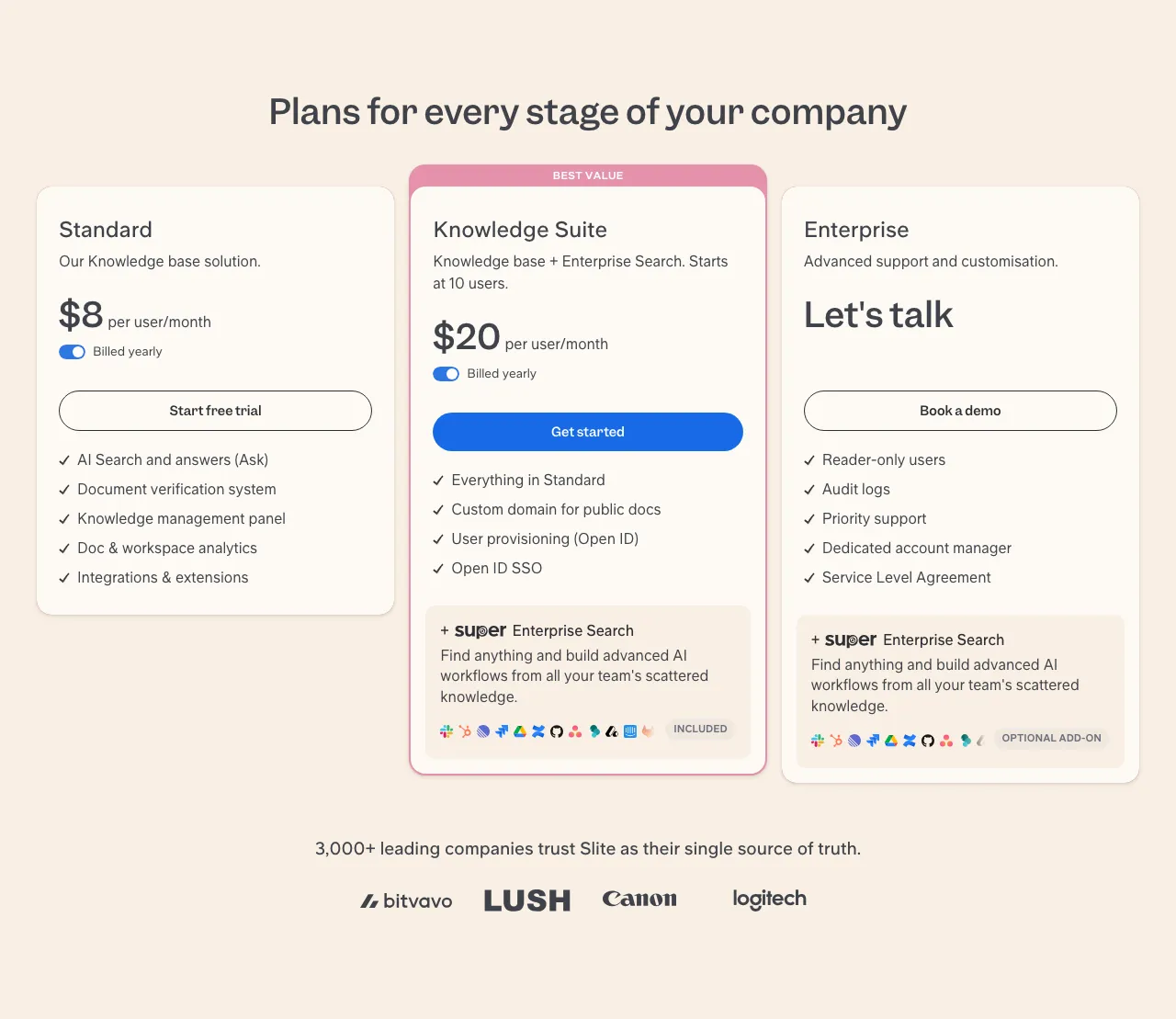 Slite pricing tiers — View current pricing
Key Features
Slite’s standout feature is its document verification system — it flags outdated content and prompts document owners to confirm whether information is still accurate. This is a feature Notion doesn’t offer at all, and for teams managing internal wikis, it prevents the knowledge rot that makes most company wikis useless within a year. The Ask AI feature answers questions directly from your team’s documents, and the Ask in Slack integration lets team members query the knowledge base without switching apps.
The Knowledge Suite plan adds Enterprise Search — an add-on that surfaces information across all connected tools, not just Slite documents. According to Slite’s pricing page, file uploads on Standard are capped at 200MB per file and 5GB total storage per user, which is generous for a knowledge base but limiting for teams storing large media files.
Limitations
The Standard plan limits AI answers to 30 questions/month/user and AI editor responses to 50/month/user — which is a meaningful constraint for teams that want to use AI search heavily. OpenID SSO and user provisioning require the Knowledge Suite plan, and HIPAA compliance and audit logs are Enterprise-only. The absence of a permanent free tier is also a real barrier for teams testing before committing.
Team size verdict — Small Team (2–15): Slite Standard at $8/user/month is the best Notion alternative for small teams managing a company wiki or internal knowledge base. The document verification system alone justifies the switch for any team where stale documentation is a recurring problem.
Team size verdict — Mid-size Team (15–50): The Knowledge Suite at $20/user/month with a 10-user minimum is appropriate for mid-size teams that need Enterprise Search, SSO, and advanced user management. Below 10 users, you’re overpaying relative to alternatives.
If you’re a small team drowning in outdated internal docs and want AI that can answer questions from your own knowledge base, Slite is the clearest choice at this price point.
Are Open-Source Notion Alternatives Actually Usable?
Three Notion alternatives — AppFlowy, AFFiNE, and Anytype — are meaningfully different from SaaS alternatives like Slite, Coda, and Mem. Here’s the distinction:
- AppFlowy: Fully open-source (Apache 2.0 license). Self-hosting is officially supported. Your data stays on your infrastructure entirely.
- AFFiNE: Open-source and local-first. Can run entirely in a browser or desktop app with no cloud account. Self-hosting supported.
- Anytype: The app itself is not fully open-source — only the underlying sync protocols carry an MIT license. Data is peer-to-peer encrypted, not stored on central servers.
If you’re evaluating alternatives for GDPR compliance, HIPAA-adjacent use cases, or simply want to guarantee your notes never touch a third-party server, these three are among the strongest options in the Notion alternatives space for privacy-conscious buyers. All other tools covered here are proprietary SaaS products.
AFFiNE is the best Notion alternative for users who want a visual canvas combined with offline-first document editing — a combination no proprietary SaaS offers. According to AFFiNE’s official site, the tool works entirely offline via desktop app or browser, supports self-hosting, and includes drawing and visualization capabilities that go well beyond standard note-taking.
The canvas-plus-docs hybrid is AFFiNE’s genuine differentiator: you can switch between a structured document view and a spatial whiteboard view of the same content. For researchers and visual thinkers, this is a fundamentally different working mode than Notion’s page-based structure.
AFFiNE’s concrete limitations: The Notion import feature was reported as unreliable at time of review — migration from Notion is not seamless. There are no mobile apps. The cloud version lacks two-factor authentication and has no Google Drive or Slack integrations. For teams that need mobile access or ecosystem integrations, AFFiNE is a research-grade tool, not a team collaboration platform. AI assistant features require a paid plan, though exact pricing is not available from an official verified source.
Anytype (anytype.io) takes a different approach: peer-to-peer encrypted sync using a private key, with data staying on-device rather than on central servers. It supports Notion import, templates, and mobile apps for Android and iOS. The key limitation is that losing your sync key means losing access to your data — there’s no password reset or account recovery because there’s no central account. This is a genuine privacy trade-off, not a bug. Paid plans are available; exact pricing is not confirmed from an official verified source.
Team size verdict — Solo/Freelancer (open-source): Anytype is the best Notion alternative for solo users who want end-to-end encrypted, decentralized note-taking with mobile app support. AppFlowy is better if you want AI integration alongside open-source guarantees.
Team size verdict — Small Team (open-source): AppFlowy with self-hosting is the best open-source Notion alternative for small teams, with verified pricing at appflowy.com/pricing, a genuine free tier, and Pro plan collaboration features at $10/user/month.
For more options specifically built around team project workflows, see our monday.com alternatives comparison.
Is Coda a Better Choice Than Notion for Document-Heavy Teams?
Coda is the best Notion alternative for teams that need their documents to function as applications — with complex formulas, automated workflows, and cross-document data references that Notion’s database engine can’t match. Based on our review of available documentation, if your team is building internal tools, client-facing portals, or heavily automated reporting systems inside a document environment, Coda is the clearer choice.
Pricing
Coda’s free plan is available. Based on available research at time of writing, paid plans start at around $12 per document maker/month — this figure is unverified from an official source, so verify current pricing directly at coda.io/pricing. The pricing model is unusual: it charges per “document maker” — users who can create and edit docs — not per member. Viewers and commenters are free. This model can work out cheaper than Notion for teams with many view-only stakeholders, but significantly more expensive for teams where everyone needs edit access.
Key Features
Coda’s document-as-app engine is its core differentiator. A Coda document can contain buttons that trigger automations, cross-references that pull live data from other documents, and formula logic comparable to a spreadsheet but embedded in document blocks. The flexible views (table, kanban, calendar, form, chart) mirror Notion’s offerings but with more powerful underlying data handling.
Limitations
Coda’s formula syntax has a steep learning curve for non-technical users — it’s closer to spreadsheet logic than Notion’s simpler property system. The per-document-maker pricing model is genuinely confusing for teams trying to estimate costs before committing. Because official plan details are not available from a verified source in our research, budget planning requires a direct conversation with Coda’s team for anything beyond the free tier.
Team size verdict — Small Team (2–15): Coda is the best Notion alternative for small technical or product teams building internal tooling inside their documentation. Non-technical teams will find the formula system frustrating.
Team size verdict — Mid-size Team (15–50): Coda scales well for mid-size teams where a subset of users are document makers. Budget modeling requires careful calculation of your actual maker-to-viewer ratio before committing.
If you’re a product or engineering team that wants documents that behave like lightweight apps, Coda is the clearest choice at this price point.
Which Notion Alternative Is Best for Solo Users and Freelancers?
For solo knowledge workers, Mem and Tana are the two Notion alternatives specifically designed for individual use — neither is built for team collaboration, which is exactly the point. They solve the problem Notion creates for solo users: too much structural overhead for personal note-taking. Both tools take fundamentally different approaches to the same problem of information overload.
Mem focuses on eliminating manual organization entirely. Its AI engine auto-tags and links related notes without any user input — you capture information and Mem builds the connections automatically. A free plan is available, with paid plans starting at around $12/month based on available research (unverified — verify current pricing at Mem’s official site). The core limitation is that Mem is designed for individuals, not teams — if you ever need to share a workspace with colleagues, you’ll outgrow it immediately.
Tana takes a different approach: rapid daily note capture that converts into a Supertag-based knowledge graph. Every note you write can be tagged as a typed object — a meeting, a person, a project, a decision — and Tana builds a structured graph of relationships automatically. A free plan is available, with paid plans starting at around $10/month based on available research (unverified — verify current pricing at Tana’s official site). The learning curve is steeper than Notion, not shallower — the Supertag paradigm requires genuine re-learning of how you take notes.
Team size verdict — Solo/Freelancer (AI-powered): Mem is the best Notion alternative for solo users who want zero-friction capture with automatic organization. Tana is the best Notion alternative for solo users who take structured daily notes and want to build a long-term knowledge graph from them.
For developers specifically looking for a tool to organize and share technical notes, our best tool for sharing developer notes guide covers options more suited to that workflow.
Is Microsoft Loop a Viable Notion Alternative?
Microsoft Loop is the best Notion alternative for organizations already running Microsoft 365 — and a poor fit for everyone else. This is not a tool you adopt independently; it is a tool you gain access to when your organization is already on Microsoft 365 for Business.
Loop Components — the core feature — are dynamic, portable content blocks that sync in real time across Microsoft Teams, Outlook, and SharePoint. A task list created in a Loop Component inside Teams automatically updates when a team member edits it from Outlook. For organizations where collaboration happens inside the Microsoft 365 ecosystem, this native integration is genuinely powerful and has no direct equivalent in Notion.
The hard limitation: Loop is not available as a standalone product. Access requires a Microsoft 365 for Business subscription, which starts at around $12.50/user/month based on available research (unverified — verify current pricing at Microsoft’s official site). If your organization already pays for Microsoft 365, Loop is included — evaluate it seriously. If you’re not already in the Microsoft 365 ecosystem, Loop makes no sense as a reason to enter it.
Team size verdict — Mid-size Team (15–50): Microsoft Loop is the best Notion alternative for mid-size teams already on Microsoft 365 who want tighter integration between their documents, chat, and email workflows. It is not a viable option for teams outside that ecosystem.
What Are the Specific Weaknesses of Each Notion Alternative?
Most comparison articles bury limitations in prose or skip them entirely. This symmetrical table surfaces the single most important, concrete weakness of each alternative — the kind of limitation that would cause a specific team type to reject a tool.
Here is a head-to-head breakdown of the key weakness for each alternative:
| Tool | Key Limitation | Who It Impacts Most | Practical Workaround |
|---|---|---|---|
| AppFlowy | Free plan hard-capped at 2 members; no guest editors | Teams of 3+ on a budget | Upgrade to Pro ($10/user/mo) from day one |
| Slite | AI answers capped at 30/user/month on Standard plan | Teams using AI search heavily | Upgrade to Knowledge Suite or limit AI use to key users |
| AFFiNE | Notion import is unreliable; no mobile apps | Users migrating from Notion; mobile-first workers | Manual migration; desktop-only workflow |
| Anytype | Losing your sync key = losing data access; no account recovery | Users unfamiliar with key-based auth | Back up your private key in a secure password manager |
| Coda | Formula syntax requires spreadsheet-level technical literacy | Non-technical teams | Limit formula use to one designated “Coda admin” per team |
| Mem | Personal use only — no meaningful team collaboration features | Any team trying to share a workspace | Use alongside a separate team wiki tool |
| Tana | Steeper learning curve than Notion; unique Supertag paradigm | Users expecting a simpler Notion replacement | Budget 2–3 weeks of onboarding before evaluating fit |
| Microsoft Loop | Requires Microsoft 365 subscription; no standalone product | Organizations not already on Microsoft 365 | Evaluate only if M365 is already in your stack |
What Does Switching From Notion Actually Cost?
Switching from Notion is lower-friction than most users expect for the right tools — but migration complexity varies significantly depending on which alternative you choose and how much structured data you’ve built in Notion.
Here is what you need to know before committing to a migration:
Data export from Notion: Notion allows full workspace export in Markdown and CSV format from Settings → Export. This covers pages, databases (as CSV), and files. The export is clean and portable — it’s one of Notion’s genuine strengths.
Which tools accept Notion imports directly:
- Anytype: Supports Notion import officially (anytype.io)
- AppFlowy: Supports Notion import, but requires an online account — not available in fully offline mode (appflowy.com/pricing)
- AFFiNE: Notion import was reported as unreliable at time of review — treat migration as manual (affine.pro)
For Coda, Slite, Mem, and Tana: There is no automated Notion import. Migration means exporting Markdown from Notion and rebuilding structure in the new tool. For knowledge bases and notes, this is a weekend project. For complex linked databases, budget significantly more time.
Learning curve: Slite and Coda are the closest to Notion’s UX paradigm and require the shortest adjustment period. Tana’s Supertag system and Anytype’s decentralized architecture both require genuine re-learning. AFFiNE’s canvas mode is intuitive for visual thinkers but unfamiliar to anyone coming from Notion’s linear page structure.
Contract lock-in: AppFlowy and AFFiNE are free to self-host with no vendor lock-in at all. Slite’s Knowledge Suite has a 10-user minimum that creates meaningful commitment for smaller teams who grow into that tier. For other tools, billing terms vary — verify directly with each vendor before committing to an annual plan.
For teams evaluating broader workspace alternatives beyond Notion, our monday.com alternatives guide covers project-focused tools that overlap with some of these use cases.
Pricing last checked from official vendor websites. Prices are subject to change — verify directly before purchasing.
FAQ
Is there a free Notion alternative?
Yes — AppFlowy offers a verified free forever plan for up to 2 members with unlimited pages, blocks, and 5GB storage (AppFlowy pricing). AFFiNE and Anytype are also free to use locally with no block limits. Slite discontinued its free tier and now offers only a 14-day trial of its Standard plan.
Which Notion alternative works offline?
AFFiNE and AppFlowy’s Vault Workspace both work fully offline. AFFiNE runs via desktop app or browser with no cloud account required (affine.pro). AppFlowy’s Vault Workspace mode runs AI entirely locally with no data transfer. Anytype uses peer-to-peer sync rather than cloud servers, so it functions without an internet connection once configured. Notion itself requires internet connectivity for reliable operation.
What do power users switch to from Notion?
Power users needing stronger databases switch to Coda. Users who want AI-native, zero-friction note capture switch to Mem or Tana. Privacy-focused power users migrate to AppFlowy (self-hosted) or Anytype for end-to-end encryption and local-first data storage — capabilities that Notion’s architecture fundamentally cannot offer.
Is Coda better than Notion for teams?
Coda is better than Notion for teams building document-as-app workflows with complex formula logic and cross-document data references. Notion is better for teams that want a flexible content wiki with a simpler learning curve. Coda’s per-document-maker pricing model can be more expensive than Notion for teams where everyone needs edit access, and the formula syntax creates a steeper onboarding curve for non-technical users.
What is the best open-source Notion alternative?
AppFlowy is the best open-source Notion alternative. It has a verified free forever plan (appflowy.com/pricing), official self-hosting support, local-first architecture, and a built-in AI assistant. AFFiNE is also open-source and works offline, but lacks mobile apps and has had reported issues with Notion import reliability. Anytype’s open-source claim applies only to its sync protocols — the app itself is not fully open-source.
Which Notion alternative is best for a solo user or freelancer?
Mem is the best Notion alternative for solo knowledge workers who want AI-powered automatic organization without manual tagging or folder structure. Tana is best for solo users who take heavy daily notes and want them converted into a structured, long-term knowledge graph. AppFlowy’s free plan covers the core use cases for solo users who want open-source guarantees at zero cost.
Which Notion alternative is best for a small team?
Slite is the best Notion alternative for small teams of 2–15 needing a structured knowledge base. Its Standard plan at $8/user/month (billed yearly) (slite.com/pricing) includes AI-powered search and a document verification system that flags stale content — a feature that prevents the knowledge rot affecting most company wikis. AppFlowy Pro at $10/user/month is the better choice for small teams that prioritize self-hosting and open-source guarantees over dedicated knowledge base features.