
ClickUp is the best overall monday.com alternative for most teams — its Free Forever plan includes unlimited tasks and members, and its Unlimited plan at $7/user/month undercuts monday.com significantly. Asana is the strongest choice for small teams of 4–15 who need structured task management without ClickUp’s complexity. Smartsheet is the clearest enterprise alternative for 50+ person teams already comfortable with spreadsheet-style interfaces. The right choice depends primarily on team size and how much configuration flexibility you actually need.
ClickUp
The most capable monday.com replacement at any price point — free or paid — with Gantt charts, time tracking, and project goals all included from the Unlimited plan onward.
Starting price: $7/user/mo (Unlimited, billed annually) | Free plan: Yes (Free Forever)
How Do monday.com Alternatives Actually Compare on Price and Features?
Here’s how the six strongest monday.com alternatives stack up across the criteria that matter most for a switching decision — pricing, free plan quality, and the one limitation that should give you pause before committing:
| Tool | Best For | Starting Price | Free Plan | Key Limitation |
|---|---|---|---|---|
| ClickUp | Teams wanting maximum features at lowest cost | Unlimited: $7/user/mo | Yes — Free Forever | 60MB storage on Free; advanced reporting requires Business plan ($12/user/mo) |
| Asana | Small teams needing structured task workflows | Starter: $10.99/user/mo | Yes — Personal (2 users max) | Timeline, Gantt, and automations locked behind Starter ($10.99/user/mo); free tier limited to 2 users |
| Trello | Solo users and small teams who live in Kanban | Standard: $5/user/mo | Yes — up to 10 collaborators | Calendar, Timeline, and Dashboard views require Premium ($10/user/mo); automation capped at 250 runs/mo on Free |
| Smartsheet | Mid-size to enterprise teams from spreadsheets | Pro: $9/member/mo | No — free trial only | No free plan; unlimited automations and workload tracking require Business ($19/member/mo) |
| Airtable | Teams building database-driven project workflows | Team: $20/user/mo | Yes — individual/lightweight use | Record and attachment limits on Free; Business plan ($45/user/mo) requires contacting sales |
| Notion | Knowledge-work teams combining docs and tasks | Plus: $10/member/mo | Yes — individuals only | Collaborative blocks capped on Free; SAML SSO requires Business ($20/member/mo) |
| Basecamp | Flat-rate organizations replacing multiple tools | Per-user: $15/user/mo | Yes — 1 project only | No Gantt charts, time tracking, or resource management; free plan limited to 1 active project |
Is ClickUp the Best monday.com Alternative for Most Teams?
ClickUp is the strongest overall monday.com alternative for teams of 4–50 who want more features at a lower price. The Unlimited plan at $7/user/month (billed annually) includes native time tracking, Gantt charts, goals, and portfolio management — features that monday.com locks behind higher-tier plans. For teams not ready to pay, the Free Forever plan includes unlimited tasks, unlimited free plan members, collaborative Docs, Kanban boards, sprint management, and 24/7 support.
Pricing
According to ClickUp’s pricing page, the four plans are:
- Free Forever: $0/month — unlimited tasks, unlimited free plan members, 60MB storage
- Unlimited: $7/user/month billed annually — Gantt charts, time tracking, goals, unlimited integrations
- Business: $12/user/month billed annually — advanced reporting, 5,000 automations/month, custom exporting
- Enterprise: Custom pricing — 250,000 automations/month, enterprise security, white labeling
Key Features
ClickUp’s core strength is its configurability. Almost every view, interface element, and workflow can be personalized — boards, lists, Gantt charts, whiteboards, and ClickUp Chat all live in a single workspace. The Business plan at $12/user/month adds the advanced automation and reporting that growing teams eventually need: 5,000 automations/month covers most team use cases, and built-in video recording eliminates the need for a separate Loom subscription.
The Free Forever plan is genuinely usable for small teams — not a stripped-down trial. The 24/7 support included at zero cost is a differentiator that monday.com doesn’t match at the free tier.
Limitations
ClickUp’s biggest limitation is its own breadth. Platform complexity and occasional slowness are consistently cited drawbacks — when every feature is configurable, the learning curve is real. The Free Forever plan’s 60MB storage cap is severely restrictive for any team dealing with files, images, or attachments. If your team needs advanced reporting, that is locked behind the Business plan at $12/user/month — not the Unlimited plan.
Automations are also tiered in a way that catches teams off guard: the Business plan provides 5,000/month, and only Enterprise unlocks 250,000/month. If you’re building complex multi-trigger automation sequences, budget for Business from the start.
Best For
If your team is 4–50 people, currently paying for monday.com’s Standard or Pro plan, and frustrated by the per-seat cost, ClickUp’s Unlimited plan at $7/user/month is the clearest switch. If you’re starting fresh and want to validate the tool first, the Free Forever plan gives you a genuine working environment — not a trial countdown.
Is Asana the Right monday.com Alternative for Small Teams?
Asana is the best monday.com alternative for teams of 4–15 who need structured, process-oriented task management without the configuration overhead of ClickUp. The Starter plan at $10.99/user/month (billed annually) includes Timeline and Gantt views, a workflow builder with unlimited automations, custom fields, and 100+ integrations with tools like Slack, Google Drive, and Zoom. It’s the most straightforward upgrade path for teams currently on monday.com’s Basic plan.
Pricing
According to Asana’s pricing page, the four plans are:
- Personal: $0/month — free forever for up to 2 users, unlimited tasks and projects, list/board/calendar views
- Starter: $10.99/user/month billed annually — Timeline, Gantt, workflow builder, unlimited automations, custom fields
- Advanced: $24.99/user/month billed annually — portfolio and goals tracking, workload management, advanced reporting
- Enterprise: Custom pricing — SAML SSO, data export, advanced admin controls
Key Features
Asana’s standout capability at the Starter tier is the Workflow Builder with unlimited automated rules — competitors like Smartsheet cap automations at 250/month on their entry plan. The built-in Asana AI (available across paid plans) can draft tasks, write status updates, and run autonomous agents to reduce manual overhead. For teams managing multiple cross-functional projects, the Advanced plan’s Portfolio and Goals tracking at $24.99/user/month provides department-level visibility that monday.com charges significantly more to unlock.
The Personal plan is free forever for up to 2 users and includes unlimited tasks, unlimited projects, and iOS/Android apps. It’s the best free entry point for solo operators or pairs — but the 2-user cap means it’s not suitable for any real team.
Limitations
Asana’s free tier has one of the most restrictive caps in this comparison. The Personal plan is limited to 2 users — which means any team beyond a duo must immediately move to Starter at $10.99/user/month. Timeline and Gantt views, the workflow builder, and custom fields are all absent from the free tier. If you want Goals and portfolio-level tracking, that requires jumping to the Advanced plan at $24.99/user/month — a meaningful price increase from Starter.
Best For
If you’re running a team of 4–15 people who need Gantt charts and process automation but don’t want to spend weeks configuring a platform, Asana Starter at $10.99/user/month is the clearest choice. It’s also the best fit for project managers who are migrating from monday.com and want a familiar structure without monday.com’s pricing model. For a deeper comparison, see our Asana vs monday.com breakdown.
Is Trello Still Worth Considering as a monday.com Alternative?
Trello is the right monday.com alternative for solo users and small teams of 1–10 whose entire workflow lives in Kanban boards — no Gantt charts needed, no resource management, just cards and lists. The Standard plan at $5/user/month (billed annually) is the cheapest paid alternative in this comparison, and the Free plan supports up to 10 collaborators per Workspace.
Pricing
According to Trello’s pricing page, the four plans are:
- Free: $0 — up to 10 collaborators per Workspace, unlimited cards, up to 10 boards
- Standard: $5/user/month billed annually — unlimited boards, custom fields, card mirroring, 1,000 automation runs/month
- Premium: $10/user/month billed annually — Calendar, Timeline, Table, Dashboard, and Map views, unlimited automation runs
- Enterprise: $17.50/user/month billed annually — organization-wide controls, public board management
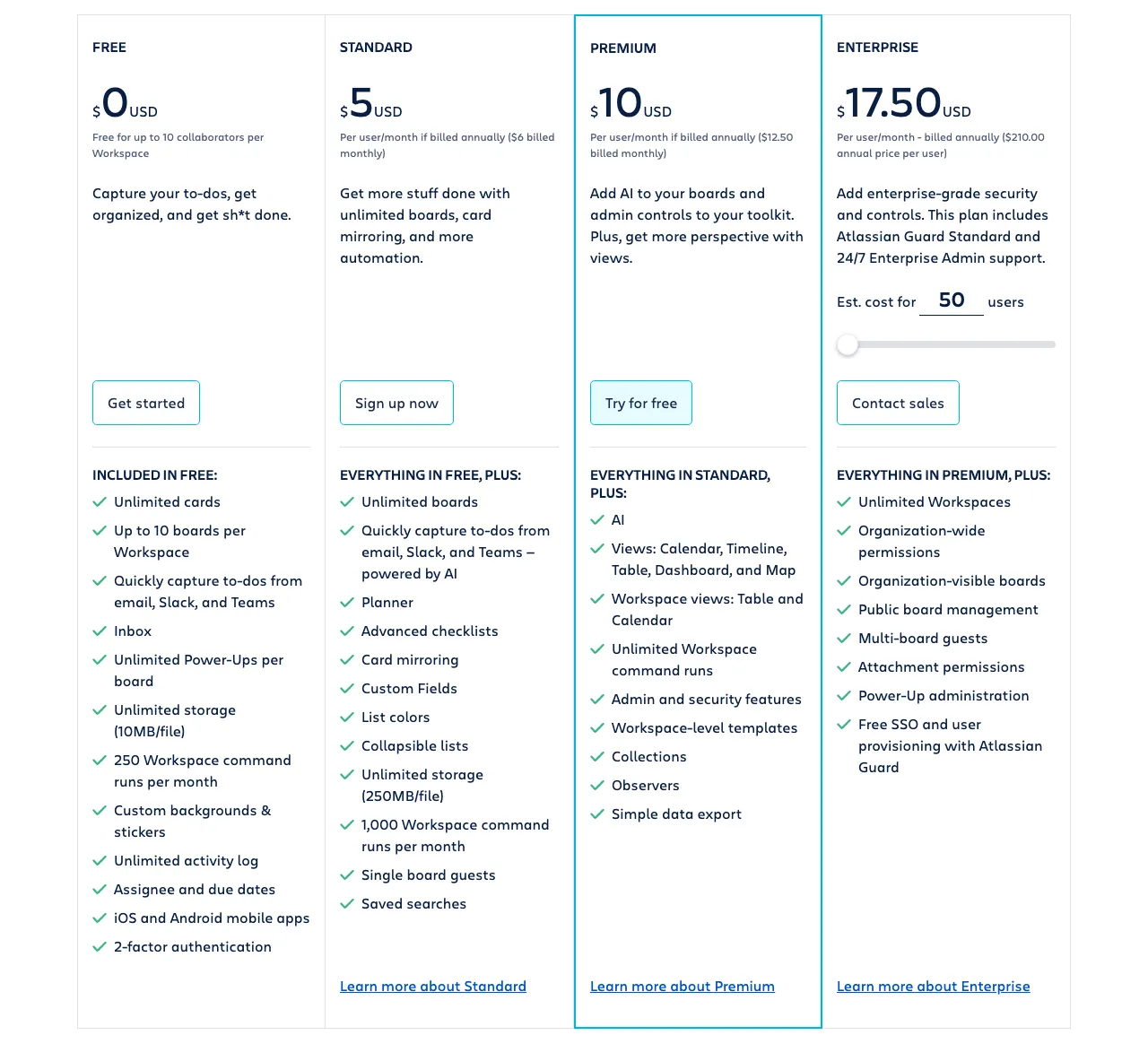 Trello’s four pricing tiers — View current pricing
Key Features
Trello’s strength is its simplicity. The Kanban-first interface is immediately intuitive — there’s no onboarding curve, and boards can be set up in minutes. The Standard plan’s AI-powered quick capture pulls tasks from email, Slack, and Microsoft Teams, which is a practical productivity gain for teams already working across multiple communication tools. With 200+ Power-Up integrations available across all plans, Trello connects to the same ecosystem as monday.com without requiring a platform switch for your entire stack.
Card mirroring (Standard and above) is a genuinely useful feature for teams managing work across multiple boards — a single card syncs its state everywhere it appears, eliminating the duplicate-update problem that plagues multi-board workflows.
Limitations
Trello’s core limitation is view depth. Calendar, Timeline, Table, Dashboard, and Map views are locked behind the Premium plan at $10/user/month — so if you need anything beyond a Kanban board on the Standard plan, you’re not getting it. Automation is also significantly restricted: Free users get 250 Workspace command runs/month, Standard gets 1,000/month, and only Premium and Enterprise unlock unlimited runs. For teams with complex automation needs, this is a deal-breaker on the two cheapest plans.
The Free plan’s 10-board cap is also a real constraint for any team managing more than a handful of projects simultaneously.
Best For
Trello is the right choice for solo operators and teams of 1–10 who primarily manage work visually through Kanban and don’t need Gantt charts or resource management. If you’re a freelancer or a small creative agency where “the board” is the whole system, Trello Standard at $5/user/month is the cheapest functional monday.com replacement available.
Is Smartsheet the Best monday.com Alternative for Enterprise Teams?
Smartsheet is the best monday.com alternative for organizations of 50+ people, particularly those migrating from Excel or Google Sheets. Its spreadsheet-style grid interface reduces onboarding resistance dramatically — users who already live in spreadsheets don’t need to relearn how to think about data. The Business plan at $19/member/month includes unlimited automations, workload tracking, and resource management that monday.com charges enterprise pricing to match.
Pricing
According to Smartsheet’s pricing page, the four plans are:
- Pro: $9/member/month billed annually — 1–10 members, unlimited sheets/forms/reports, 250 automations/month, 20GB storage
- Business: $19/member/month billed annually — 3+ members, unlimited automations, workload tracking, guest access
- Enterprise: Custom pricing — 10+ members, AI formulas, enterprise security, advanced admin
- Advanced Work Management: Custom pricing — enterprise-scale portfolio management
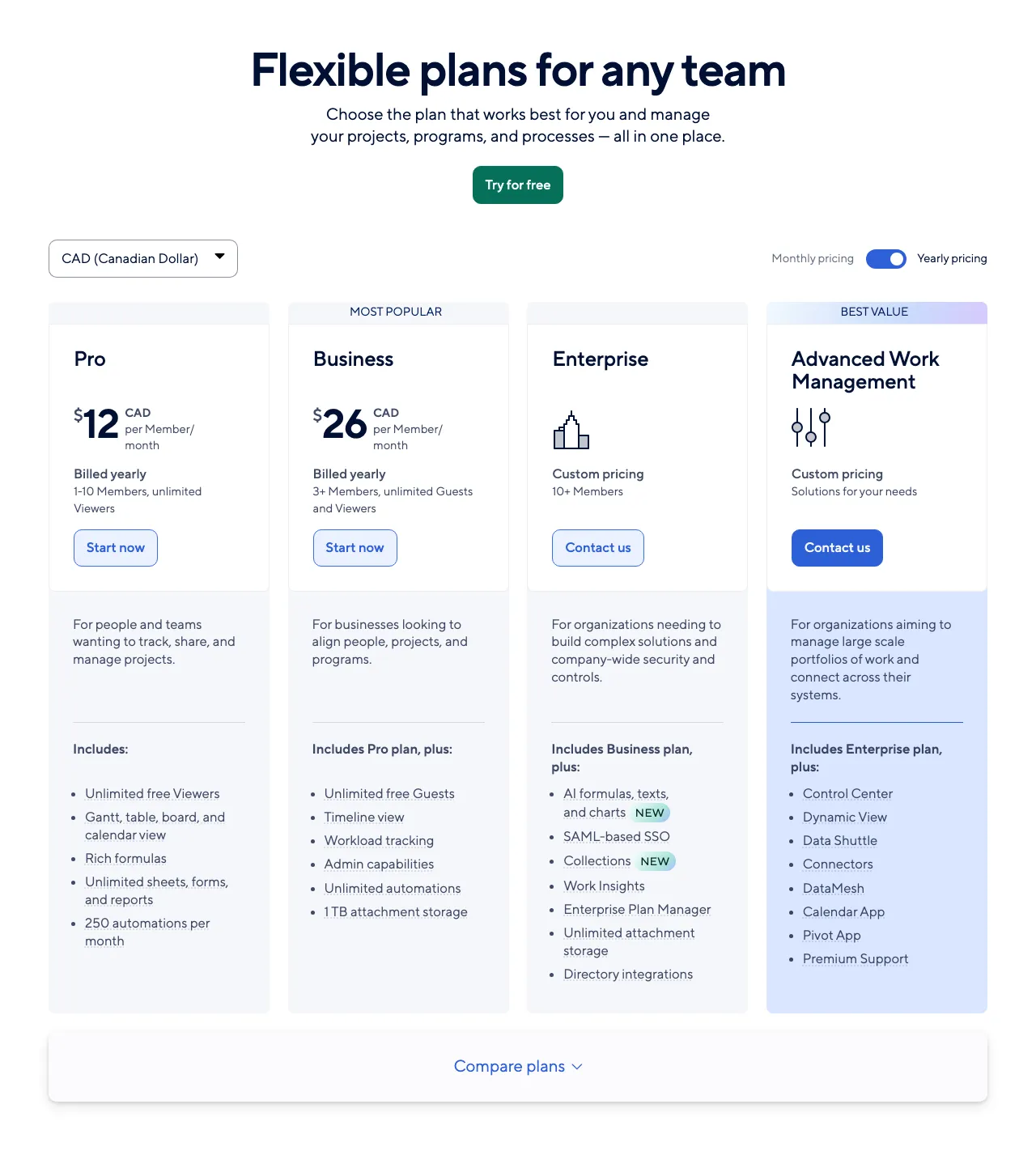 Smartsheet’s plan structure — View current pricing
Key Features
Smartsheet combines the familiar interface of a spreadsheet with the power of Gantt charts, board view, calendar, and table view across all paid plans. Unlimited sheets, forms, reports, and dashboards are included from Pro onward — there’s no artificial cap on project volume. The Business plan’s workload tracking is a standout feature for resource managers: you can see who is over- or under-allocated across all projects in a single view, which monday.com requires a higher-tier plan to replicate. The Enterprise plan’s AI formulas and text summaries reduce manual reporting overhead for large teams.
Limitations
Smartsheet has no free plan — only a free trial. Every team must pay from day one, which makes it a harder sell for teams that want to validate the tool before committing. The Pro plan’s 10-member cap and 20GB storage limit mean growing teams quickly outgrow it. Timeline view, unlimited automations, workload tracking, and guest access all require the Business plan at $19/member/month — features that competitors like Asana include at a lower price point.
Best For
Smartsheet is the clearest choice for organizations of 50+ people managing complex, multi-team projects who want enterprise-grade resource management without enterprise-tier pricing. It’s also the right call for any organization that has tried to force Excel or Google Sheets into a project management role and needs a tool that feels familiar while adding real PM structure.
Is Notion a Viable monday.com Alternative for Knowledge-Work Teams?
Notion is a strong monday.com alternative for knowledge-work teams — startups, content teams, and product teams — who want docs and project tracking in a single workspace. The Plus plan at $10/member/month (billed annually) includes unlimited blocks and database views (Kanban, calendar, table, and gallery), along with Notion Calendar and Notion Mail integrations across all plans. It is not a replacement for teams that need resource management or complex scheduling.
Pricing
According to Notion’s pricing page, the four plans are:
- Free: $0/member/month — unlimited pages and blocks for individuals, limited collaborative blocks for 2+ members, 5MB file upload limit
- Plus: $10/member/month — unlimited blocks for teams, unlimited file uploads, 30-day page history
- Business: $20/member/month — Notion AI Agent, private teamspaces, SAML SSO, AI Meeting Notes, Enterprise Search
- Enterprise: Custom pricing — advanced security, audit log, custom contracts
Key Features
Notion’s key differentiator is its unified workspace. Docs, wikis, project databases, and task boards all live in one tool — eliminating the tab-switching between a project management app and a document editor that most monday.com teams experience. The Notion AI Agent (Business plan and above) can complete multi-step tasks using context from across your Notion workspace and connected apps like Slack and GitHub, which is genuinely useful for teams that do a lot of async knowledge work. Notion Calendar and Notion Mail integrations are included across all plans, giving teams a lightweight coordination layer without additional tools.
For product and content teams, Notion’s granular database permissions (Business plan) allow collaborating on specific rows without granting full database access — a real advantage for external contributors or client-facing workspaces. If you’re currently using monday.com primarily as a content calendar or product roadmap tool, Notion Plus at $10/member/month handles both use cases more elegantly. For more on how Notion compares to other knowledge tools, see our Notion alternatives guide.
Limitations
Notion’s free tier collaborative block limit is its most significant gotcha. Individual use is genuinely unlimited, but teams with 2+ members hit a collaboration wall on the free plan and must upgrade to Plus at $10/member/month. File uploads are capped at 5MB per file on Free — useless for teams handling design assets, presentations, or any media files. SAML SSO, private teamspaces, and domain verification all require the Business plan at $20/member/month, which is a significant security and access control gap for teams in regulated industries or larger organizations.
Notion also lacks dedicated project management features like Gantt charts and resource management — database views give you Kanban and calendar, but not the scheduling depth that PM-heavy teams need.
Best For
Notion is the right monday.com alternative for startups, product teams, and content operations of 4–15 people who spend as much time writing and documenting as they do managing tasks. If monday.com feels like overkill for your project complexity but you want something more structured than a shared Google Doc folder, Notion Plus at $10/member/month is the right balance.
Which monday.com Alternative Should You Use Based on Team Size?
Few competitor roundups address team-size-specific fit directly — every tool tends to claim it works for everyone. Based on verified pricing and feature sets across all plans, these are the definitive picks for each team-size segment.
Here are the direct recommendations for each team-size segment:
Solo and Teams of 1–3
Trello Free is the right starting point for solo operators and micro-teams. Up to 10 collaborators, unlimited cards, and 200+ Power-Up integrations at zero cost. If you outgrow the 10-board limit or need Timeline view, upgrade to Trello Premium at $10/user/month rather than switching tools. The only reason to skip Trello at this size is if your workflow requires database-driven project tracking — in which case Notion Free (unlimited pages for individuals) is the better foundation.
Teams of 4–15 (Small Teams)
Asana Starter at $10.99/user/month is the definitive choice. It includes Gantt charts, unlimited automations, custom fields, and 100+ integrations — everything a structured small team needs without ClickUp’s configuration overhead. The 2-user limit on Asana’s Personal plan means free isn’t viable here, but the Starter plan is a straightforward, predictable cost. For teams that want to stay free longer, ClickUp Free Forever handles unlimited members with real PM capabilities, though the 60MB storage cap becomes painful quickly. See our full comparison of project management tools for small teams for more depth on this segment.
Teams of 16–50 (Mid-Size Teams)
ClickUp Business at $12/user/month is the right call for mid-size teams. The step up from Unlimited ($7/user/month) adds advanced reporting, custom exporting, and 5,000 automations/month — enough automation capacity for teams running complex multi-step workflows. At $12/user/month versus monday.com’s Standard plan pricing, ClickUp Business typically represents meaningful savings for teams in this range while delivering more native features.
Teams of 50+ (Enterprise and Scaling)
Smartsheet Business at $19/member/month is the strongest enterprise-grade monday.com alternative. Unlimited automations, workload tracking, and resource management are included at the Business tier — no enterprise sales call required to unlock core PM features. The spreadsheet-style interface reduces the change management burden for large organizations migrating from Excel-based project tracking. For organizations with complex security requirements, Smartsheet Enterprise (custom pricing) adds AI formulas, enterprise-grade security controls, and advanced admin capabilities. For teams managing distributed remote workforces, also see our guide to project management tools for remote teams.
What Does Switching from monday.com Actually Cost You?
Migrating from monday.com requires understanding what your data export covers — and where manual reconstruction begins. Here’s what the fact sheets and official vendor documentation confirm about the migration process.
What transfers via CSV/Excel export:
- Board and task data — importable into Asana, ClickUp, Smartsheet, and Notion via CSV import
- Text, number, date, and status column data — basic data types map cleanly across platforms
- File attachments — downloadable from monday.com and re-uploadable to your new tool
What requires manual rebuilding:
- Automations — monday.com automation recipes have no cross-platform export format; they must be rebuilt manually in the destination tool
- Custom column types — advanced column types (formula columns, dependency columns, mirror columns) don’t map 1:1 to alternatives and require remapping
- Integrations — third-party integrations and API connections must be reconfigured in the new platform
- Dashboard widgets — monday.com dashboards are proprietary; all reporting views must be rebuilt from scratch
Migration complexity by destination:
- ClickUp — accepts CSV import on the Free Forever plan; all plan tiers support data import
- Smartsheet — accepts CSV/Excel import; familiar spreadsheet structure reduces remapping effort for Excel-origin data
- Asana — CSV import wizard handles basic board-to-project conversion; automations require full manual rebuild
- Notion — CSV import supported but requires the most manual restructuring; not a 1:1 task management import
The most realistic migration friction point for any team is automation rebuilding — this is true regardless of which alternative you choose. Teams with complex automation workflows should test their highest-priority automations in the new tool during the free trial period before committing.
How Do the Limitations of Each Alternative Compare?
Honest limitation comparisons are rare in project management roundups. Here is a symmetrical view of where each monday.com alternative falls short in practice — so you can match the limitation that matters least to your workflow against the tool that’s otherwise the best fit:
| Tool | Key Limitation | Impact | Practical Workaround |
|---|---|---|---|
| ClickUp | Free plan: 60MB storage only | High for file-heavy teams | Upgrade to Unlimited ($7/user/mo) or integrate with Google Drive |
| Asana | Free Personal plan: 2 users max | High — forces paid upgrade for any real team | Start on Starter ($10.99/user/mo); no free workaround for teams |
| Trello | Calendar/Timeline/Dashboard views require Premium ($10/user/mo) | Medium — view-locked on Standard | Use Power-Up integrations for limited calendar visibility |
| Smartsheet | No free plan — paid from day one | High for budget-constrained teams | Use free trial period strategically before committing |
| Airtable | Business plan ($45/user/mo) requires contacting sales | Medium — self-serve blocked at Business tier | Team plan ($20/user/mo) is self-serve; contact sales only for Business+ |
| Notion | Collaborative blocks capped on Free; SAML SSO requires Business ($20/member/mo) | High for security-conscious teams | Upgrade to Plus ($10/member/mo) for team collaboration; Business for SSO |
| Basecamp | No Gantt charts, time tracking, or resource management | High for PM-heavy workflows | Not a workaround — switch tools if these are core requirements |
FAQ
What is the cheapest monday.com alternative?
Trello’s Standard plan at $5/user/month (billed annually) is the cheapest paid monday.com alternative. For free options, ClickUp’s Free Forever plan is the most capable — it includes unlimited tasks, unlimited free plan members, Kanban boards, and collaborative Docs at no cost, though storage is capped at 60MB.
Which monday.com alternative is best for small teams?
Asana is the best monday.com alternative for small teams of 4–15. The Starter plan at $10.99/user/month includes Timeline and Gantt views, a workflow builder with unlimited automations, and 100+ integrations. It balances power and simplicity better than ClickUp for teams in this size range.
Is ClickUp really free?
ClickUp’s Free Forever plan is genuinely free with no time limit. It includes unlimited tasks, unlimited free plan members, Kanban boards, sprint management, calendar view, collaborative Docs, and 24/7 support. The main restrictions are 60MB storage and only 1 Form, which limits it for teams handling file-heavy projects or requiring multiple intake forms.
What is the best monday.com alternative for enterprise teams over 50 people?
Smartsheet is the best monday.com alternative for enterprise teams of 50+. Its Business plan at $19/member/month includes unlimited automations, workload tracking, and resource management. The Enterprise plan adds AI formulas and enterprise-grade security. Smartsheet’s spreadsheet-style interface also reduces onboarding resistance for teams already working in Excel or Google Sheets.
Can I migrate my monday.com data to another tool?
You can export monday.com boards as Excel/CSV files and import them into most alternatives. Asana, ClickUp, Smartsheet, and Notion all accept CSV imports. What doesn’t transfer cleanly: monday.com automations (must be rebuilt), custom column types beyond basic text and numbers (need remapping), and file attachments (must be re-uploaded manually).
Does Notion work as a project management tool?
Notion works as a project management tool for teams that want docs and tasks in one place, but it lacks dedicated PM features like resource management and complex scheduling. The Plus plan at $10/member/month includes database views (Kanban, calendar, table, gallery) and unlimited blocks. It’s best for knowledge-work teams and startups — not for teams running construction, operations, or engineering workflows. See our full Notion alternatives guide for options if Notion also falls short of your needs.
Pricing last checked from official vendor websites. Prices are subject to change — verify directly before purchasing.
For teams that primarily need project tracking alongside CRM workflows, it’s also worth reviewing how project management integrates with marketing tools — particularly if your team runs campaigns and task management in the same platform.