
Best Project Management Software for Small Teams in 2026: Verified Pricing & Honest Verdicts
For solo operators and teams of 1–3, Notion Free or Trello Free are the strongest no-cost options. For teams of 4–10, ClickUp Free Forever is the only plan with no user cap and full task management features. Teams of 11–25 should use ClickUp Unlimited at $7/user/month; teams of 26–50 need ClickUp Business at $12/user/month for workload management and 5,000 monthly automations. The key decision factor is team size combined with technical comfort — ClickUp rewards configuration effort; Trello and Notion do not require it.
ClickUp
The most complete project management platform at the lowest verified price point — $7/user/month unlocks unlimited integrations, native time tracking, Gantt charts, and automations on the Business plan.
Starting price: $7/user/mo (Unlimited plan, billed annually) | Free plan: Yes — unlimited users
How Do the Top Project Management Tools for Small Teams Actually Compare?
Here is how ClickUp, Asana, Trello, and Notion stack up across the dimensions that matter most to small teams — free plan quality, verified paid pricing, and specific use-case fit. The limitations column below reflects the most impactful constraint per tool; a full side-by-side limitations breakdown follows each tool’s section.
| Tool | Best For | Free Plan | Starting Paid Price | Key Limitation | Our Verdict |
|---|---|---|---|---|---|
| ClickUp | Teams of 4–25 needing full PM features | Yes — unlimited users | Unlimited: $7/user/mo (billed annually) | Steep onboarding curve; feature density overwhelms non-technical teams | ✅ Best Overall |
| Trello | Teams ≤10 wanting simple Kanban | Yes — up to 10 collaborators | Standard: $5/user/mo (billed annually) | 10-board cap on Free; advanced views locked behind Premium at $10/user/mo | ✅ Best Budget Pick |
| Asana | Teams of 3–25 needing structured workflows | Yes — 2 users only | Starter: $10.99/user/mo (billed annually) | Free plan capped at 2 users; any team of 3+ must pay from day one | ✅ Best for Workflow Automation |
| Notion | Teams wanting docs + tasks in one place | Yes — limited for 2+ members | Plus: $10/user/mo | Free collaborative blocks restricted for teams; $20/user/mo for SSO | ✅ Best All-in-One Workspace |
All pricing sourced from official vendor pages: ClickUp pricing, Asana pricing, Trello pricing.
Symmetrical limitations — every tool reviewed, two specific weaknesses each:
| Tool | Limitation 1 | Limitation 2 |
|---|---|---|
| ClickUp | Feature density creates steep onboarding — non-technical teams often abandon it before unlocking value | Free Forever plan caps storage at 60MB — teams sharing files will need Unlimited ($7/user/mo) immediately |
| Trello | Free plan limited to 10 boards and 10 collaborators — growing teams outgrow it fast | Timeline, Gantt, and Dashboard views require Premium at $10/user/mo — unavailable on the cheapest paid Standard plan |
| Asana | Free Personal plan hard-capped at 2 users — any team of 3+ must pay from day one | Goals tracking and portfolio management locked behind Advanced at $24.99/user/mo — nearly 2.5x the Starter price |
| Notion | Free plan collaborative blocks are restricted for teams with 2+ members — effectively a solo product at no cost | File uploads capped at 5MB on Free — unusable for teams sharing design files or documents; requires Plus at $10/user/mo |
Is ClickUp Worth It for a Small Team in 2026?
ClickUp is the best project management software for small teams of 4–25 people who need a full-featured platform and are willing to invest a few hours in setup. In our evaluation of plan-level features and verified pricing, the Free Forever plan is genuinely functional — not a stripped-down demo — and the $7/user/month Unlimited plan is one of the strongest value propositions in the category.
Pricing
According to ClickUp’s official pricing page, the four tiers are:
- Free Forever: $0 — unlimited users, unlimited tasks, Kanban boards, sprint management, collaborative docs, 60MB storage
- Unlimited: $7/user/month billed annually — unlimited storage, native time tracking, unlimited integrations, Gantt charts, timeline view, custom fields
- Business: $12/user/month billed annually — 5,000 automations/month, advanced reporting, workload management
- Enterprise: Custom pricing (contact sales)
For a team of 10, the Unlimited plan costs $70/month — less than most tools charge for half the features.
Key Features
ClickUp’s Unlimited plan gives small teams a complete toolkit without forcing an upgrade to Business. According to ClickUp’s pricing page, the features that matter most for day-to-day team management include:
- Multiple project views: Kanban board, Gantt chart, timeline, table, calendar, and list — switch between them on the same project without duplicating data
- Native time tracking: Log hours directly inside tasks without a third-party integration (available from Unlimited tier)
- Unlimited integrations with Slack, HubSpot, Google Drive, and 200+ other tools (Unlimited plan and above)
- Built-in AI writing tool for drafting task descriptions and project updates (available on paid plans)
- Sprint management available even on the Free Forever plan
For remote small teams, the combination of time tracking and Slack integration makes ClickUp a strong fit.
Limitations
ClickUp has two honest limitations that no other review in this category mentions clearly:
- Feature density creates a steep onboarding curve. Nested Spaces, custom views, and automation builders require deliberate configuration time. Teams without a dedicated admin or operations person often abandon ClickUp within the first two weeks before reaching its full value.
- The Free Forever plan’s 60MB storage cap is a real constraint. Teams sharing design files, PDFs, or any media will hit the limit quickly. Upgrading to Unlimited ($7/user/mo) resolves this entirely, but it is worth knowing before you migrate.
If you are a growing team using ClickUp alongside customer communication tools, our best CRM for small business guide covers how to connect project management to your sales pipeline.
If you’re a team of 4–25 managing recurring projects, sprints, or cross-functional work, ClickUp Unlimited at $7/user/month is the clearest choice at this price point.
Is Trello Right for a Small Team That Needs Something Simple?
Trello is the best project management tool for small teams of up to 10 people who want a simple, visual Kanban board with minimal setup time. The Free plan supports up to 10 collaborators and requires no onboarding — teams are productive within an hour of signup.
Pricing
From Trello’s official pricing page:
- Free: $0 — up to 10 collaborators, up to 10 boards per Workspace, unlimited cards, 250 automation runs/month
- Standard: $5/user/month billed annually ($6/month billed monthly) — unlimited boards, custom fields, advanced checklists, card mirroring
- Premium: $10/user/month billed annually ($12.50/month billed monthly) — Calendar, Timeline, Table, Dashboard, and Map views; AI features; admin controls
- Enterprise: $17.50/user/month billed annually
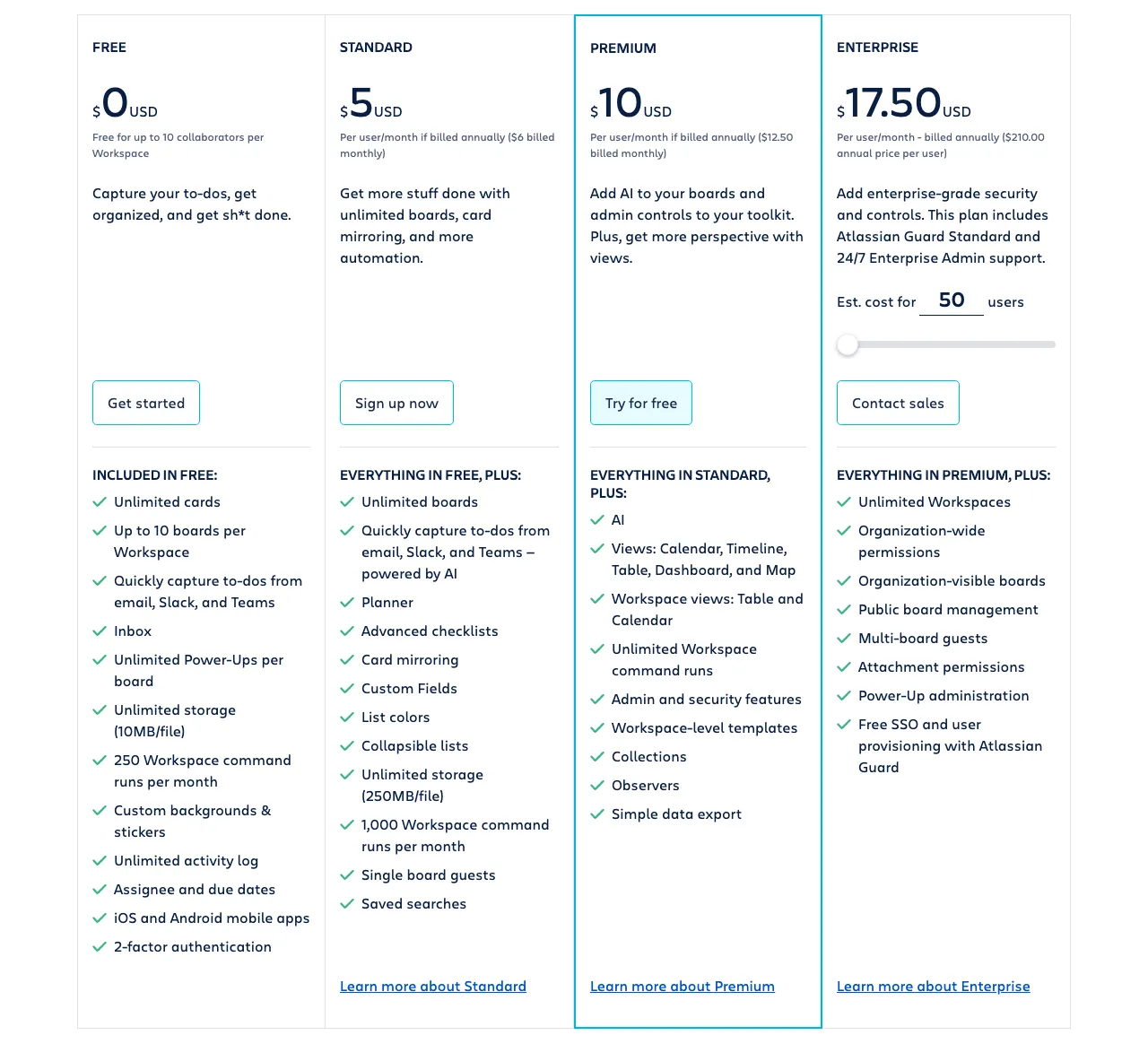 Trello’s current pricing tiers — View current pricing
Key Features
Trello’s strength is its simplicity. The card-and-board interface maps naturally to how small teams already think about work — columns represent stages, cards represent tasks, and drag-and-drop movement is instant. According to Trello’s pricing page, key capabilities include:
- Kanban-first interface with collapsible lists and easy card creation — the most intuitive board experience in the category
- Unlimited Power-Ups on all plans (200+ app integrations including Slack, Google Drive, and Salesforce)
- Built-in no-code automation (Butler) for rules, custom buttons, and email reports — available on all plans, including Free
- Card mirroring on Standard and above: mirror one card across multiple boards for cross-team visibility
- Advanced views (Calendar, Timeline, Table, Dashboard, Map) on Premium and above; AI features also require Premium
Teams that outgrow Trello’s board-centric approach often migrate to ClickUp or monday.com. If you’re considering that transition, our monday.com alternatives guide covers what to expect.
Limitations
Trello’s two most impactful limitations for small teams:
- The Free plan’s 10-board cap becomes a constraint faster than most teams expect. A team running 3+ active projects simultaneously — each with separate boards for planning, execution, and backlog — hits the limit within weeks. The Standard plan at $5/user/month removes this cap entirely.
- Timeline, Gantt, and Dashboard views require the Premium plan at $10/user/month. Teams that need deadline visibility across multiple projects will find the Free and Standard plans significantly limited. At $10/user/month, Premium is competitively priced — but it doubles the cost of Standard.
If you’re a team of up to 10 managing Kanban-style work without complex dependencies or Gantt requirements, Trello Standard at $5/user/month is the clearest choice at this price point.
Is Asana the Best Project Management Software for Structured Workflows?
Asana is the best project management tool for teams of 3–25 who need structured, automated workflows and are ready to invest in a paid plan. The Personal (free) plan supports up to 2 users — making it viable for solo operators and two-person partnerships, but not for any team of 3 or more. The Starter plan at $10.99/user/month is where Asana becomes a fully capable platform for small teams.
Pricing
From Asana’s official pricing page:
- Personal: $0 — up to 2 users only, list/board/calendar views, unlimited tasks and projects, 100MB file uploads
- Starter: $10.99/user/month billed annually — timeline/Gantt view, workflow automation, custom fields, project dashboards, unlimited free guests
- Advanced: $24.99/user/month billed annually — Goals tracking, portfolio management, advanced reporting
- Enterprise: Custom pricing (contact sales)
Key Features
Asana’s Starter plan workflow builder is the standout feature for small teams managing repeatable processes. According to Asana’s pricing page, specific capabilities available from Starter include:
- No-code workflow builder for automating routine task assignments, status updates, and notifications — no developer required (Starter and above)
- Timeline/Gantt view for visualizing project dependencies and deadlines across multiple tasks
- Universal reporting pulling data from all projects into a single dashboard
- Unlimited free guests on Starter and above — external collaborators (clients, contractors) can view and comment without consuming a paid seat
- Asana AI for drafting task descriptions and status updates (Starter and above)
Asana integrates well with communication tools — if your team is evaluating Slack alternatives, Asana connects natively with most options in that category.
Limitations
Asana has two significant limitations that are consistently underreported:
- The free Personal plan is limited to exactly 2 users, making it functional only for solo operators and two-person partnerships. Unlike ClickUp’s Free Forever (unlimited users) or Trello’s Free (up to 10), Asana requires a paid plan the moment you add a third team member.
- Goals tracking and portfolio management — features teams often assume are standard — are locked behind the Advanced plan at $24.99/user/month. For a 10-person team, that is $250/month versus $110/month on Starter. Teams with strategic planning needs should budget for Advanced or choose a platform where these features are more accessible.
If you’re a team of 3–25 managing client projects or repeatable workflows with external collaborators, Asana Starter at $10.99/user/month is the clearest choice at this price point.
Is Notion a Viable Project Management Tool for Small Teams?
Notion is the best option for small teams that need documentation, wikis, and project tracking in a single workspace rather than a dedicated project management tool. It is not a pure PM platform — but for teams whose work is knowledge-heavy, it eliminates the need for a separate wiki or documentation tool.
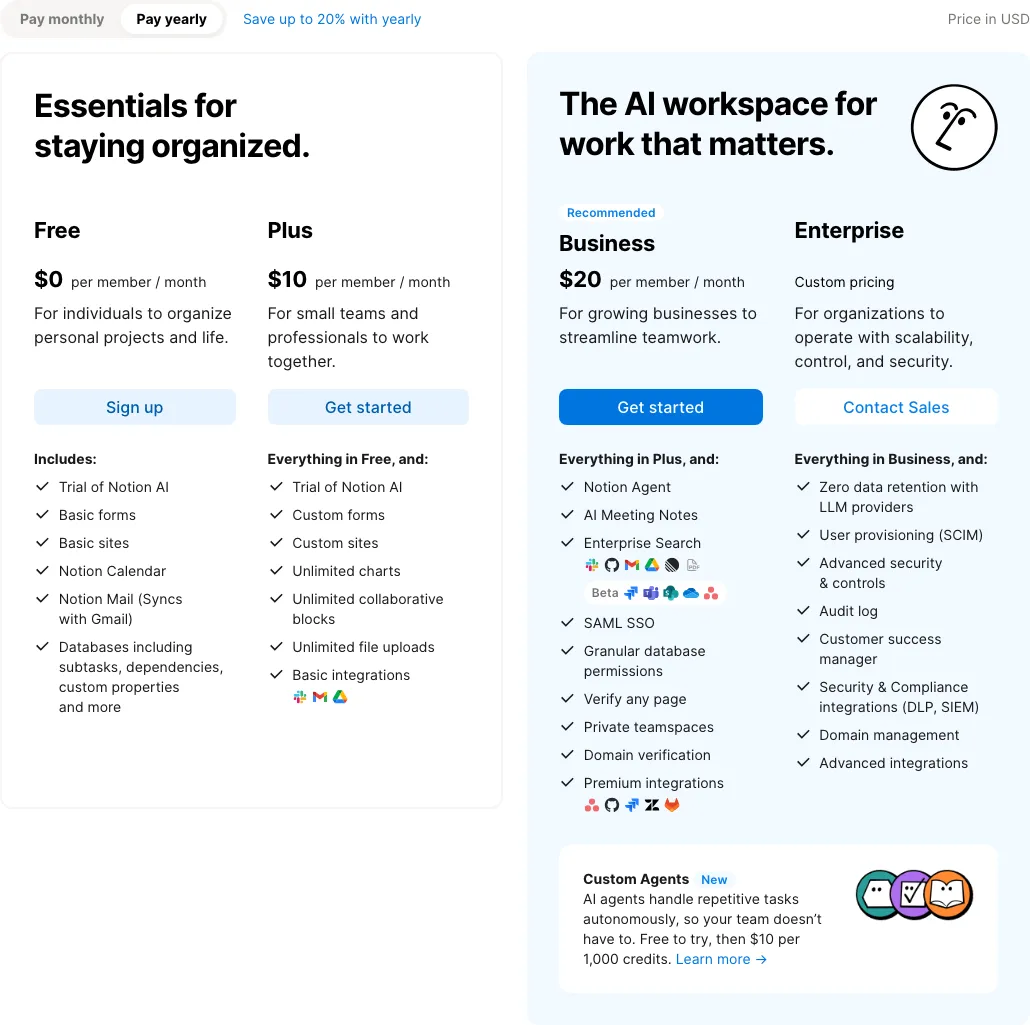 Notion’s current plan structure — View current pricing
Pricing
According to Notion’s official pricing page:
- Free: $0 — unlimited pages and blocks for individuals; limited collaborative blocks for teams with 2+ members; 5MB file upload limit
- Plus: $10/user/month — unlimited blocks for teams, unlimited file uploads, advanced databases with subtasks and dependencies, unlimited charts
- Business: $20/user/month — Notion AI Agent, SAML SSO, private teamspaces, GitHub and Asana integrations
- Enterprise: Custom pricing
Key Features
Notion’s core advantage is its flexibility. Unlike ClickUp, Asana, or Trello — which are task-management tools that added documents — Notion started as a document platform and added project management. For teams where writing, research, and knowledge sharing are central to how work happens, this architecture is a genuine advantage:
- All-in-one workspace combining docs, wikis, databases, and project views in one platform
- Databases with multiple views — Kanban, table, calendar, timeline, and gallery — with custom properties and filters (Plus and above)
- Unlimited charts (donut, bar, line) for visualizing database data (Plus and above)
- Notion Calendar and Notion Mail integrations available across all plans
- Notion AI Agent on Business: completes multi-step tasks using context from your workspace and connected apps
Teams replacing Notion for project management often discover they still need its documentation features. Our Notion alternatives for project management guide covers what you gain and lose when switching.
Limitations
Notion’s two most impactful limitations for small teams:
- The Free plan’s collaborative block limits make it effectively solo-only for real team use. The unlimited blocks that make Notion powerful are restricted for workspaces with 2+ members on the Free plan. A team of 3 will hit this limit within days.
- File uploads on the Free plan are capped at 5MB per file. Teams sharing design assets, presentations, or video files cannot use the Free tier in any meaningful way. The Plus plan at $10/user/month removes this limit entirely.
If you’re a team of 4–15 doing knowledge-intensive work — consulting, content, research, or product development — where documentation and project tracking are equally important, Notion Plus at $10/user/month is the clearest choice at this price point.
Which Free Plan Is Actually Usable for a Small Team?
No competitor article addresses this directly. Based on our review of each tool’s verified free tier features — drawn from ClickUp’s pricing page, Trello’s pricing page, Asana’s pricing page, and Notion’s pricing page — here is an honest free-tier viability verdict:
- ClickUp Free Forever — Genuinely usable for teams of 3–15. Unlimited users, unlimited tasks, Kanban boards, sprint management, and collaborative docs are all available. The 60MB storage cap is the only meaningful constraint, and it only becomes a problem if your team shares large files through the platform. For task management, communication, and sprint planning, ClickUp Free is the strongest no-cost option in this category.
- Trello Free — Usable for teams up to 10, with caveats. The 10-board and 10-collaborator limits are real, but for a team of under 10 managing fewer than 10 active projects, Trello Free is fully functional. The moment you need Timeline or Gantt views, you must upgrade to Premium at $10/user/month.
- Asana Personal — Viable only for solo users and 2-person partnerships; not viable for teams of 3+. The 2-user cap makes this plan irrelevant for any team of three or more. Partnerships and solo operators get a capable free tier with list, board, and calendar views, unlimited tasks, and 100MB file uploads — but any team of 3+ should plan to pay from day one at $10.99/user/month on Starter.
- Notion Free — Not viable for collaborative team use. Collaborative block limits activate the moment a second member joins. For individuals building a personal knowledge base, the Free plan is excellent. For teams, it functions as a trial at best.
Bottom line: If your team cannot spend on a paid plan right now, ClickUp Free Forever is the only option with no meaningful user cap and enough features to be genuinely productive. Trello Free is a strong second for teams of up to 10.
What Is the Best Project Management Tool by Team Size?
Every other article covering this topic gives generic “great for small teams” verdicts. Based on verified pricing and feature availability across tiers sourced from official vendor pages, here are definitive recommendations by specific team size segment.
Solo / 1–3 People
Best pick: Notion Free or Trello Free.
A solo operator can use Notion’s Free plan without hitting the collaborative block limits. A 2-person partnership has two strong options: Asana Personal (free, includes list/board/calendar views and unlimited tasks), Notion Free, or Trello Free (supports up to 10 collaborators). Trello Free is simpler to set up for 2-person teams that need a shared board. ClickUp Free is also excellent at this size but may be more than a tiny team needs.
4–10 People
Best pick: ClickUp Free Forever, or ClickUp Unlimited at $7/user/month.
At 4–10 people, ClickUp’s Free Forever plan handles the full team without user-cap issues. If the team shares files frequently or needs time tracking, upgrading to Unlimited at $7/user/month ($28–$70/month total) is a straightforward decision. Trello Free is viable up to 10 people, but the 10-board cap becomes tight as the team runs multiple concurrent projects.
11–25 People
Best pick: ClickUp Unlimited at $7/user/month.
At this size, the free plans of Trello and Notion start showing structural limits. ClickUp Unlimited scales cleanly: $7/user/month for 11–25 people costs $77–$175/month and includes everything a growing team needs — time tracking, Gantt charts, and unlimited integrations. Asana Starter at $10.99/user/month is the strongest alternative if structured workflow automation is the priority.
26–50 People
Best pick: ClickUp Business at $12/user/month.
Teams of 26–50 people need workload management, advanced reporting, and high automation volume — all of which are locked behind ClickUp Business, which includes 5,000 automations/month according to ClickUp’s pricing page. At $12/user/month, the total cost for a 30-person team is $360/month. Asana Advanced at $24.99/user/month becomes expensive at this scale ($750/month for 30 people) and is only worth it if portfolio management and Goals tracking are business-critical.
Switching to a New Project Management Tool: What Does It Actually Cost?
If your team is migrating from spreadsheets, email threads, or another PM tool, the real switching cost is rarely the subscription fee. Here is what to expect across the dimensions that matter most.
Data migration: ClickUp supports CSV import from most tools and has direct migration wizards for Asana and Trello, according to ClickUp’s documented import features. Asana offers CSV import and API access on all paid plans. Both ClickUp and Asana allow full data export, which matters if you decide to switch again later. Notion accepts Markdown, HTML, and CSV imports for its database content.
Configuration complexity varies significantly by tool. Trello requires the least configuration — teams can create boards and start adding cards immediately. Notion requires teams to establish their database structure and page conventions before work can flow naturally. Asana’s workflow builder takes time to configure correctly for teams migrating from less structured systems. ClickUp has the steepest configuration requirement — Spaces, views, and automation rules all need deliberate setup, and teams without a dedicated admin often underestimate this investment.
Billing flexibility is worth checking directly with each vendor before committing, as billing terms and cancellation policies may change. All four tools offer annual billing at a lower per-seat rate than monthly billing — ClickUp Unlimited billed annually is $7/user/month, for example. If you are uncertain about fit, starting on a monthly billing cycle and switching to annual once the team adopts the tool is the lower-risk path.
If your team is also evaluating time tracking alongside project management, our best time tracking software for remote teams guide covers how these tools integrate with dedicated time-tracking platforms.
What Are the Most Common Questions About Project Management Software for Small Teams?
The questions below address the most common decision points for teams choosing between ClickUp, Trello, Asana, and Notion — from free plan viability to switching from spreadsheets.
What is the best free project management software for a team of 5?
ClickUp’s Free Forever plan is the best free option for a team of 5. It supports unlimited users, unlimited tasks, and includes Kanban boards, sprint management, and collaborative docs at no cost. The only real constraints are 60MB storage and limited guest permissions — both acceptable for a small team just starting out. Trello Free is the strongest alternative if simplicity is the priority, but its 10-board cap can become limiting within a few months.
Is Asana free for small teams?
Asana’s Personal plan is free, but it is strictly limited to 2 users — making it essentially unusable for teams of 3 or more. Solo operators and two-person partnerships get a capable free tier with unlimited tasks, list/board/calendar views, and 100MB file uploads. Teams of 3+ need the Starter plan at $10.99 per user per month billed annually, which unlocks timeline views, workflow automation, and custom fields.
What is the cheapest paid project management tool for a small team?
Trello Standard is the cheapest paid option at $5 per user per month billed annually. It unlocks unlimited boards, custom fields, and card mirroring. For teams that work primarily with Kanban-style boards and do not need Gantt charts or advanced automation, Trello Standard delivers strong value at the lowest price point. The next cheapest option is ClickUp Unlimited at $7/user/month, which offers significantly more features for $2 more per seat.
Which project management tool is best for a team switching from spreadsheets?
Trello is the easiest transition from spreadsheets for teams using Kanban-style tracking. Its card-and-board interface maps directly to column-based spreadsheet thinking, and the Free plan supports up to 10 collaborators with no setup required. Teams that need more structure — like Gantt charts or automated workflows — should start with Asana Starter instead, which offers a guided setup experience designed for teams migrating from less structured systems.
Is ClickUp good for non-technical small teams?
ClickUp is powerful but has a steep onboarding curve for non-technical teams. Its feature density — multiple views, nested Spaces, custom automations — can overwhelm teams without a dedicated admin to configure it. Non-technical teams of under 10 people are often better served starting with Trello or Notion before graduating to ClickUp as their needs grow. If you do choose ClickUp, using a pre-built template from ClickUp’s template library significantly reduces setup time.
What project management tool works best for remote small teams?
ClickUp’s Unlimited plan at $7 per user per month is the strongest option for remote small teams, offering time tracking, unlimited integrations with tools like Slack and Google Drive, and multiple project views including Gantt and timeline. Notion is a strong alternative for remote teams that prioritize documentation and wikis alongside task management.
Pricing last checked from official vendor websites. Prices are subject to change — verify directly before purchasing.