
Quick Answer
Top Pick
HubSpot is the right default for teams that need a shared CRM and sales pipeline — its free tier is genuinely functional with no time limit. ActiveCampaign wins for teams whose primary growth lever is email automation, with its Plus plan delivering 45+ triggers, unlimited actions, and full conditional branching logic at $95/month. The key decision factor: if your bottleneck is sales pipeline visibility, choose HubSpot; if it’s automated email nurturing, choose ActiveCampaign.
ActiveCampaign
The deepest email automation logic below a high-tier enterprise spend — 45+ triggers, 50+ actions, and 950+ pre-built automation recipes at verified, transparent pricing.
Starting price: $19/month (1,000 contacts, billed annually) | Free trial: 14 days, no credit card required
No credit card required — 14-day free trial
Most HubSpot vs ActiveCampaign articles were written for everyone, which makes them useful for no one. Every top-ranking piece on this topic either skips exact pricing, ignores real limitations, or lands on “it depends” without telling you what it depends on. In our evaluation of both platforms, we prioritized verified pricing from official sources, documented feature limitations, and direct verdicts by team size — no hedging.
Here’s how HubSpot and ActiveCampaign compare across the categories that determine the right fit for teams of 1 to 50+:
How Do HubSpot and ActiveCampaign Compare at a Glance?
| Category | HubSpot | ActiveCampaign | Verdict |
|---|---|---|---|
| Starting Price | Free CRM (paid Hubs for advanced features) | $19/month — Starter, 1,000 contacts, billed annually (source) | ActiveCampaign (transparent pricing) |
| Best For | Sales-led teams needing a unified CRM | Marketing-led teams running email automation | Depends on growth motion |
| Free Tier | Yes — no time limit, basic CRM features | No — 14-day free trial only | HubSpot |
| Email Automation Depth | Basic at entry level; advanced requires higher-tier Hubs | Starter: basic automation, 5-action limit per workflow. Full depth (45+ triggers, 50+ actions, unlimited branching) requires Plus at $95/mo | ActiveCampaign Plus |
| CRM Quality | Full-featured, native, included in free tier | Functional but secondary; Pipelines are a paid add-on | HubSpot |
| Reporting | Visual dashboards; custom reporting in higher Hubs | Strong email analytics; weaker revenue attribution | HubSpot (broader) |
| Integrations | Larger native integration marketplace | 950+ automation recipes, Zapier, native integrations | HubSpot (by breadth) |
| Ease of Setup | Guided onboarding, under 2 hours to first pipeline | Free migration + in-person classes included; steeper automation learning curve | HubSpot |
| Pricing Transparency | Paid Hub pricing not specified on standard pages | Exact plan tiers publicly listed | ActiveCampaign |
Is ActiveCampaign Worth It for Email Automation?
ActiveCampaign is the strongest email automation platform in its price tier. No competitor in the $19–$149/month range offers the same combination of trigger depth, branching logic, and pre-built recipes. For teams where the primary growth motion is email nurturing, this is the clearest choice at this price point.
Pricing
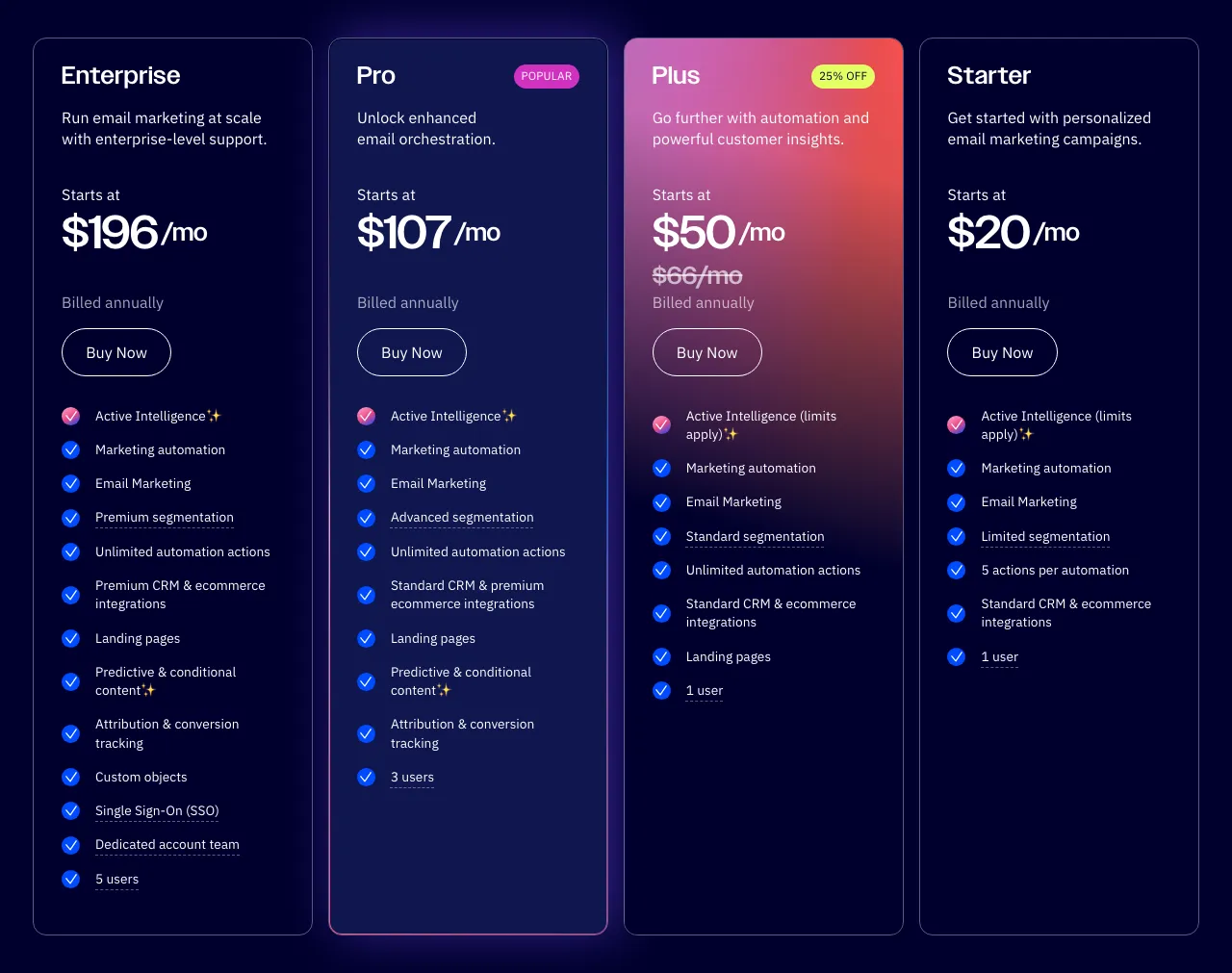 ActiveCampaign pricing — View current pricing
According to ActiveCampaign’s pricing page, the verified plan tiers (billed annually) are:
- Starter: $19/month — 1,000 contacts, basic automation, 1 user seat, 5 actions per automation
- Plus: $95/month — 2,500 contacts, unlimited automation actions, CRM Pipelines, landing pages, 3 users
- Pro: $149/month — 2,500 contacts, predictive sending, site messaging, 5 users
- Enterprise: $255/month — 2,500 contacts, custom reporting, dedicated support, unlimited users
One pricing reality to flag: all tiers scale by contact count. At 2,500 contacts, the Starter plan costs $39/month. Factor this into your projection if your list is growing.
Key Features
ActiveCampaign is built around its AI-native platform (“Active Intelligence”), which includes an AI automation builder, AI campaign builder, AI-suggested segments, and predictive sending. The full automation engine — supporting 45+ triggers and 50+ actions with unlimited branching logic — is available from the Plus plan at $95/month. That depth enables sequences that respond to site visits, email interactions, CRM deal stages, and purchase history simultaneously. The Starter plan at $19/month provides basic automation with a cap of 5 actions per workflow — sufficient for simple follow-up sequences, but not behavioral nurture campaigns.
The 950+ pre-built automation recipes save meaningful setup time. Rather than building from scratch, teams can import a trial activation sequence, a post-purchase re-engagement flow, or an interest-based segmentation workflow and customize from there. ActiveCampaign also includes free data migration services and in-person classes in all packages — a real advantage over competitors that charge for onboarding.
Limitations
ActiveCampaign has real constraints worth naming directly:
- No permanent free tier. Only a 14-day free trial. Teams that need zero-cost entry cannot use ActiveCampaign the way they can use HubSpot’s free CRM.
- Starter plan is heavily restricted. The $19/month tier limits automations to 5 actions, gives you only 1 user seat, and restricts segmentation and AI access. Meaningful automation work requires Plus at $95/month.
- CRM and Sales Engagement are paid add-ons. Pipelines and lead scoring cost extra on top of the base plan price.
- Single email address per contact. ActiveCampaign cannot store multiple email addresses for the same contact, which creates friction for account-based workflows.
For teams that primarily need sales pipeline management rather than email automation, ActiveCampaign’s CRM gap shows up fast — its CRM is secondary to the email tooling, and the stronger CRM workflows are tier-gated rather than fully available at entry level.
If you’re running a 5–25 person marketing-led team where email sequences drive conversion, ActiveCampaign Plus is the clearest choice at this price point.
Start Your ActiveCampaign Trial
Free migration included — no credit card required for trial
Is HubSpot the Right CRM for Your Team?
HubSpot is the right default for teams that need a shared CRM and sales pipeline without paying anything to start. Its free CRM is genuinely functional — not a stripped-down teaser — and the modular Hub structure lets you add marketing, service, or content tooling as the team grows. The catch: many advanced features require paid Hubs, and pricing on those tiers requires visiting HubSpot’s pricing page directly.
Pricing
HubSpot’s pricing splits across modular “Hubs” — Marketing Hub, Sales Hub, Service Hub, Content Hub, and Data Hub. The free CRM is available at $0/month with no time limit and basic CRM features included. Exact paid Hub pricing is not listed on standard comparison pages — consult HubSpot’s official pricing page for current figures.
What is confirmed: bundle discounts require a 12-month commitment, which reduces flexibility for smaller teams still evaluating fit. Factor contract lock-in into total cost of ownership before signing a bundle deal.
Key Features
HubSpot’s primary strength is cross-team visibility through a unified data layer. Every customer interaction — email opens, deal stage changes, support tickets, form submissions — lives in a single contact record that every Hub reads from. For a 10-person team where one person manages sales and marketing, this consolidation has direct operational value.
The custom report builder covers revenue attribution, multi-touch reporting, and pipeline analytics in ways that ActiveCampaign’s reporting does not match at similar tiers. HubSpot also maintains a larger native integration marketplace than ActiveCampaign, including HTML and webhook triggers in automation flows. Breeze AI handles data enrichment, personalized outreach, and customer response automation. Forms, landing pages, ad management, and social media posting are native to the platform rather than add-ons. That said, teams with heavy social media workflows should evaluate dedicated social media management tools for small business — HubSpot’s native social posting covers the basics but lacks the scheduling depth and analytics of purpose-built platforms.
Limitations
HubSpot’s honest downsides are worth stating clearly:
- Most advanced features require paid Hubs. The free CRM is a real entry point, but teams that need marketing automation or advanced reporting hit paywalls quickly.
- Bundle discounts require a 12-month commitment. For teams still evaluating fit, this lock-in reduces flexibility versus month-to-month options.
- Pipeline count is capped by tier. Unlike ActiveCampaign, which offers unlimited pipelines at all tiers, HubSpot caps pipelines by plan — a real constraint for teams managing multiple sales motions.
- Onboarding, migration, and branding removal are paid add-ons. What ActiveCampaign includes free, HubSpot charges for separately.
For teams who need deep email automation at a predictable price, HubSpot’s paid tier structure creates friction — especially around reporting and personalization features that are gated behind Professional-tier pricing.
If you’re a sales-led team of any size that needs a shared CRM without paying upfront, HubSpot’s free tier is the clearest starting point available.
Where Do Both Tools Fall Short?
No competitor article puts both tools’ weaknesses in a structured, side-by-side format. Here is the honest breakdown based on official documentation and verified feature comparisons:
| Limitation | HubSpot | ActiveCampaign |
|---|---|---|
| Free tier depth | Free CRM has real utility, but most advanced features require paid Hubs | No free tier — only a 14-day free trial |
| Automation access | Conditional branching requires higher-tier paid Hubs | Starter plan caps automations at 5 actions; full branching depth requires Plus at $95/mo |
| CRM nativity | CRM is fully native and free | CRM Pipelines and Sales Engagement are paid add-ons |
| Pricing transparency | Paid Hub pricing not listed on standard pages | Exact plan tiers publicly listed; costs scale with contact count |
| Pipeline flexibility | Pipeline count capped by tier | Unlimited pipelines at all tiers |
| Onboarding cost | Onboarding, migration, and branding removal are paid add-ons | Free migration and in-person classes included in all packages |
| Contract flexibility | Bundle discounts require 12-month commitment | Annual billing required for listed prices |
| Multi-email per contact | Supported | Cannot add multiple email addresses for the same contact |
Both platforms have genuine weaknesses. The right choice is not “which tool is better” — it’s which tool’s limitations hurt your specific use case the least.
Which Platform Should You Choose by Team Size?
This is the section no competitor article provides. Generic “great for all businesses” framing is not useful. Here are direct verdicts by team size and growth motion.
Solo founder or freelancer (1 person)
Use HubSpot’s free CRM. There is no cost to start, no time limit, and no credit card required. You get contact management, deal pipelines, and basic email tracking. The best CRM for freelancers guide covers lighter-weight options if HubSpot’s feature set exceeds your current needs — but for most solo operators, the free tier delivers more than enough to manage a pipeline.
Small team (2–10 employees)
Use HubSpot if your team is sales-led; use ActiveCampaign if email is your primary growth channel. At 2–10 people, shared pipeline visibility is often the first thing that breaks without a proper CRM. HubSpot’s free tier solves this right away. Teams evaluating a broader range of CRM options for this team size should also see our best CRM for small business guide. If revenue comes primarily from email nurturing — SaaS trial activation, lead magnet follow-up, e-commerce re-engagement — ActiveCampaign’s Plus plan at $95/month delivers the automation depth and branching logic HubSpot cannot match at a comparable cost.
Growth-stage team (11–50 employees)
This is where the decision is most consequential. A growth-stage team with active sales and marketing functions often ends up constrained by either platform’s single-tool limits. The most cost-effective setup for this segment is HubSpot’s free CRM for pipeline management combined with ActiveCampaign Plus for email automation. This hybrid covers the core functions of a high-tier HubSpot paid subscription at a fraction of the monthly cost. Teams evaluating a broader set of platforms at this stage should review the Keap alternatives comparison before committing.
For teams where email sequences drive most trial conversions or revenue, and where one person is dedicated to marketing operations, ActiveCampaign Pro at $149/month — with predictive sending, site messaging, and 5 user seats — is the strongest standalone option.
Mid-market team (50+ employees)
HubSpot’s full Hub suite is the right default at this scale, assuming budget supports the paid tier structure. The cross-team visibility, custom reporting, Breeze AI enrichment, and enterprise integrations justify the cost when revenue operations, marketing, and customer success are all active functions. For teams where email automation remains the primary function even at 50+ employees, ActiveCampaign Enterprise at $255/month (2,500 contacts) offers custom reporting and dedicated support at a publicly listed price — a transparency advantage over HubSpot’s custom enterprise pricing.
Does ActiveCampaign’s Automation Engine Beat HubSpot’s?
Yes — ActiveCampaign’s automation engine is deeper than HubSpot’s at comparable price points. The Plus plan at $95/month supports 45+ triggers and 50+ actions with unlimited branching logic, enabling multi-step behavioral sequences that respond to site visits, email interactions, CRM deal stages, and purchase history simultaneously. HubSpot requires a higher-tier paid Hub to replicate this logic. The Starter plan at $19/month provides basic automation with a 5-action cap — useful for simple sequences, not behavioral campaigns.
To make this concrete, here are three automation workflows available on ActiveCampaign Plus that have no equivalent at a comparable HubSpot tier — based on ActiveCampaign’s publicly documented automation capabilities:
-
Trial activation with setup check: Contact starts a free trial → Day 2, check if setup is complete → Branch: if complete, send advanced feature walkthrough; if not, send setup help email → Day 5, check for pricing page visits → if 2+ visits, assign deal to sales rep.
-
Behavioral intent trigger: Contact visits pricing page twice → Tag as “high-intent” → Create deal in CRM pipeline → Send personalized outreach from the assigned rep’s connected email address (not a generic marketing send).
-
Interest-based segmentation: Contact clicks any link about Feature A → Tag as “interested: Feature A” → Remove from generic nurture sequence → Add to a targeted 3-email Feature A sequence.
All three workflows are available on ActiveCampaign Plus at $95/month.
HubSpot’s entry-level automation is functional for simple follow-up sequences — send email 1, wait 3 days, send email 2, stop if the contact replies. For a sales team managing outbound follow-up, this is enough. For a marketing team running behavioral nurture campaigns, it is not.
What Does It Actually Cost to Switch Between HubSpot and ActiveCampaign?
Switching costs between HubSpot and ActiveCampaign are real but manageable — the main variables are data migration complexity, learning curve, and contract lock-in. Understanding these three factors before you commit saves significant friction later.
Data migration:
- Switching to ActiveCampaign: Free migration services are included in all ActiveCampaign packages. Contact lists, tags, and basic automation logic can be moved with support from the onboarding team.
- Switching to HubSpot: CSV import is supported on the free tier; more complex migration from a CRM or marketing automation platform is a paid onboarding service.
Learning curve:
- ActiveCampaign’s automation builder has a steeper learning curve. New users typically need 2–4 hours before building their first working automated sequence with confidence. The in-person classes included in all packages help offset this.
- HubSpot’s CRM and pipeline setup is faster — most teams have a working contact pipeline within 2 hours of first login. The onboarding experience is more structured for non-technical users.
Contract lock-in:
- ActiveCampaign prices at annual billing rates on all listed tiers.
- HubSpot bundle discounts require a 12-month commitment. If you commit to a paid Hub bundle and decide to switch, you may be locked into the contract term. Review the scope carefully before signing.
For teams on HubSpot’s free CRM who want to add ActiveCampaign for email automation, the switching cost is minimal — the platforms integrate natively, and you’re adding a tool rather than replacing one. For teams replacing one platform entirely, migration and contract terms are the primary risk factors.
FAQ
Is ActiveCampaign better than HubSpot?
For email automation, ActiveCampaign Plus is the stronger platform — its builder offers 45+ triggers, 50+ actions, and unlimited branching logic at $95/month. The Starter tier at $19/month provides basic automations with a 5-action limit per workflow. For CRM and sales pipeline management, HubSpot is better. The right choice depends on whether your team’s primary bottleneck is email nurturing or sales pipeline visibility. For further research, G2’s comparison page and Capterra’s side-by-side are useful starting points for user reviews.
Can ActiveCampaign replace HubSpot CRM?
Not without trade-offs. ActiveCampaign includes deal pipelines and contact records, but its CRM is secondary to the email tooling. Teams that need collaborative sales pipeline management with shared contact timelines, activity logging, and intuitive deal stages will find HubSpot’s CRM more complete.
Is HubSpot too expensive for small businesses?
HubSpot’s free CRM is genuinely free — no time limit, no credit card. The pricing challenge for small businesses comes when they outgrow the free tier. Many advanced features require paid Hubs, and bundle discounts require a 12-month commitment that limits flexibility. For small teams that primarily need email automation rather than a full CRM suite, ActiveCampaign starts at $19/month and delivers more automation depth per dollar than HubSpot’s entry-level paid tiers.
Can I use HubSpot and ActiveCampaign together?
Yes — and for growth-stage teams, this is often the best setup. HubSpot’s free CRM handles sales pipeline and contact management; ActiveCampaign handles email automation. The two platforms integrate natively — contacts sync between them. This hybrid covers core automation at a fraction of the cost of a full HubSpot paid Hub. For teams also evaluating Mailchimp or Brevo for the email layer, the Brevo vs Mailchimp comparison is worth reviewing before committing. If your marketing stack also includes SEO tooling, our Semrush alternatives guide covers the best options by team size and budget.
What does ActiveCampaign do that HubSpot can’t at the same price?
ActiveCampaign Plus at $95/month supports unlimited automation actions and deep conditional branching based on contact behavior. Sequences like “if they clicked this link but didn’t visit the pricing page, wait 2 days then send this email” are available without a high-tier commitment. HubSpot requires a significantly higher-priced paid Hub to replicate this logic. ActiveCampaign also offers unlimited pipelines at all tiers, while HubSpot caps pipeline count by plan.
Is HubSpot free actually free?
Yes — HubSpot’s free CRM is available at $0/month with no time limit. Basic contact management and deal pipelines are included. The real limits: branding removal on emails is a paid add-on, onboarding and migration services cost extra, and most features beyond basic CRM require paid Hubs. Per HubSpot’s pricing page, the free plan is a genuine entry point — not a time-limited trial.
How long does it take to set up ActiveCampaign?
For a basic email sequence, plan 1–2 hours. For a full automation setup with branching logic on the Plus plan, plan a full day. ActiveCampaign’s automation builder is more powerful than HubSpot’s at comparable tiers, but that power comes with a steeper learning curve. The platform includes free migration services and in-person classes in all packages.
What’s the Final Verdict?
HubSpot is the right default for sales-led teams that need a shared CRM — the free tier is genuinely functional, onboarding is approachable, and the modular Hub structure gives a credible upgrade path. If your team’s primary bottleneck is pipeline visibility and contact management, start with HubSpot’s free CRM.
ActiveCampaign is the right choice when email automation is your primary revenue lever. At $19/month for Starter (basic automation, 5-action limit) and $95/month for Plus with unlimited automation actions and full branching depth, it delivers automation capability no comparable HubSpot tier matches. If your growth depends on behavioral email sequences, trial activation campaigns, or interest-based segmentation, ActiveCampaign Plus is the clearest choice at this price point.
Choose HubSpot if: You need a shared CRM, your team is sales-led, pipeline count flexibility isn’t critical, and you want zero cost to start.
Choose ActiveCampaign if: Email automation is your growth engine, you can commit a day to setup, and you want transparent per-contact pricing with a 14-day trial before committing.
For teams earlier in the evaluation process, G2’s comparison page covers how these platforms stack up on user-reported satisfaction metrics across the key categories above.
Pricing last checked from official vendor websites. Prices are subject to change — verify directly before purchasing.