
Quick Answer
Top Pick
Asana is the stronger choice for structured work with sequential dependencies — sprint planning, product launches, and OKR-linked project tracking. Monday.com wins for flexible, cross-functional workflows where teams need fast setup, visual boards, and no-code automation via its Automations Center. For teams of 1–10, Monday.com’s faster onboarding is the deciding factor; for teams of 11–50, the choice depends on whether structure or flexibility matters more to your workflow.
Asana
Asana's Timeline view, Rules automation, and Workload feature give structured teams the dependency management and capacity planning that Monday.com approximates but doesn't match natively.
Starting price: $0 (up to 10 users) | $10.99/user/mo (Starter, billed monthly) | Free plan: Yes
Most Asana vs Monday.com comparisons end with “it depends on your needs” and leave you no closer to a decision. This article doesn’t do that. Below you’ll find plan names and publicly listed prices for both tools, a symmetrical side-by-side limitations table that no other comparison currently includes, and definitive verdicts for three team-size segments. If you’re deciding between these two tools — or wondering whether a Monday.com alternative makes more sense — this is the comparison to read first.
How Do Asana and Monday.com Compare on the Fundamentals?
Here’s how Asana and Monday.com stack up across the dimensions that matter most for 1–50 person teams. The table below covers key capability areas with a directional verdict — not a numeric score — so you can scan the tradeoffs before diving into the detail.
| Dimension | Asana | Monday.com | Verdict |
|---|---|---|---|
| Ease of Use | Steeper curve; requires upfront planning | Board-first; intuitive from day one | Monday wins |
| Automation | Rules (available Starter+) | Automations Center (250 actions/mo on Standard) | Monday wins on volume |
| Reporting | Workload view on Starter; Portfolios on Advanced | Dashboards on higher tiers; Workload on Pro | Asana wins at Starter price |
| Dependency Management | Timeline view; integrated blocking notifications | Mirror columns; manual dependency setup | Asana wins |
| Integrations | GitHub, Jira, Salesforce, Zapier | HubSpot, Zendesk, 200+ native, Zapier | Even — context-dependent |
| Pricing Value (10 users) | $109.90/mo (Starter, monthly) | $120/mo (Standard, monthly) | Near-identical |
| Free Plan Usefulness | Up to 10 users — genuinely functional | Up to 2 seats — theoretical for most teams | Asana wins |
| Sprint Planning | First-class via Timeline + Rules | Functional but requires manual setup | Asana wins |
| CRM-style Pipelines | Possible but not native | Status columns + Mirror columns make it natural | Monday wins |
| Support Quality | Customer success on paid plans; live onboarding | In-app resources; 24/7 support on Enterprise | Even |
What Do Asana and Monday.com Plans Cost?
Here are the plan names and publicly listed prices for both tools, based on their official pricing pages at the time of writing. Pricing and features can change — always review the vendor’s official pricing page before making a decision.
Asana Pricing (per asana.com/pricing)
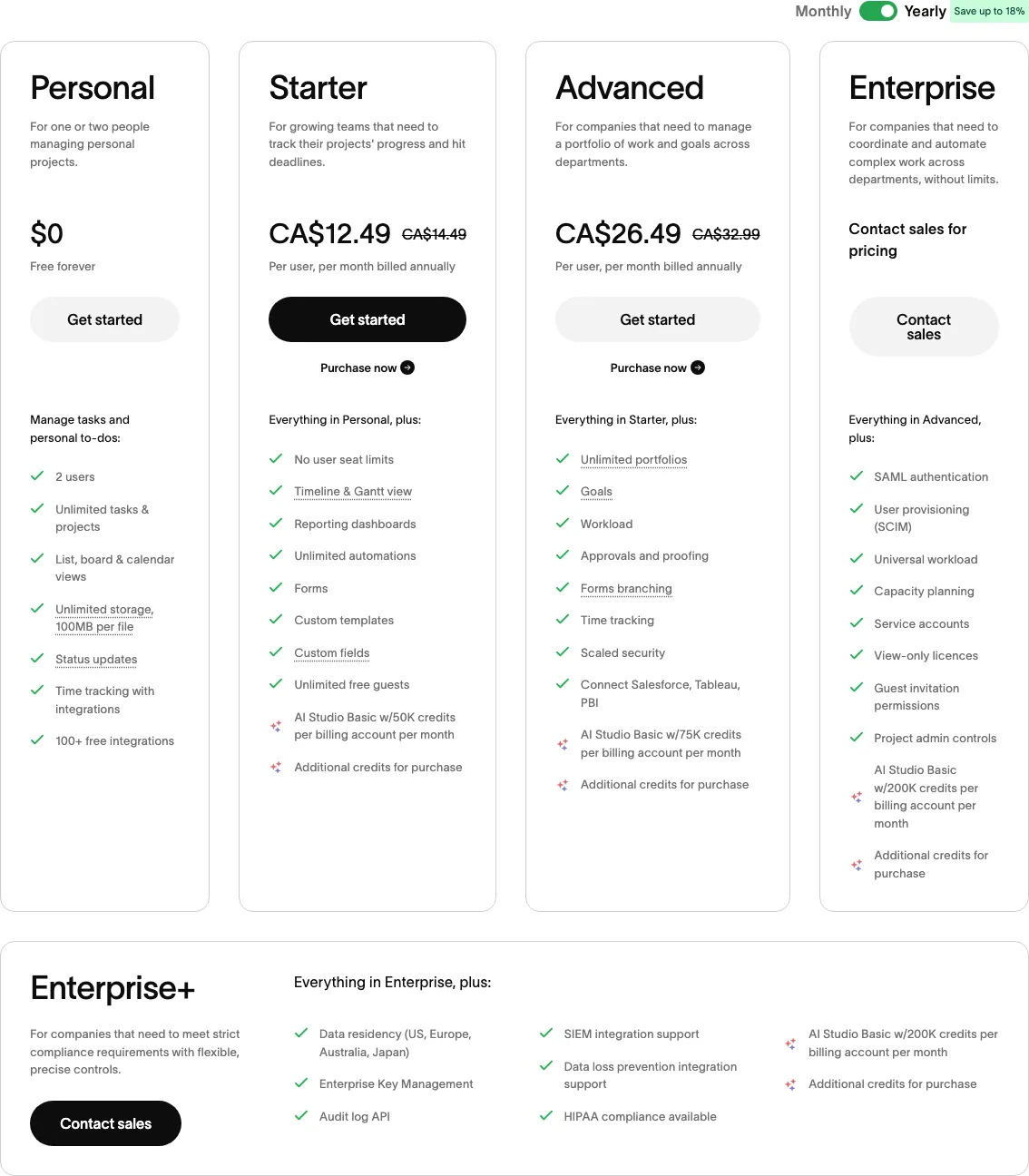 Asana pricing — View current pricing
Asana’s plan structure is built around team size and feature depth. The key unlock at each tier is meaningful:
- Personal (Free): $0 for up to 10 users. Includes unlimited tasks and projects, basic list and board views. Excludes Timeline view, custom fields, reporting dashboards, and task dependencies.
- Starter: $10.99/user/month billed monthly, or $7.99/user/month billed annually. Unlocks Timeline view, custom fields, task dependencies, and the Rules automation builder. For a 10-person team billed monthly: $109.90/month.
- Advanced: $24.99/user/month billed monthly, or $17.99/user/month billed annually. Adds Portfolios, Goals, advanced reporting, and Workload view at a deeper level. For a 10-person team billed monthly: $249.90/month.
- Enterprise: Custom pricing. Adds SSO, audit logs, data residency, and advanced admin controls.
- Enterprise+: Custom pricing. Adds HIPAA compliance and AI features at scale.
Monday.com Pricing (per monday.com/pricing and support.monday.com)
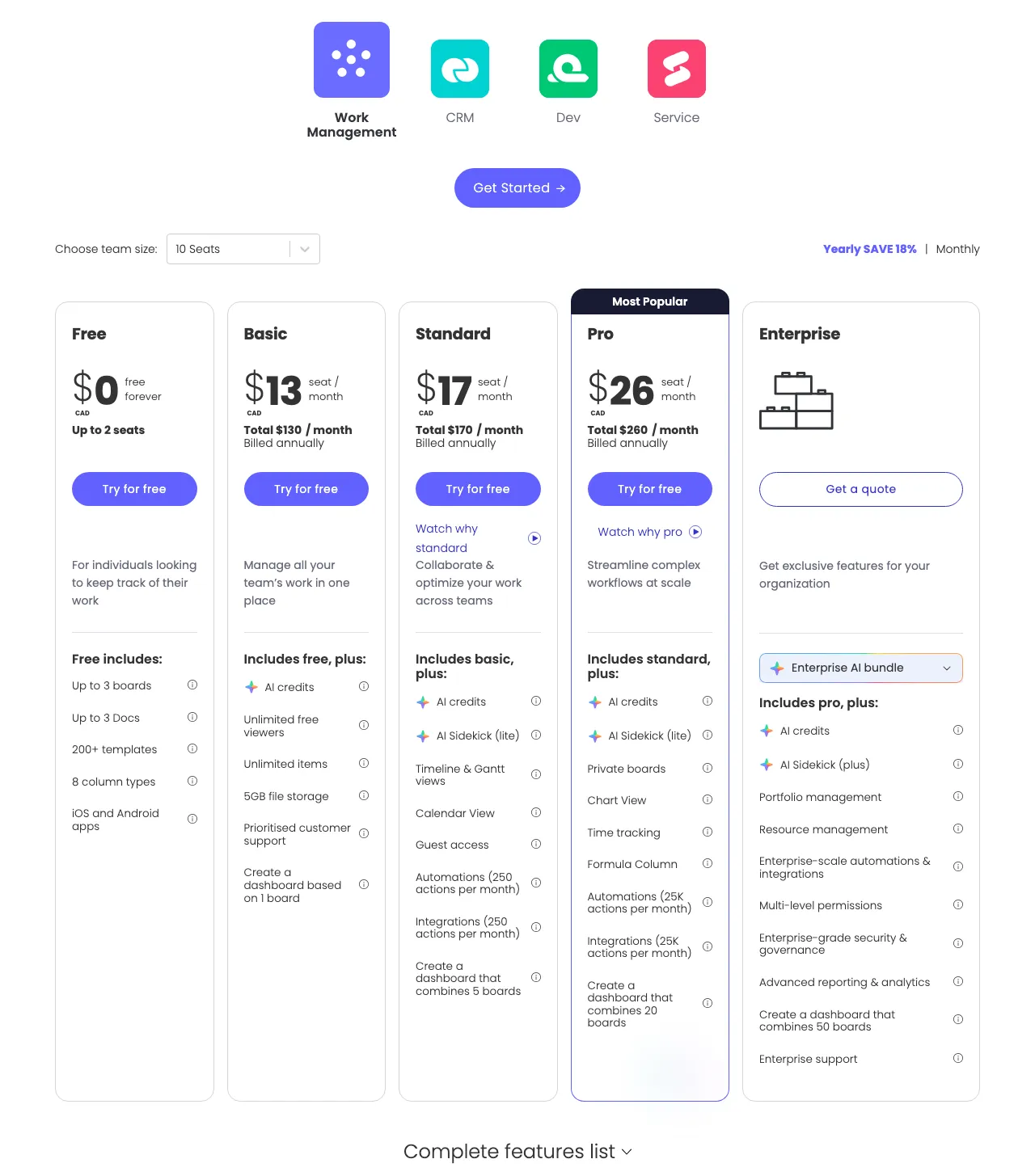 Monday.com pricing — View current pricing
Monday.com’s pricing has one structural quirk: all paid plans have a minimum 3-seat requirement, which sets a price floor even for two-person teams.
- Free: $0 for up to 2 seats. Includes unlimited boards and docs, but the 2-seat cap makes it impractical for real teams.
- Basic: $9/seat/month billed monthly, or $8/seat/month billed annually. Minimum 3 seats ($27/month floor). Includes unlimited boards and 5GB storage. No Timeline view, no automations.
- Standard: $12/seat/month billed monthly, or $10/seat/month billed annually. The most popular tier — adds Timeline view, Calendar view, and 250 automation actions per month via the Automations Center. For a 10-person team billed monthly: $120/month.
- Pro: $19/seat/month billed monthly, or $16/seat/month billed annually. Adds private boards, native time tracking, and 25,000 automation actions per month. For a 10-person team billed monthly: $190/month.
- Enterprise: Custom pricing. HIPAA compliance, advanced analytics, enterprise security, and premium support.
The Hidden Cost Gap at Scale
At 10 users, Asana Starter ($109.90/mo) and Monday.com Standard ($120/mo) are nearly identical. The gap widens meaningfully if you need advanced features. At 25 users needing reporting and automation volume, Asana Advanced runs $624.75/month versus Monday.com Pro at $475/month — a difference of roughly $1,790/year in Monday’s favor at that scale.
What Are the Specific Weaknesses of Each Tool?
Every comparison article lists features. Almost none list specific, named weaknesses side by side. The table below shows the real limitations of Asana and Monday.com that will affect your daily work — a symmetrical view so you can evaluate tradeoffs honestly rather than relying on each vendor’s marketing copy.
| Limitation | Asana | Monday.com |
|---|---|---|
| Free plan user cap | Hard cap at 10 users — any growth triggers a paid plan immediately | Hard cap at 2 seats — effectively no free option for real teams |
| Time tracking | No native time tracking on Starter; requires Harvest/Toggl integration | Native time tracking only on Pro ($19/seat/mo) — not available on Standard |
| Minimum seat requirement | None — pay for exactly the seats you need | Minimum 3 seats on all paid plans — a solo user pays for 3 seats |
| Automation volume at entry tier | Rules available on Starter but scope is narrower than Monday’s equivalent | 250 automation actions/month on Standard — can be exhausted by active teams |
| Dependency notifications | Integrated — downstream assignees are notified automatically | Manual — dependency columns exist but notifications require custom automation setup |
| Onboarding curve | 2–3 weeks to fluency; requires upfront structural planning | ~1 week to functional use; boards can proliferate without governance |
| Board governance risk | Lower — structure enforces organization | Higher — flexible boards can become ungoverned without a dedicated admin |
| Gantt / critical path | First-class via Timeline view | Functional but clunkier; specialists will find it limiting |
| Portfolio management | Available on Advanced ($24.99/user/mo) | Equivalent dashboards require Pro ($19/seat/mo) — lower price threshold |
Is Asana the Right Tool for Your Workflow?
Asana is the clearest choice for teams whose work follows a defined sequence — where task A must complete before task B begins, and where missed handoffs have real consequences. Asana’s dependency model consistently outperforms Monday.com’s manual configuration approach for sprint planning, product launches, compliance workflows, and any project with a critical path.
Pricing
Asana’s Starter plan at $10.99/user/month (billed monthly) is where the tool becomes genuinely useful. The free Personal plan is functional for simple task lists in teams under 10, but Timeline view and task dependencies — Asana’s two strongest features — are both locked behind Starter. For teams that need portfolio-level visibility and OKR tracking, the Advanced plan at $24.99/user/month is the right tier, though it’s a significant step up in cost. See asana.com/pricing for the current plan structure.
Key Features
Asana’s Timeline view is a native Gantt-style interface that visualizes task dependencies and lets you drag to reschedule. When a dependency shifts, Timeline updates downstream tasks automatically — this is qualitatively different from Monday.com’s dependency columns, which require manual configuration to trigger notifications.
Asana’s Rules (the automation builder, available on Starter) handles recurring task logic: automatically assigning tasks when a section changes, sending notifications when a due date passes, or moving tasks to a new project on completion. The scope is narrower than Monday’s Automations Center at equivalent price points, but the integration with Asana’s task model is tighter.
Limitations
Asana’s biggest limitation for growing teams is the cost jump from Starter to Advanced. The gap between $10.99/user/month and $24.99/user/month is substantial — and several features that feel essential at scale (deeper reporting, Portfolios, Goals) live exclusively on Advanced. Additionally, Asana has no native time tracking on Starter — teams that need time tracking alongside task management must integrate a third-party tool like Harvest or Toggl, adding cost and friction.
If you’re a product manager, engineering lead, or operations director running sequential, dependency-heavy work, Asana is the clearest choice at the Starter price point.
Is Monday.com Worth It for Your Team?
Monday.com is the stronger choice when your work doesn’t fit a single workflow pattern — when marketing, operations, sales, and product need to coordinate, each with different task structures, and speed of setup matters more than rigid governance. The Automations Center and Mirror columns deliver genuine coordination value that Asana’s task-centric model cannot replicate natively.
Pricing
Monday.com’s Standard plan at $12/seat/month (billed monthly) is the entry point for a genuinely functional tool. The Basic plan ($9/seat/month) omits Timeline view and automations, making it only suitable for simple status tracking. The minimum 3-seat requirement on all paid plans is a real constraint — a 2-person founding team pays for 3 seats regardless. Full pricing is listed at monday.com/pricing.
Key Features
Monday’s Automations Center is the tool’s most compelling differentiator at the Standard tier. With 250 automation actions per month included, teams can automate status changes, assignee notifications, recurring task creation, and item archiving — all without code. At the Pro tier (25,000 actions/month), the Automations Center handles complex cross-board workflows that would require Zapier in comparable tools.
Monday’s Mirror columns allow data from one board to appear in another — a powerful feature for cross-functional teams where a sales deal’s status in the CRM board automatically mirrors into the product roadmap board. This has no direct Asana equivalent.
Limitations
Monday.com’s flexibility is also its primary failure mode. Without deliberate governance — a designated “Monday admin” and enforced naming conventions — boards proliferate rapidly and the system becomes disorganized within months. Additionally, Monday.com’s Gantt and critical path management is functional but not first-class — specialists who live in Gantt charts will find Asana’s Timeline view more precise and notification-integrated.
For teams evaluating whether Monday.com is the right fit or whether a different tool serves them better, the Monday.com alternatives guide covers the full competitive landscape ranked by team size and use case.
If you’re an ops lead, marketing director, or team manager coordinating across functions where each team has a different working style, Monday.com Standard is the clearest choice for getting your team operational within two weeks.
Which Tool Wins by Team Size?
Generic “it depends” conclusions aren’t useful. Here are definitive verdicts for three specific team-size segments based on what each tool does best at each scale.
Solo Users and Teams of 1–10
Asana’s Personal plan is free for up to 10 users with no time limit — a genuinely functional tier for simple task management, unlimited projects, and basic list and board views. Monday.com’s free plan caps at 2 seats, making it essentially a solo evaluation tool rather than a functional team option.
At the paid entry tier, both tools cost approximately $10–12/user/month. Monday.com’s Standard plan onboards faster — most teams are fully operational within one week, versus 2–3 weeks for Asana. For a team of 5 in an early-stage startup where everyone wears multiple hats, the lower onboarding friction of Monday.com’s visual boards is a real productivity advantage. However, if your small team is a product or engineering squad running sprints, Asana’s dependency management and Timeline view on the Starter plan outperform Monday.com’s Standard tier for that specific workflow.
Winner for 1–10: Monday.com for general-purpose teams needing fast setup and flexibility. Asana for small product and engineering teams where dependency tracking is essential.
Teams of 11–50
At 25 users billed monthly, Asana Starter ($274.75/month) and Monday.com Standard ($300/month) remain close. But if either team outgrows the entry tier, the divergence is significant: Asana Advanced at $24.99/user/month versus Monday.com Pro at $19/seat/month — a difference that compounds to nearly $1,800/year for a 25-person team.
The key question for this segment is who governs the system. Asana’s structured model maintains organization without dedicated oversight. Monday.com at this scale requires an active admin to prevent board proliferation. For cross-functional teams — where marketing, sales, and product all need project visibility — Monday.com’s Mirror columns and Automations Center make cross-board coordination significantly easier than Asana’s equivalent.
Winner for 11–50: Asana for structured, single-function teams (product, engineering, ops). Monday.com for cross-functional teams with an assigned platform admin.
Teams of 51 and Above
At this scale, both tools move to Enterprise pricing — custom, negotiated, and heavily dependent on your security, compliance, and admin requirements. Asana’s Enterprise+ plan includes advanced AI features and data residency controls. Monday.com’s Enterprise tier has stronger built-in analytics and a more mature customer success motion, based on user reviews on G2’s monday.com page and G2’s Asana page.
At 51+ users, the switching cost of migrating either direction is substantial — training, data migration, and workflow rebuilding. The right answer here is to pilot both tools with a team of 10–15 before committing the organization.
Winner for 51+: Monday.com edges ahead for organizations with diverse departmental workflows; Asana edges ahead for organizations with disciplined, structured project delivery. Both require an Enterprise quote — push vendors on annual pricing and seat minimums.
Which Tool Wins for Specific Workflows?
The most important question isn’t “which tool is generally better” — it’s “which tool handles the work my team actually does.” Here are verdicts for four specific workflow types, tied to named features in each tool.
Sprint Planning: Asana wins. Asana’s Timeline view provides a native Gantt interface where dependencies block downstream tasks and trigger automatic notifications. Asana’s Rules automation can automatically move tasks between sections when status changes — modeling sprint stages without manual drag-and-drop. Monday.com’s Automations Center can replicate some of this behavior, but dependency notifications require custom automation setup.
CRM-Style Pipeline Tracking: Monday.com wins. Monday.com’s column-based board structure maps naturally to pipeline stages. Mirror columns allow deal data from a sales board to appear automatically in a project delivery board, creating seamless handoffs between sales and ops without duplicate data entry.
Creative Project Intake and Campaign Management: Monday.com wins. Marketing and creative teams benefit from Monday’s Automations Center and its flexible column structure. Asana’s rigid project-section-task hierarchy feels constraining for creative workflows where tasks frequently change shape mid-project.
OKR and Goals Tracking: Asana wins. Asana’s Goals feature (available on Advanced) creates a direct linkage between individual tasks, team milestones, and company-level OKRs. Monday.com handles goal tracking through workdocs and manual status columns, which requires more maintenance and doesn’t provide the same automatic roll-up from task completion to goal progress.
What Does Switching Between Asana and Monday.com Actually Cost?
Migrating from Asana to Monday.com is the easier direction. Monday.com includes a native Asana import tool that migrates projects, tasks, sections, and assignees. Expect a 1–2 day data cleanup for custom field data and formatting that doesn’t transfer cleanly. The conceptual model shift — from Asana’s projects-sections-tasks hierarchy to Monday’s boards-groups-items structure — requires approximately 1–2 weeks for re-orientation. Asana’s paid plans are available month-to-month, so cancellation is possible without penalty outside annual billing periods.
Migrating from Monday.com to Asana is significantly harder. Monday.com does not have a native Asana export tool — the standard path is a CSV export followed by manual reimport into Asana. For teams with complex board structures and many custom columns, this is a multi-day project. Teams must also decide upfront how their Monday boards map to Asana’s projects and sections — this planning step is frequently skipped and causes a second rebuild 4–6 weeks post-migration. Monday.com’s annual plans forfeit remaining subscription value on cancellation, and the minimum 3-seat requirement means you cannot reduce to 1–2 seats even if your team shrinks temporarily.
The bottom line: Asana-to-Monday is significantly easier than Monday-to-Asana. If you’re currently on Monday.com and considering Asana, factor an additional 3–5 days of migration work and 3–4 weeks of retraining into your timeline.
FAQ
Is Asana free forever?
Asana’s Personal plan is free with no time limit for teams of up to 10 users. It includes unlimited tasks and projects, basic list and board views, and mobile access. The permanent restrictions are meaningful — no Timeline view, no custom fields, no reporting dashboards, and no task dependencies. Once your team grows beyond 10 users, the Personal plan forces an upgrade to Starter ($10.99/user/month billed monthly) regardless of which features you actually need.
Which is easier to learn, Asana or Monday.com?
Monday.com is easier to learn for most users. Its column-based boards mirror the logic of a spreadsheet, and new users typically reach functional fluency within one week. Asana’s model — with specific meanings for projects, sections, portfolios, and goals — requires 2–3 weeks before users stop miscategorizing work. If your team has high turnover or needs to onboard contractors frequently, Monday.com’s lower learning curve is a material advantage.
Can you switch from Asana to Monday.com?
Yes, and it’s relatively straightforward. Monday.com includes a native Asana import tool that migrates projects, tasks, sections, and assignees. Expect a 1–2 day cleanup period for custom field data and formatting that doesn’t transfer perfectly. Switching in the reverse direction — from Monday.com to Asana — requires a CSV export and manual reimport, which is a longer and more labor-intensive process.
What is the minimum cost for Monday.com for a team of 5?
For a 5-person team, Monday.com Standard costs $60/month billed monthly ($12/seat × 5 seats). The Basic plan ($9/seat) is available but excludes Timeline view and automations — the two features that make the tool worthwhile for most teams. Note that the minimum 3-seat requirement applies to all paid plans, so even a 2-person team pays for 3 seats minimum ($36/month on Standard).
Does Asana have time tracking?
Asana does not include native time tracking on its Starter plan. Teams that need time tracking alongside task management must integrate a third-party tool (Harvest and Toggl are the most common). Native time tracking becomes available on Asana’s Advanced plan and above. Monday.com includes native time tracking, but only on the Pro plan ($19/seat/month) — not on Standard.
Which tool is better for sprint planning?
Asana is better for sprint planning. Asana’s Timeline view provides integrated dependency blocking — when a predecessor task is incomplete, downstream assignees are automatically notified, and the dependency relationship is visible in the Gantt timeline. Asana’s Rules automation handles sprint state transitions automatically. Monday.com’s Automations Center can approximate sprint tracking behavior, but dependency notifications require custom automation setup rather than being natively integrated.
Pricing and features can change — always review the vendor’s official pricing page before making a decision.